
No-Code Automation Limitations: When You Actually Need Custom Development
Last updated: August 27, 2026 · By Joseph Olivas, Founder, MEAN Consultors · 9 min read
I want to be clear at the start, because this topic attracts a lot of bad-faith argument from people selling one side of it: no-code automation is excellent, and for most business workflows it is where you should start. It is fast, it is cheap, it fails safely, and building the flow forces someone to write the process down properly for the first time.
The problem is that no-code has no natural stopping point. Nothing in the tool tells you that a workflow has outgrown it. It just gets slower, more expensive, and more fragile, one branch at a time, until the day a silent failure costs real money. This guide is about recognizing that transition before it happens, and about how we handle it in AI and automation engagements at MEAN Consultors.
What organizations actually report going wrong
The failure modes here are well documented and remarkably consistent. Research into low-code and no-code adoption compiled from Gartner’s coverage of the market puts ungoverned citizen development and shadow IT at the top of the concern list, followed by scalability, vendor lock-in, difficulty handling complex applications, and application security.
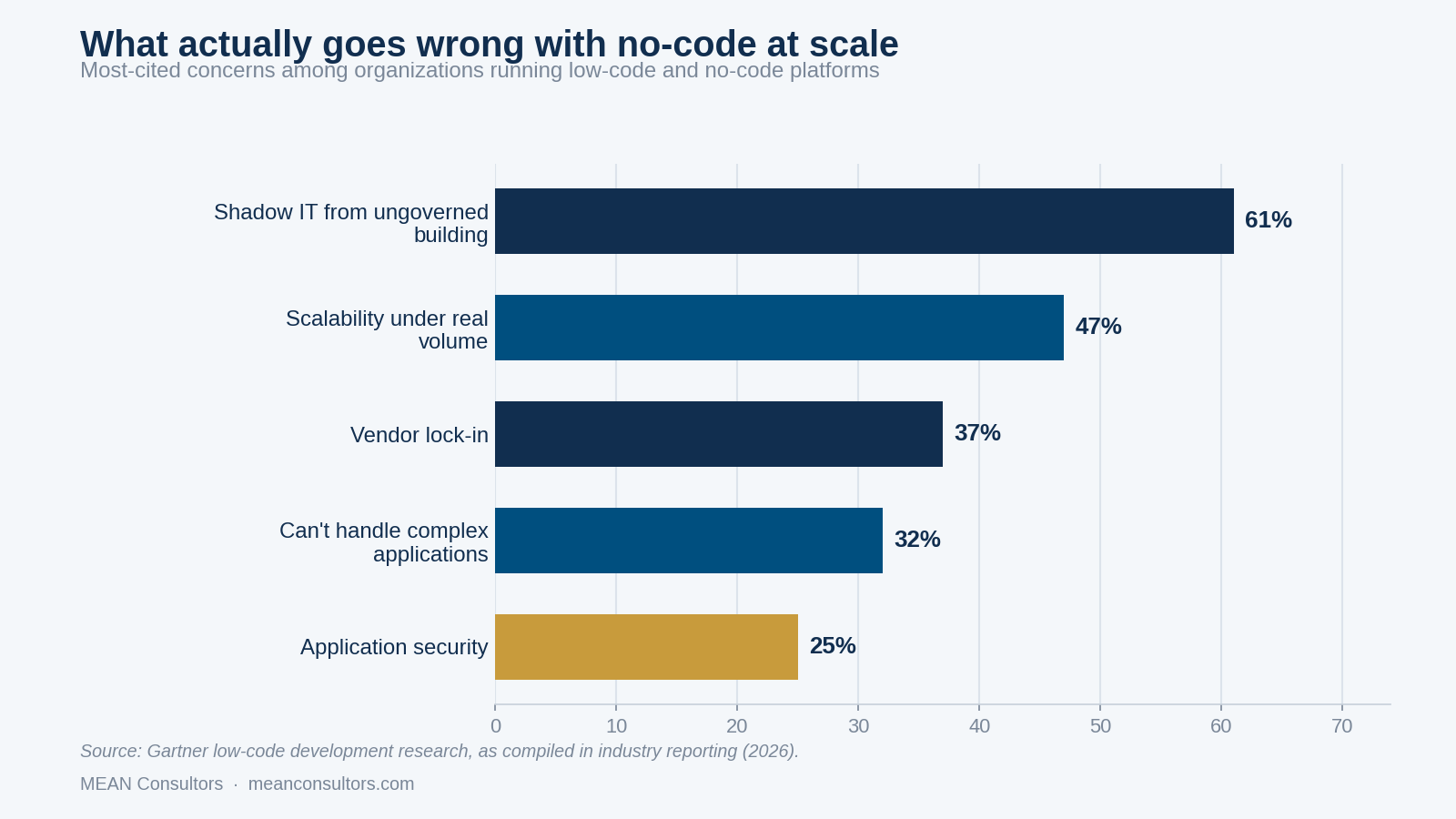
Figure 1: Most-cited concerns among organizations operating low-code and no-code platforms. Source: Gartner low-code development research as compiled in industry reporting, 2026.
Read that list carefully and notice what it is not. Not one of the top concerns is “the tool cannot do the thing.” They are all consequences of success — of enough people building enough things that nobody has a map. The trap is not that no-code is weak. It is that it is strong enough to accumulate load nobody planned for.
This matters because the market is not shrinking. Gartner forecasts the low-code development technologies market at roughly $44.5 billion in 2026, with the overwhelming majority of new applications involving builders outside traditional IT. The question for most businesses is not whether they will run no-code automation. It is whether they will notice which flows have outgrown it.
The four ceilings
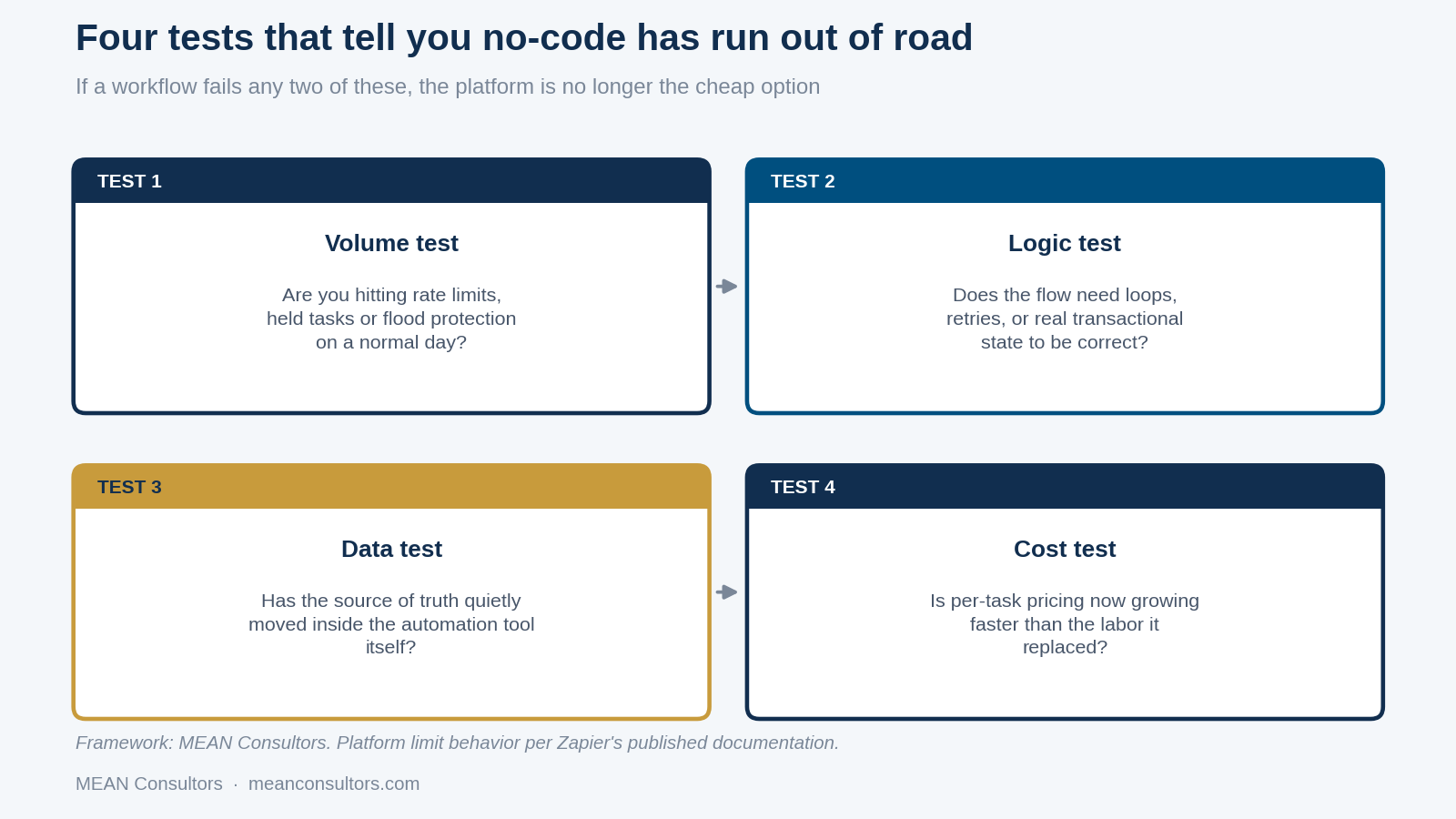
Figure 2: The four tests MEAN Consultors applies to decide whether a workflow should stay on a no-code platform.
1. The volume ceiling
Every no-code platform enforces throughput limits, and they are documented rather than mysterious. Zapier’s published guidance describes throttling when a large number of triggers or actions occur in a short span, holding events when a workflow receives a burst above the flood-protection threshold, and plan-tier request limits on polling triggers. Flood protection counts incoming trigger items before filters or paths run, which means a flow that ultimately processes ten records can still be held because a hundred arrived at the gate.
The operational symptom is not an outage. It is delay: your order-confirmation flow that used to run in seconds now runs in minutes during the busy hour, and nobody notices until a customer does. If throttling and held tasks are part of your normal week rather than your peak week, you are at the volume ceiling.
2. The logic ceiling
No-code tools express sequences and branches well. They express loops, retries with backoff, partial rollback, and transactional consistency poorly or not at all. The tell is a flow that has grown paths inside paths, a step whose only job is to call a second flow, or a filter chain that exists to compensate for the fact that the platform cannot simply hold a variable across iterations.
The specific danger is partial completion. When step seven of eleven fails after money has moved or inventory has been decremented, a custom service can roll the transaction back. A no-code flow generally cannot, and you are left reconciling by hand without knowing which records are affected.
3. The data ceiling
This one arrives quietly. A flow needs somewhere to remember a value between runs, so someone adds a table inside the automation platform. Then a second flow reads from it. Then a report is built on it. Within a year, the operational truth about a real business process lives inside a tool you chose for wiring, not for storage — with no schema discipline, no referential integrity, no migration path, and an export button as your only exit.
Ask a direct question: if this platform were unavailable for 48 hours, what would we not know? If the answer is anything other than “which automations ran,” you are at the data ceiling.
4. The cost ceiling
Per-task pricing is beautifully aligned with value at low volume and inverts at high volume. Automation costs scale with the number of operations, while the labor it replaced was roughly fixed. Somewhere on that curve the two lines cross, and past the crossing you are paying a growing monthly fee for a fragile version of something a fixed-cost service would do more reliably.
The honest comparison includes the maintenance you are already doing: the hours spent fixing broken steps after a vendor changes an API, and the cost of the incidents that slip through. Our guide to automation payback period covers how to model this properly.
- Shadow IT from ungoverned building is the single most-cited low-code concern at 61%, ahead of scalability at 47% — the problem is organizational before it is technical.
- Platform limits are documented, not hidden: Zapier publishes its throttling, held-task, and flood-protection behavior, so you can predict the volume ceiling rather than discover it.
- Failing one of the four tests is normal. Failing two is the point at which no-code is adding fragility and cost instead of removing them.
- An existing no-code flow is the best specification available for its replacement — it already encodes every edge case someone found the hard way.
A workflow-by-workflow decision table
The decision is per workflow, not per company. Most organizations should end up with both.
| Workflow characteristic | Stay on no-code | Move to custom |
|---|---|---|
| Runs per month | Hundreds to low thousands | Tens of thousands and climbing |
| Consequence of a silent failure | Someone re-sends an email | Money moves incorrectly or an order ships wrong |
| Logic shape | Linear with a few branches | Loops, retries, rollback, shared state |
| Where the data lives | In real systems; the tool only moves it | Inside the automation platform |
| Number of chained steps | Under about a dozen | Enough that nobody can explain it from memory |
| Compliance or audit exposure | None | Regulated data, or an auditor will ask for a trail |
| Rate of change | Changes monthly as the process evolves | Stable enough to be worth encoding properly |
That last row is the one people get backwards. A process still in flux belongs on no-code precisely because it is cheap to change. Freeze it in custom code too early and you have paid to make an unfinished decision permanent.
How to move a workflow off no-code without a big-bang rewrite
Rebuilding does not mean starting over, and it does not mean shutting the existing flow off on day one.
- Export the flow as a specification. Screenshot every step, every filter condition, every field mapping. This is your requirements document and it is more accurate than anything a workshop would produce.
- Instrument the current version first. Run it for a few weeks with logging so you know real volumes, real error rates, and which branches actually fire. Teams are routinely wrong about which path carries the traffic.
- Build the custom service alongside. Same inputs, same outputs, writing to a staging destination.
- Run both in parallel and diff the results. Every discrepancy is either a bug in the new service or an undocumented behavior in the old flow. Both are worth finding before cutover.
- Cut over with the old flow paused, not deleted. Keep it for a full cycle as your rollback.
- Keep the no-code platform. You are moving one workflow, not abandoning a tool that is doing fine for thirty others.
If the flow you are moving involves document handling or order processing, our walkthrough of automating invoice and order processing shows what the no-code version looks like at the stage where it still works well, which is a useful baseline for comparison.
Preventing the next one
Given that shadow IT is the most-cited concern in the research, the highest-leverage fix is also the least technical: know what exists. Keep a simple inventory listing each automation, its owner, its monthly run volume, and what breaks if it stops. Review the top few by volume each quarter against the four tests. Set an explicit threshold — a run volume, a step count, or a money-moving flag — that promotes a flow into a reviewed build rather than leaving the decision to whoever notices.
None of that requires a governance committee. It requires a spreadsheet and one person who looks at it four times a year, which is a small price for not discovering your most critical process was a personal project nobody documented.
If you are still choosing between platforms rather than deciding whether to leave one, our comparison of Zapier, Make, and custom automation covers the trade-offs, and n8n versus Zapier covers the self-hosted middle ground that sometimes buys you another year before a custom build is warranted.
Frequently Asked Questions
Is no-code automation a bad idea?
Not at all. For most business workflows it is the correct first move: it is fast, cheap, reversible, and it forces you to document the process before you invest in it. The failure mode is not adopting no-code — it is leaving a workflow there after it has outgrown the platform, usually because nobody was watching for the signals that it had.
At what volume does no-code stop making sense?
There is no universal number, because it depends on the platform, the plan, and how many steps each run consumes. What you should watch instead is behavior: held tasks, throttling errors, and flood-protection interventions on ordinary days rather than during spikes. Zapier’s own documentation describes holding events and rate-limiting when volume exceeds plan thresholds — when your normal Tuesday is triggering those mechanisms, the platform is telling you something.
Can’t we just upgrade to a higher plan?
Sometimes, and that is often the right short-term answer. But upgrading solves throughput, not the other three ceilings. If the problem is that your workflow needs real transactional logic, or that your source of truth has migrated into the automation tool, a bigger plan makes the situation more expensive without making it more sound.
What is the actual risk of leaving a critical process in no-code?
Three things, in the order they usually bite. Silent failure, because a step that fails at 2 a.m. often produces no alert anyone sees. Un-debuggability, because when something goes wrong across twelve chained steps there is limited state to inspect. And key-person risk, because the person who built it understands it and nobody else does.
Does rebuilding mean throwing the no-code work away?
No, and it is the most valuable thing you will bring to the project. A working no-code flow is executable documentation: it encodes every edge case, every exception, and every field mapping that someone discovered the hard way. We routinely use an existing automation as the specification for the replacement, which shortens discovery considerably.
Should we move everything at once?
No. Move the specific workflows that fail the tests, and leave the rest. A mature automation estate usually ends up mixed: no-code for the long tail of low-volume internal flows, and custom services for the two or three processes that carry real money or real volume. Trying to consolidate everything onto one approach is how organizations overbuild.
How do we prevent this from happening again?
Governance, lightly applied. Keep an inventory of automations with a named owner for each, review the top five by volume quarterly against the four tests, and set an explicit threshold at which a flow gets promoted to a reviewed build. This is exactly the shadow-IT concern that shows up as the top-cited issue in low-code adoption research, and an inventory solves most of it.
MEAN Consultors rebuilds the workflows that carry real volume and real money as reliable services — and leaves the rest where they are.