
Automation Payback Period: How Long Until Automation Pays for Itself?
Last updated: August 7, 2026 · By Joseph Olivas, Founder, MEAN Consultors · 9 min read
“How long until this pays for itself?” is the single most common question I get when scoping automation work — and it’s the right question. ROI percentages can be inflated by optimistic assumptions stretched over five years, but a payback period is falsifiable: by month X, cumulative savings either covered the build cost or they didn’t. Here’s how to calculate it honestly, what the benchmarks say, and which levers actually shorten it.
What payback period means (and how it differs from ROI)
Payback period answers one question: when do I get my money back? It’s the number of months until cumulative net savings equal the total upfront investment. ROI answers a different question — how much do I make relative to what I spent over some horizon? A project can show a fine three-year ROI and still be a bad fit for a cash-conscious business if the payback is 20 months away. That’s why I calculate both, but lead with payback when advising owners: it maps directly to cash flow risk. I’ve covered the full ROI side — benefit categories, hidden costs, and the calculation worksheet — in how to calculate ROI on a business automation project; this article goes deep on the time dimension.
The formula is simple:
where monthly net savings = gross monthly savings − monthly running costs (licenses, hosting, maintenance, human review time).
The two words people skip are total and net. Total upfront cost includes discovery, process mapping, development, integration, testing, training, and the productivity dip while the team adjusts — not just the developer invoice. Net savings subtracts what the automation costs to keep running. Skipping either turns a 9-month payback into a “3-month payback” on paper and a credibility problem later.
What the benchmarks say
Deloitte’s global RPA survey — still the most-cited industry benchmark for automation economics — found organizations reporting payback in under 12 months on average, with robots delivering roughly 20% of full-time-equivalent capacity. McKinsey’s automation research points the same direction: in about 60% of occupations, at least 30% of constituent activities are technically automatable, which is why well-chosen automations find so much recoverable time inside ordinary jobs.
Those are averages across large organizations. In our own work with small and mid-size businesses, the pattern is that payback is driven far more by which process you pick than by how sophisticated the technology is. A boring, high-volume process (invoice entry, order status emails, report assembly) with 15–20 hours a week of manual effort routinely beats a flashy AI project that touches 30 minutes a day.

Figure 1: Illustrative payback curve — an $18,000 build saving a net $2,500/month breaks even at roughly 7.2 months.
A worked example you can copy
Say a distributor pays a coordinator to re-key orders from email into their ERP: 20 hours a week at a fully-loaded labor cost of $35/hour. An automation that handles 90% of those orders costs $18,000 to build and $150/month to run.
| Line item | Value | Notes |
|---|---|---|
| Manual effort automated | 18 hrs/week (90% of 20) | Keep the human exception queue honest |
| Gross monthly savings | 18 × $35 × 4.33 = $2,728 | 4.33 = average weeks per month |
| Running costs | −$228/month | $150 licenses/hosting + ~1 hr/wk review |
| Net monthly savings | $2,500 | |
| Total upfront cost | $18,000 | Includes mapping, testing, training |
| Payback period | 7.2 months | $18,000 ÷ $2,500 |
Everything after month eight is margin — and that’s before counting the benefits that don’t fit in the formula: fewer keying errors, faster order confirmation, and a coordinator redeployed to work that actually needs judgment. Those are real, but I recommend leaving them out of the payback math and letting them be upside. Conservative math that proves itself builds the internal trust you need for automation number two — the same discipline I used in our automation case study cutting manual processing time by 40%+.
The levers that actually shorten payback
Payback is a fraction, so only two things move it: lower the numerator (cost) or raise the denominator (net savings). In practice, that means:
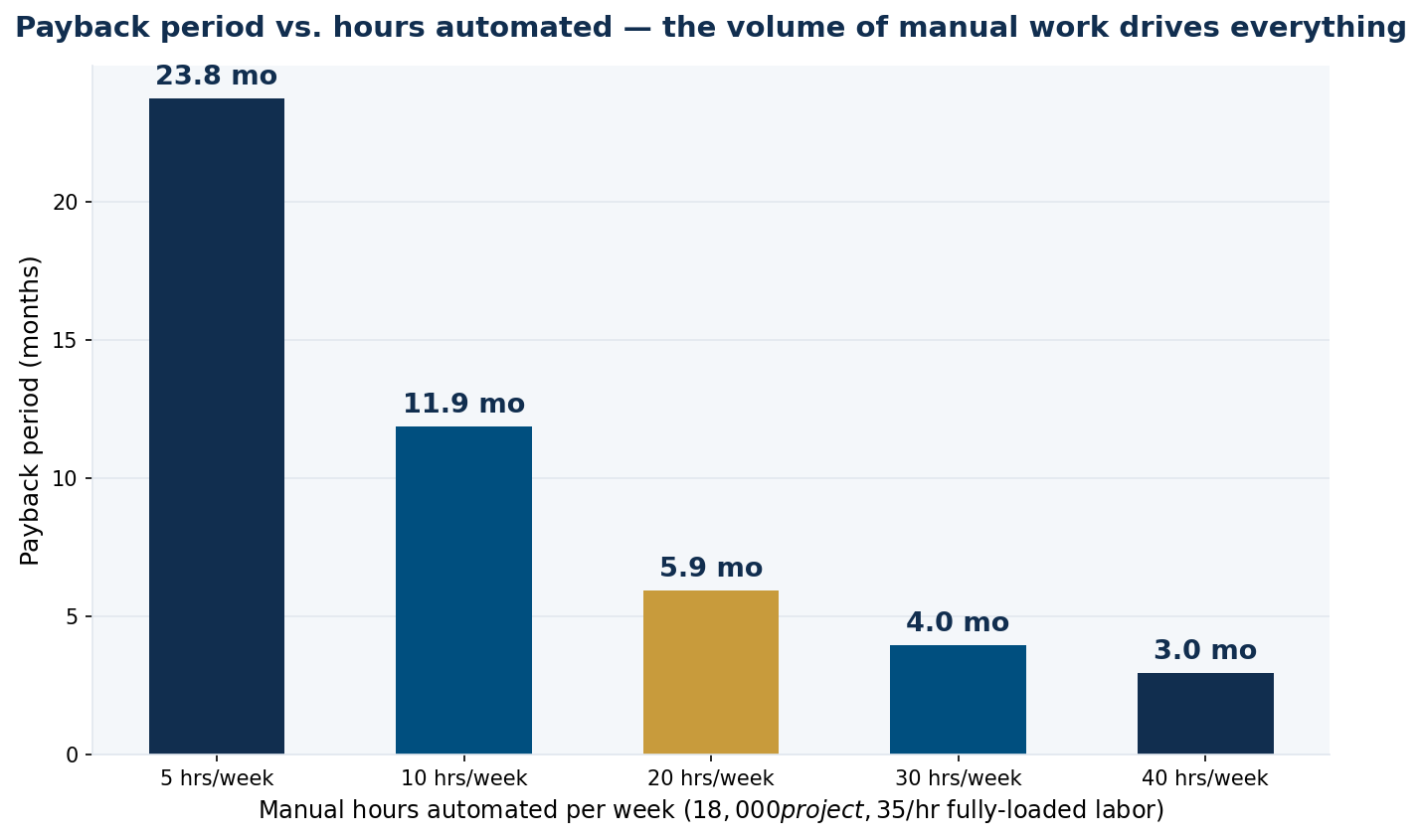
Figure 2: Payback sensitivity for an $18,000 project at $35/hour — hours of manual work automated per week is the dominant variable.
- Pick volume over glamour. As the chart shows, the same $18,000 project pays back in 3 months at 40 automated hours/week and takes almost two years at 5 hours/week. Process selection is 80% of the outcome — my list of the most automatable tasks in a growing business is a good hunting ground.
- Automate 80–90%, not 100%. The last edge cases are the most expensive to build. Route exceptions to a human queue and ship months earlier.
- Phase the build. Ship the highest-volume path first so savings start accruing while phase two is still in development — the savings from phase one effectively finance phase two.
- Count the full labor cost. Use fully-loaded rates (wages + taxes + benefits, typically 1.25–1.4× salary), not base pay — undercounting labor understates savings and overstates payback.
- Keep running costs honest. A $500/month tool stack quietly adds months to payback on a small automation. Favor architectures with low recurring costs.
- Payback = total upfront cost ÷ monthly net savings; use fully-loaded labor rates and subtract running costs.
- Deloitte’s benchmark: most organizations report automation payback within 12 months; 4–12 months is a healthy target for SMB projects.
- Hours of manual work automated per week is the dominant variable — a high-volume boring process beats a low-volume impressive one every time.
When the payback math is telling you not to automate
A payback calculation is most valuable when it says no. Projections beyond 24 months usually mean one of three things: the process doesn’t run at enough volume, the process itself is broken (automating a bad process just makes bad outcomes faster — map it first, as I argued in workflow mapping before automation), or the build is over-scoped for the problem. The fix is rarely “don’t automate” — it’s usually “automate a smaller slice first.” And sometimes the numbers surprise in the other direction: processes that feel small turn out to bleed hours across many people, which is exactly what we found when quantifying the real cost of manual data entry.
Frequently Asked Questions
What is a good payback period for business automation?
For small and mid-size businesses, 4 to 12 months is a healthy range for a first automation project, consistent with Deloitte’s finding that most organizations report RPA payback within a year. Under 4 months usually means you found a genuinely high-volume process; over 24 months means re-scope before building.
How do I calculate the payback period for automation?
Divide total upfront cost by monthly net savings. Total upfront cost includes discovery, development, integration, testing, and training. Monthly net savings equals hours saved per month × fully-loaded hourly labor cost, minus recurring costs like licenses, hosting, and human review of exceptions.
What costs do people forget in automation payback calculations?
The most common omissions: process-mapping and discovery time, staff training, the temporary productivity dip during rollout, ongoing license and hosting fees, and the human time spent reviewing the automation’s exception queue. Forgetting these typically understates true payback by 30–50%.
Is payback period better than ROI for evaluating automation?
They answer different questions and work best together. Payback measures cash-flow risk — how long your money is exposed. ROI measures total return over a horizon. For cash-conscious smaller businesses, payback is usually the better first filter, because a great 3-year ROI doesn’t help if you can’t float the cost for 20 months.
Does AI automation pay back faster than traditional automation?
Not inherently. AI widens what can be automated — unstructured emails, documents, judgment-adjacent steps — but often carries higher build and running costs (model usage, review workflows). The payback math is identical; what matters is the volume of manual hours eliminated, not whether the tool is AI-powered.
MEAN Consultors scopes automation projects with conservative, falsifiable payback estimates — and builds the ones the numbers justify.