
Workflow Mapping Before Automation: Why Skipping This Step Backfires
Last updated: July 16, 2026 · By Joseph Olivas, Founder, MEAN Consultors · 8 min read
Automation gets pitched as a shortcut: point a tool at a slow task and let software take over. But the businesses that get burned almost always share one habit — they automated a process they never actually understood. At MEAN Consultors, the most expensive automation cleanups I’m called in to fix trace back to the same missing step: nobody mapped the workflow first.
What workflow mapping is — and why it comes first
Workflow mapping is the practice of writing down how work truly flows from trigger to finish: who touches it, what they do, where it waits, and what happens when something goes wrong. It sounds obvious, yet most teams operate on a mental model of their process that is cleaner and simpler than reality. The map surfaces the messy truth — the duplicate data entry, the “just email Sarah” step, the exception that happens 20% of the time and breaks everything. Doing this before business process automation is what separates automation that pays off from automation that quietly makes things worse.
What goes wrong when you automate without mapping
When you automate a process you haven’t mapped, you don’t remove the dysfunction — you encode it. The workaround that a person could quietly handle becomes a rigid rule the software enforces. Errors that used to get caught by a human now propagate at machine speed. And because the logic is now buried in a tool, fixing it later costs far more than fixing it on paper would have.
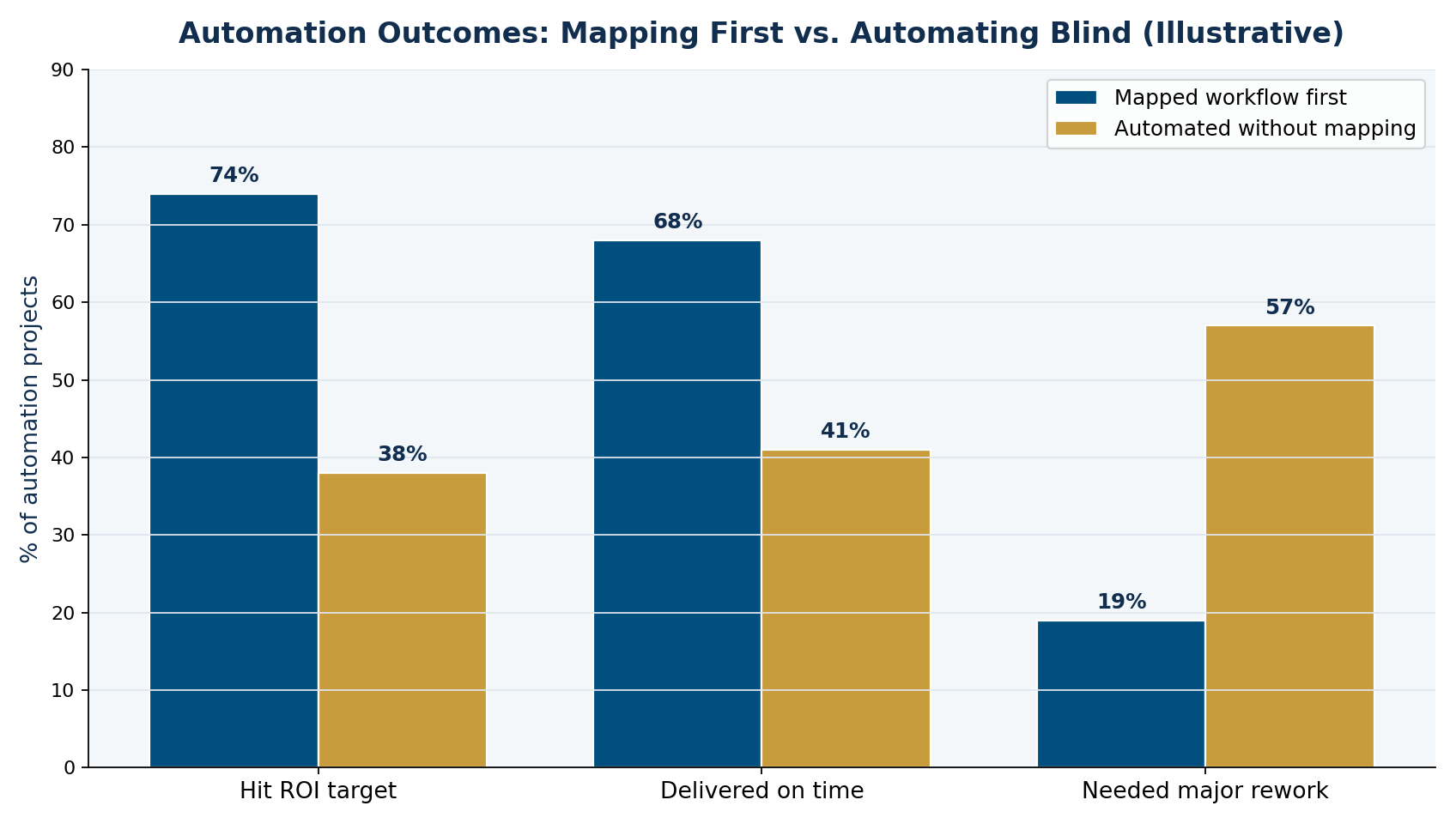
Figure 1: An illustrative comparison — automation projects that map the workflow first tend to hit ROI targets and need less rework.
The pattern above matches what analysts have seen at scale. McKinsey Global Institute research found that roughly half of the activities people are paid to do could be automated with current technology — but capturing that value depends on redesigning how the work is done, not just bolting software onto the status quo. Gartner’s guidance on hyperautomation makes the same point: discovering and documenting processes is a prerequisite, not an afterthought.
- Automating an unmapped process locks in its waste — the software just runs the dysfunction faster.
- Errors that humans used to catch propagate silently once the logic is buried in a tool.
- Fixing a flawed workflow on paper is cheap; fixing it after it’s automated is expensive.
How to map a workflow before you automate
You don’t need specialized software to map a process well — a whiteboard, sticky notes, or a shared doc is enough. What matters is the sequence. Here is the five-step approach I use with clients before scoping any automation.
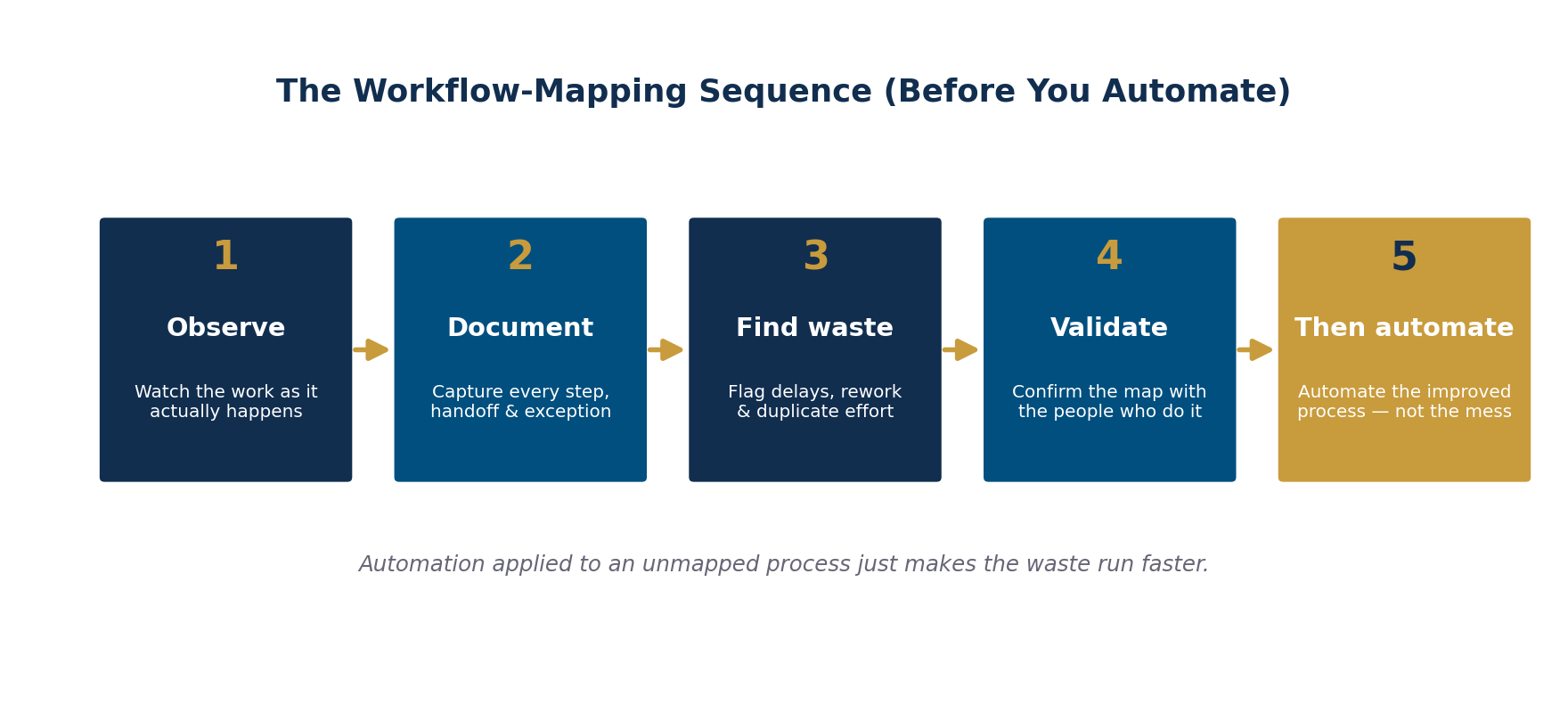
Figure 2: The workflow-mapping sequence to run before you automate anything.
- Observe the process as it actually happens, not as the org chart says it should.
- Document every step, handoff, decision point, and exception — especially the workarounds.
- Find the waste: flag delays, rework loops, duplicate entry, and approvals that add no value.
- Validate the map with the people who do the work daily; they’ll catch what you missed.
- Then automate the improved process — never the original mess.
Notice that automation is the last step, not the first. By the time you get there, you often discover that half of what you planned to automate should simply be eliminated, and the remaining steps are far cleaner to build for.
| Approach | Time to launch | Typical outcome | Cost to fix later |
|---|---|---|---|
| Automate without mapping | Fastest | Encodes existing waste; frequent rework | High — logic is buried in the tool |
| Map, then automate | Slightly slower start | Leaner process; higher ROI hit rate | Low — issues caught on paper |
How to know your process is ready to automate
A workflow is ready for automation when the map is complete, the obvious waste has been removed, the exceptions are documented with clear rules, and the people who run the process agree the map is accurate. If any of those are missing, you’re not ready — you’re guessing. This discipline is the foundation of every successful AI and automation project we take on, and it pairs directly with knowing where to start with automation in the first place.
Frequently Asked Questions
What is workflow mapping before automation?
It is documenting how a process actually runs — every step, handoff, decision, and exception — before you build automation on top of it. The goal is to remove waste and validate the process first, so you automate an improved workflow rather than an existing broken one.
Why is workflow mapping important before automating?
Because automation encodes whatever process you point it at. If the workflow contains waste, duplicate steps, or undocumented exceptions, automation locks those in and runs them faster. Mapping first lets you fix the process cheaply on paper before it’s expensive to change in software.
How long does it take to map a workflow?
Many processes can be mapped in a single afternoon with the right people in the room. Complex, cross-department workflows take longer, but if a core process can’t be sketched out relatively quickly, that difficulty itself is a red flag worth resolving before automating.
Do I need special software to map a workflow?
No. A whiteboard, sticky notes, or a shared document works fine for most businesses. The sequence — observe, document, find waste, validate, then automate — matters far more than the tool you map with.
What happens if I automate a broken process?
You get faster dysfunction. Errors propagate at machine speed, workarounds become rigid rules, and the flawed logic gets buried in the tool where it’s costly to fix. That is the single most common reason automation projects underdeliver.
MEAN Consultors maps your workflow first, cuts the waste, and automates only what’s worth automating — so the ROI actually lands.