
Business Process Automation 101: Where to Start When Everything Feels Manual
Last updated: July 13, 2026 · By Joseph Olivas, Founder, MEAN Consultors · 8 min read
When everything in a business feels manual, automation sounds like a luxury for bigger companies. It is not. The tasks quietly eating your week — copying numbers between systems, chasing invoices, confirming appointments — are exactly the ones software handles best. The hard part is not the technology; it is knowing where to begin. This guide walks through a practical, low-risk way to start, even if you have never automated anything.
What Business Process Automation Actually Means
Business process automation is using software to complete routine work that follows predictable rules — without a person doing each step manually. If a task can be described as “when X happens, do Y,” it is a candidate. Sending a welcome email when someone signs up, generating an invoice when an order closes, moving a lead to the next stage when a form is submitted: these are all automations. The goal is not to remove people; it is to remove the repetitive keystrokes so your people spend their time on work that actually needs judgment. Our AI and automation practice exists to find and build exactly these “when X, do Y” workflows for small teams.
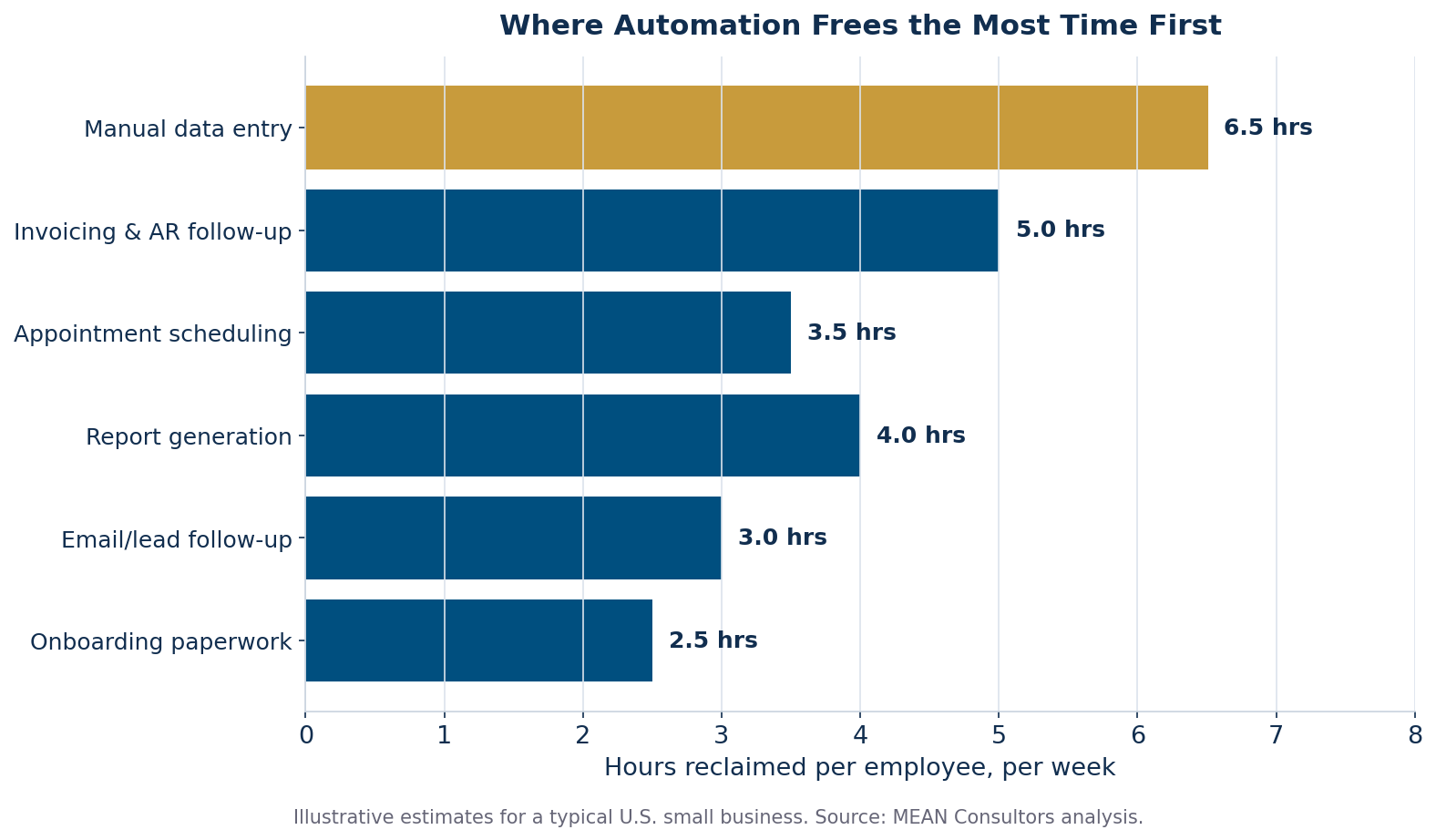
Figure 1: The tasks that typically return the most time when automated first. Manual data entry is almost always the biggest single drain.
Why It Matters for a Small Business
The opportunity is larger than most owners assume. McKinsey’s research on the future of work estimates that roughly half of the activities people are paid to do today are technically automatable with existing technology. That does not mean half your jobs disappear — it means a large share of the steps inside those jobs can be handled by software, freeing your team for the parts only a human can do. The flip side of that opportunity is what you are paying for today: sprawling subscriptions and manual glue work. Zylo’s 2025 SaaS Management Index found that 52.7% of purchased software licenses sit idle, a sign that many businesses buy more tools without ever connecting them into a workflow that actually saves time. Automation is often less about buying another app and more about making the ones you already own talk to each other.
- About half of work activities are technically automatable with today’s technology (McKinsey) — the ceiling is high even for small teams.
- Start with the biggest time drain, not the newest tool. Manual data entry and invoicing usually top the list.
- Automation is often integration. With more than half of licenses unused (Zylo, 2025), connecting existing tools beats buying new ones.
Where to Start When Everything Feels Manual
The mistake I see most often is trying to automate everything at once, getting overwhelmed, and doing nothing. The fix is a phased approach: map, rank, pilot, scale. You prove value on one workflow before touching the next, which keeps risk low and builds momentum.
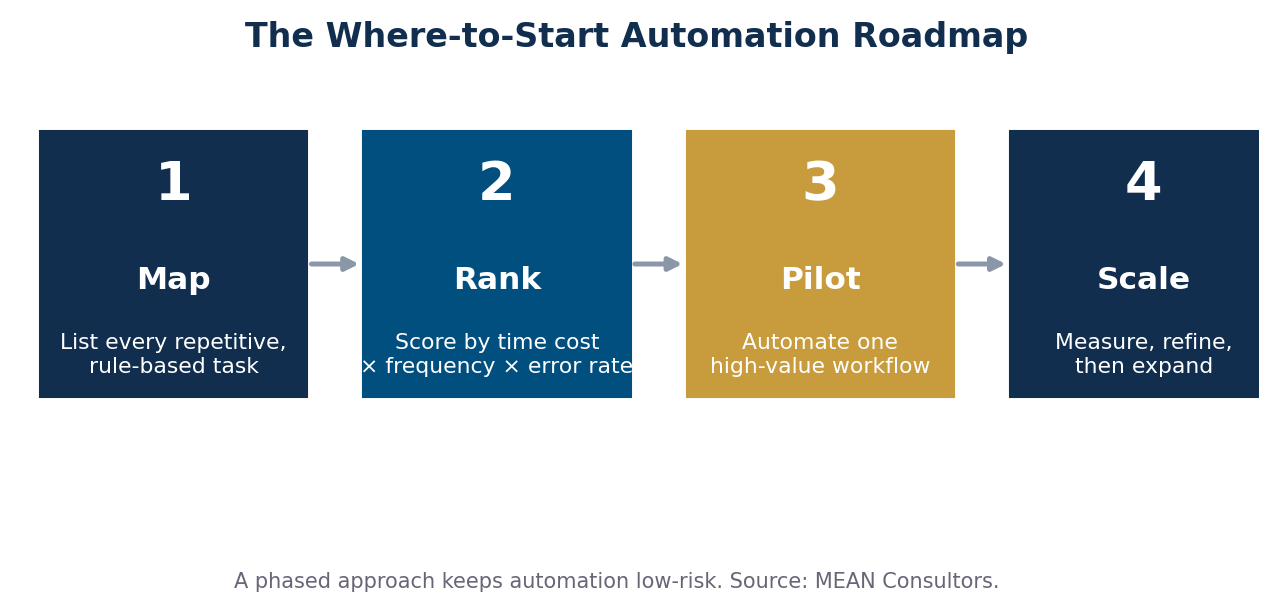
Figure 2: A four-step roadmap that keeps automation low-risk — each stage proves value before you expand.
Step 1: Map the repetitive work
For one week, have your team note every task that repeats and follows the same steps. Do not judge yet — just list them. You are looking for anything that sounds like “every time this happens, I have to….”
Step 2: Rank by time cost and frequency
Score each task by how long it takes, how often it happens, and how error-prone it is by hand. A five-minute task done fifty times a week beats a one-hour task done monthly. The winners rise to the top quickly.
Step 3: Pilot one high-value workflow
Pick the single highest-scoring task and automate just that. A contained first win — automated invoicing, say — builds confidence and teaches you how automation behaves in your business before you scale it.
Step 4: Measure, refine, then expand
Track the hours reclaimed and the errors avoided. Once the pilot is stable, move to the next task on your ranked list. Automation compounds: each connected workflow makes the next one easier.
What Most Small Businesses Automate First
Every business is different, but the highest-return starting points are remarkably consistent. Here is where owners typically see the fastest payback, and the rough weekly time it frees per employee.
| Workflow | What automation does | Typical time reclaimed / week |
|---|---|---|
| Manual data entry | Syncs data between tools automatically | ~6.5 hours |
| Invoicing & AR follow-up | Generates and chases invoices on schedule | ~5 hours |
| Report generation | Pulls numbers into a ready dashboard | ~4 hours |
| Appointment scheduling | Books, confirms, and reminds without back-and-forth | ~3.5 hours |
| Lead & email follow-up | Triggers timely, consistent responses | ~3 hours |
Getting It Right Without Overcomplicating It
You do not need an enterprise platform or a data-science team to start. You need a clear map of your repetitive work and the discipline to automate one thing at a time. Keep these principles in mind:
- Automate a stable process, not a broken one — fix the workflow first, then automate it.
- Start with tools you already own before buying anything new.
- Keep a human checkpoint on anything involving money or customer-facing messages until you trust it.
- Document each automation so it is not a black box only one person understands.
Frequently Asked Questions
What is business process automation, in plain terms?
It is using software to do repetitive, rule-based tasks for you — things like sending a confirmation email, creating an invoice, or updating a record — so your team does not have to do them by hand. If a task follows the same steps every time, it can usually be automated.
What should a small business automate first?
The task that costs the most hours and repeats the most often, which is usually manual data entry or invoicing. Map your repetitive work, rank it by time saved and frequency, and automate the single highest-value workflow before expanding.
Do I need to replace my current software to automate?
Usually not. Much of automation is connecting the tools you already use so they share data and trigger each other. Since more than half of software licenses go unused, integration often delivers more value than buying yet another app.
How much does business process automation cost for a small business?
It ranges widely. Simple automations that connect existing tools can be inexpensive to set up, while custom workflows across multiple systems cost more. The right question is payback: an automation that saves several hours a week usually pays for itself quickly.
Will automation replace my employees?
In practice, it replaces tasks, not people. Automating repetitive steps frees your team for work that needs judgment, relationships, and creativity — the parts of their jobs that actually grow the business.
MEAN Consultors maps your repetitive workflows and builds the automations that pay for themselves — starting with your biggest time drain.