
How to Budget for a Website Redesign Without Losing SEO Rankings
Last updated: July 16, 2026 · By Joseph Olivas, Founder, MEAN Consultors · 8 min read
A redesign is supposed to make your website better. Too often it quietly makes it invisible. I have seen businesses in Jacksonville and across the U.S. launch a beautiful new site, then watch leads dry up for months because nobody protected the SEO equity the old site had spent years earning. The good news: this is almost entirely preventable, and it comes down to how you budget for the project before a single pixel is designed.
Why Website Redesigns Wreck SEO (and What It Costs)
Search engines rank individual URLs, not “your website” as a concept. When a redesign changes URLs, strips out metadata, removes content, or slows the site down, Google effectively sees a different site — and rankings reset. According to migration research, only about 10% of site migrations improve SEO, and a 40–80% loss of organic visibility within weeks of launch is a common outcome when the technical fundamentals are ignored.
The most damaging failure is missing 301 redirects. When old, ranking URLs return a 404 instead of redirecting to their new equivalents, that page’s accumulated authority evaporates. The chart below shows the causes I most often diagnose when a client calls me after their traffic has cratered.
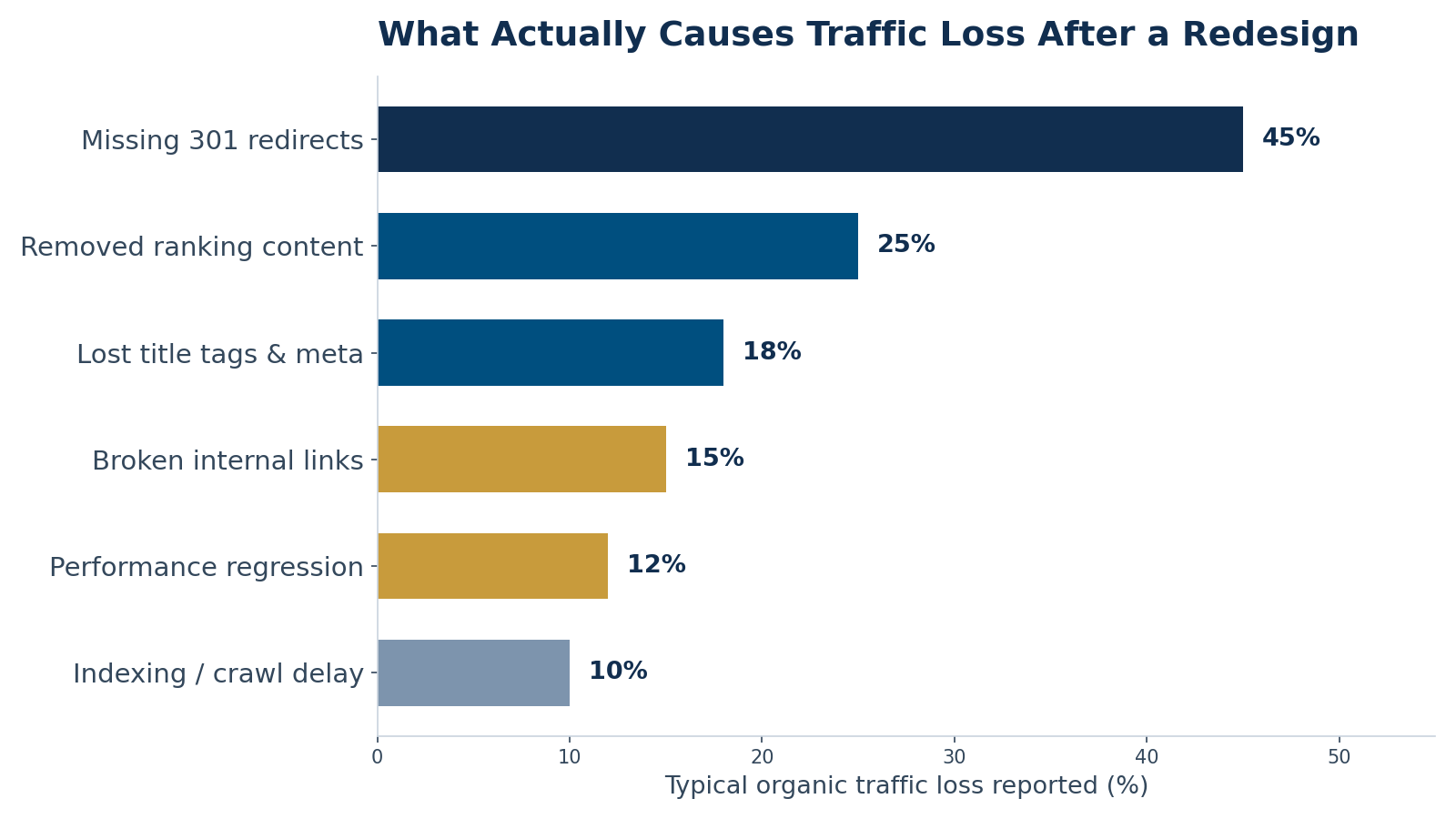
Figure 1: Typical organic traffic loss reported across redesign case studies, by root cause. Percentages reflect ranges commonly cited in migration post-mortems.
- Only ~10% of website migrations improve SEO — the default outcome is loss, not gain.
- Missing or broken 301 redirects can wipe out 30–50% of organic traffic on their own.
- Average recovery time after a botched migration is roughly 18 months, and about 17% of sites never fully recover.
That last point is why budgeting matters so much. A redesign that costs $15,000 but erases a year of lead flow is not a savings — it is one of the most expensive mistakes a growing business can make. Protecting rankings is not an add-on; it is core to the return on the whole investment. This is exactly the kind of risk we plan around in our web development engagements.
How to Build a Redesign Budget That Protects Rankings
Most redesign quotes bundle everything into “design and development” and leave SEO migration invisible — which means it usually does not get done. The fix is to break the budget into explicit line items so SEO preservation is funded on purpose. Here is the allocation I recommend to clients as a starting framework for a typical small-to-mid-size business redesign.
| Budget line item | Share of total | Why it matters |
|---|---|---|
| Discovery & strategy | 10% | Goals, audience, and a full audit of current top-ranking pages |
| UX / UI design | 25% | The visible redesign — layout, brand, conversion flow |
| Development & build | 30% | Turning designs into a fast, functional site |
| SEO migration & preservation | 15–20% | URL mapping, 301 redirects, metadata, schema, monitoring |
| Content migration | 10% | Moving and updating ranking content without losing it |
| QA, testing & launch | 5–10% | Catching broken links and errors before they cost traffic |
The number that gets cut first — SEO migration & preservation — is the one that protects the traffic you already have. Treat it as non-negotiable. If a vendor’s proposal does not name it as a line item, ask where redirect mapping and on-page preservation live in the budget. Silence there is a red flag.
The 6-Step SEO-Safe Redesign Process
Budget only protects rankings if it funds the right work in the right order. This is the sequence we follow so that search visibility survives launch day.
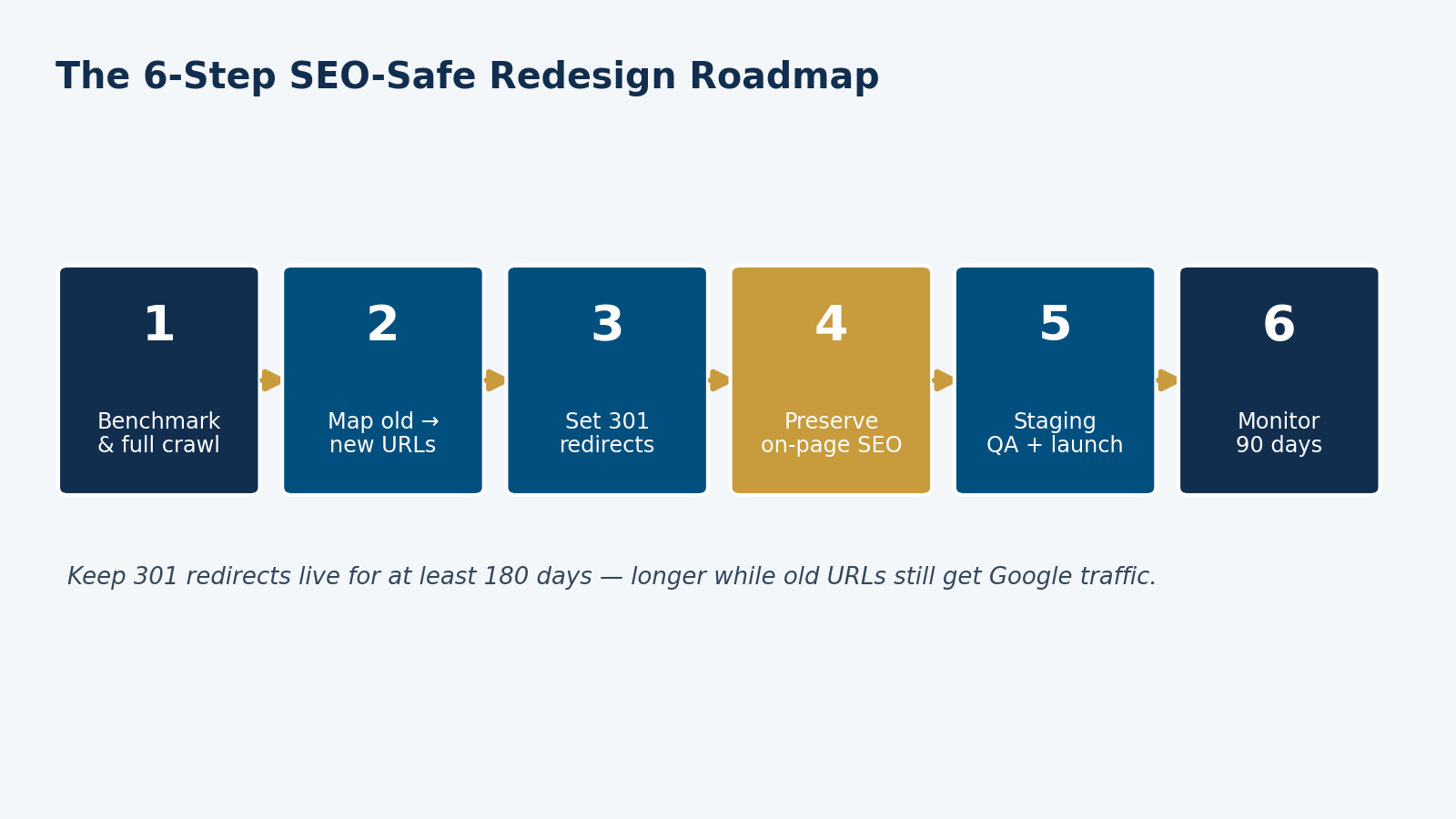
Figure 2: The six-step SEO-safe redesign roadmap MEAN Consultors uses to preserve rankings through a launch.
- Benchmark first. Record current rankings, traffic, and a full crawl of every indexed URL before anything changes.
- Map old URLs to new ones in a spreadsheet — every page gets a destination.
- Implement 301 redirects for every changed URL, avoiding redirect chains of more than a couple of hops.
- Preserve on-page SEO: carry over title tags, meta descriptions, headings, image alt text, and structured data.
- QA on staging, then launch the whole site at once so Google detects the move quickly.
- Monitor for 90 days in Search Console, fixing crawl errors and redirect gaps as they surface.
Google’s own guidance is clear on the mechanics: use permanent 301 redirects, keep them in place for at least 180 days (longer while old URLs still receive search traffic), and for small or mid-size sites move everything at once rather than in phases. Following that guidance is what separates the 10% of migrations that gain from the majority that lose.
What a Redesign Really Costs — and Where Not to Cut
Redesign budgets for U.S. small and mid-size businesses commonly run from a few thousand dollars for a light refresh to well into five figures for a custom build with new functionality. Wherever you land on that range, the proportion matters more than the absolute number: an SEO-safe $8,000 project beats a $20,000 project that torches your rankings.
If your redesign also involves questions about the underlying platform — whether to stay on your current CMS or rebuild — that decision has its own cost and SEO implications worth planning for. We help clients weigh those trade-offs as part of both web development and SEO planning so the redesign and the rankings are handled as one project, not two.
Frequently Asked Questions
How much of my redesign budget should go to SEO?
Plan for 15–20% of the total project cost to cover SEO migration and preservation — URL mapping, 301 redirects, metadata and schema carryover, and 90 days of post-launch monitoring. It is the line item that protects the traffic and leads you already have.
Will I always lose traffic after a website redesign?
No. A small, temporary dip of under 10% is normal and usually recovers within a few weeks. Larger, sustained losses are a sign that redirects, metadata, or content were mishandled — and those are preventable with the right process.
How long does it take to recover lost rankings after a redesign?
Recovery varies widely. Industry data puts the average at roughly 18 months, though well-executed fixes can recover in weeks. Because about 17% of sites never fully recover, prevention is far cheaper than recovery.
What is the single most important step to protect SEO during a redesign?
Mapping every old URL to its new destination and implementing 301 redirects. Missing redirects are the number-one cause of post-redesign traffic loss, capable of erasing 30–50% of organic visibility on their own.
Should I redesign my site if it is ranking well now?
You can — but treat the existing rankings as an asset to protect, not a risk to ignore. Benchmark current performance, budget for SEO preservation up front, and choose a partner who names redirect mapping and monitoring in the proposal.
MEAN Consultors builds SEO-safe website redesigns for U.S. businesses — redirects, metadata, and monitoring included, not bolted on.