
n8n vs. Zapier: An Open-Source Alternative for Growing Businesses
Last updated: August 26, 2026 · By Joseph Olivas, Founder, MEAN Consultors · 10 min read
I have written before about when to graduate from no-code to custom automation. This piece answers a narrower question I get asked constantly since n8n became mainstream: is the open-source option actually a serious alternative to Zapier for a growing business, or is it a hobbyist tool with good marketing?
It is serious. It is also not free in the way people assume. Here is the honest comparison.
The billing model is the whole argument
Start with the part that determines your bill, because it is the difference most comparisons underplay. Zapier’s published task rates are explicit: a standard trigger or action step that connects your apps consumes one task per step, AI steps consume one, three, or five tasks depending on the model tier, and MCP tool calls consume two tasks per call. Built-in utilities — Formatter, Paths, Filters, Delay, Looping, Sub-Zaps, Digests, Storage, Tables and Forms — consume none.
n8n’s commercial model meters workflow executions instead. A run of a workflow is a run, whether it contains three nodes or thirty. Multiply that difference across a month of real volume and the curves separate sharply.

Figure 1: Billable units consumed by 1,000 monthly runs, calculated from each vendor’s published billing unit.
The chart is arithmetic, not a benchmark: it applies Zapier’s one-task-per-action-step rule and n8n’s per-execution metering to the same workload. At three steps the difference is modest. At twenty steps the same work consumes twenty thousand billable units on one model and one thousand on the other. That is why the honest answer to “which is cheaper” is “how long are your workflows.”
Two fair caveats. Zapier’s free built-in utilities mean not every node in a Zap is billable, so a real workflow rarely bills at its full visual length. And headline plan prices differ, so cheaper per unit does not automatically mean a smaller invoice at low volume. Below a few hundred runs a month of short workflows, the comparison is close enough that cost should not drive the decision at all.
- Zapier bills one task per successful action step; n8n meters full workflow executions — workflow length is the variable that decides which is cheaper.
- Zapier’s built-in utility steps such as Filters, Paths, Formatter and Looping consume zero tasks, which narrows the gap on well-built Zaps.
- n8n’s Community edition is free to self-host indefinitely with almost the complete feature set; registering by email unlocks folders, in-editor debugging, and custom execution data at no cost.
- Self-hosting is not free labour — you own updates, backups, monitoring, and uptime.
What self-hosting really gives you, and what it costs
n8n’s documentation is unusually straightforward about this. You can run the Community edition free, indefinitely, with almost the complete feature set. Registering your instance by email unlocks folders, debug-in-editor, and custom execution data at no charge. Paid Business and Enterprise licences add the governance features — SSO, environments, projects, external secrets, log streaming, and Git-based version control for workflows.
The genuine advantages of running it yourself are three, and they are not about price:
| Consideration | Zapier (hosted) | n8n Cloud | n8n self-hosted |
|---|---|---|---|
| Where data is processed | Vendor infrastructure | Vendor infrastructure | Infrastructure you control |
| Cost driver | Action steps executed | Workflow executions | Server capacity |
| App catalogue | Widest available, 9,000+ integrations | Broad, plus generic HTTP | Broad, plus generic HTTP and custom code |
| Who can build | Anyone in operations | A technical operations person | A technical operations person |
| Upgrades and uptime | Vendor | Vendor | You |
| Exit cost | Rebuild elsewhere | Move workflows to self-host | Already portable |
That last row matters more than it looks. Workflows built on a self-hosted instance are yours in a literal sense — they are files you can move, version, and review. For a business that has quietly accumulated forty automations holding its operations together, portability is a risk control, not a preference.
The cost is real and it is operational, not financial. Somebody has to patch the server, watch memory when a workflow processes a large batch, keep credentials encrypted and backed up, and notice at two in the morning when the queue stops draining. If nobody on your team owns that, choose a hosted option and be honest about why.
Where each tool genuinely wins
Zapier wins on breadth and on who can own it. It advertises over nine thousand app integrations, and for the long tail of niche SaaS tools that lead is real and durable. It also wins when the person who will maintain the automation is in operations rather than engineering. A Zap is legible to a non-developer in a way an n8n canvas full of code nodes is not, and legibility is what determines whether an automation survives a staff change.
n8n wins on complexity, volume, and control. Branching, looping over collections, transforming payloads, calling arbitrary APIs, and dropping into JavaScript when no node fits — these are comfortable in n8n and awkward or expensive elsewhere. Add high run volume or a requirement that data not leave your infrastructure, and the case gets straightforward.
Both lose to a custom service when the automation becomes load-bearing infrastructure: when downtime means lost revenue, when you need real test coverage, or when the logic has grown past what any canvas can express legibly. That threshold is the subject of the graduation guide.
A decision path you can run in ten minutes
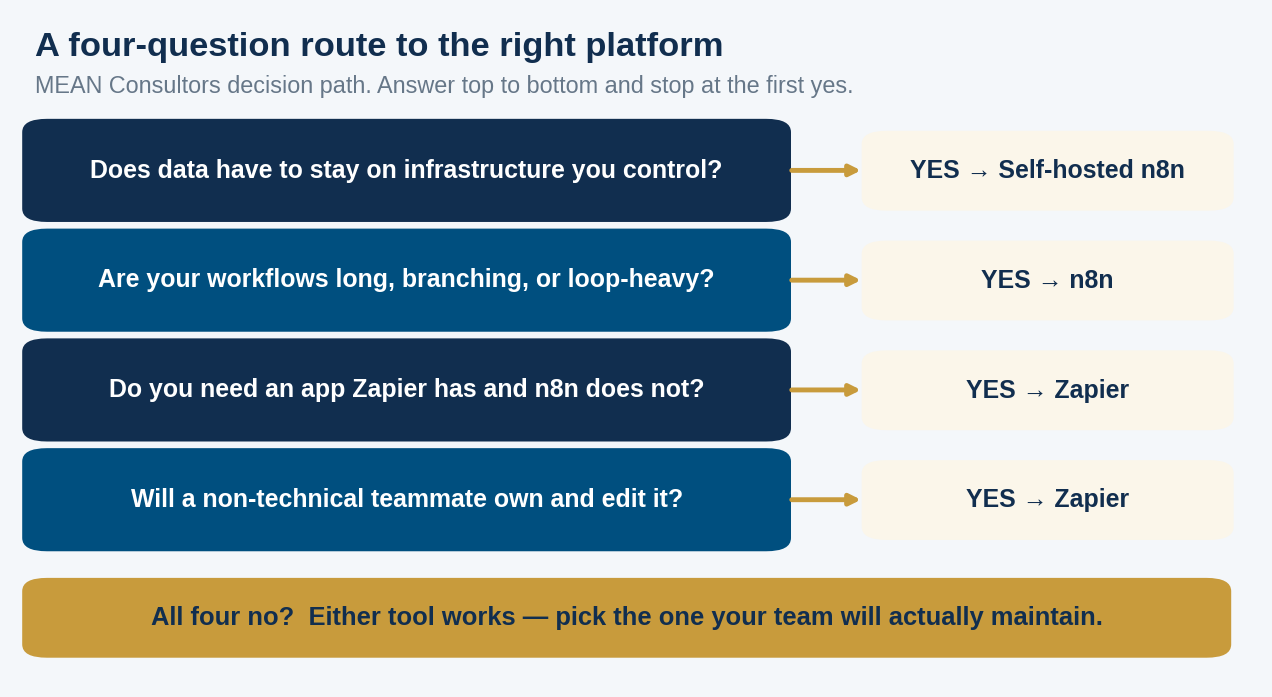
Figure 2: MEAN Consultors decision path. Answer top to bottom and stop at the first yes.
Before you run it, map the workflow you actually intend to automate. Counting the steps is what turns this from a philosophical debate into arithmetic, and mapping first is the discipline that prevents automating a broken process — the argument in workflow mapping before automation. If you are not yet sure which processes deserve automating, start with the ten most automatable tasks in a growing business.
Where AI features change the maths
Both platforms now let you put a language model inside a workflow, and this is where costs surprise people. Zapier prices AI steps by model tier — one task for standard models, three for advanced, five for premium — and charges per tool call at the same rates when an agent decides to use a tool. An agentic step that makes several tool calls can therefore consume more billable units than an entire deterministic workflow.
On self-hosted n8n you pay your model provider directly and the orchestration is effectively free, which is attractive for high-volume classification or extraction work. The trade-off is that you now own the prompt, the model choice, the error handling, and the failure modes. That is a real engineering responsibility, and it is worth reading choosing an LLM provider and human-in-the-loop automation before you put a model in the path of anything customer-facing.
The answer is often both
The most durable setups I build are hybrids. Zapier handles the long tail of small connections to niche apps where its catalogue is unbeatable and where an operations manager needs to make changes without filing a ticket. n8n handles the high-volume, multi-step, data-heavy workflows where per-step billing would be punitive and where the logic needs room to branch. Each tool does what it is good at, and neither is asked to be the whole platform.
If you want help drawing that line for your own operation, our AI and automation practice maps the workflows first and recommends the platform second — including recommending you stay exactly where you are when the numbers say so.
Frequently Asked Questions
Is n8n really free?
The self-hosted Community edition is free to run indefinitely with almost the complete feature set, and registering by email unlocks a few extra features at no cost. What is not free is the infrastructure and the ongoing operational work — updates, backups, monitoring, and someone responsible when it stops.
Is n8n harder to use than Zapier?
Yes, moderately. Zapier’s linear step model is easier for a non-technical person to build and read. n8n’s canvas rewards someone comfortable with data structures and APIs. Both are learnable; the question is who on your team will own the automation twelve months from now.
Which is cheaper, n8n or Zapier?
It depends almost entirely on workflow length and volume. Because Zapier bills per action step and n8n meters per execution, long workflows favour n8n and short, low-volume ones can favour Zapier once plan prices are compared. Count the billable steps in your real workflows before assuming either answer.
Can n8n connect to the same apps as Zapier?
Not to the same breadth — Zapier advertises over nine thousand integrations and that lead is meaningful for niche tools. n8n covers the major platforms and includes a generic HTTP node, so anything with an API is reachable; it just takes more work than clicking a prebuilt connector.
Does self-hosting n8n satisfy data residency requirements?
It can, because the processing happens on infrastructure you control, but self-hosting alone is not compliance. You still need encryption, access control, logging, retention policy, and vendor review of whatever third-party APIs the workflow calls. Treat it as one requirement satisfied, not the whole obligation.
Can I migrate existing Zaps to n8n?
Not automatically. The models differ enough that migration means rebuilding, which is a useful forcing function — most workflows that have been running for years contain steps nobody can justify anymore. Migrate the workflows that earn it, retire the rest.
Should a small business start with n8n or Zapier?
If nobody on the team is comfortable running a server, start with Zapier and revisit when volume or complexity makes the bill uncomfortable. Starting with the harder tool to save a subscription you have not yet outgrown is optimising the wrong thing.
We map your processes, count the real billable steps, and recommend the platform that fits — including the one you already pay for.