
Building a Custom Purchase Order and Inventory System: Lessons From a Real DME Deployment
Last updated: August 26, 2026 · By Joseph Olivas, Founder, MEAN Consultors · 10 min read
Durable medical equipment is a useful teacher. A DME supplier holds inventory that is simultaneously a physical asset, a regulated device, a billable item, and a patient’s property in waiting. Every unit needs to be traceable from the purchase order that brought it in to the documentation packet that supports the claim. Very little general-purpose inventory software is built with that chain in mind.
I have built and rebuilt this category of system, and the lessons transfer well beyond healthcare — to distributors handling serialized goods, equipment rental, field service, and anyone whose stock carries a paper trail. Here is what actually determines whether the project succeeds.
When custom is the right answer — and when it is not
I turn down more of these projects than I take. If your inventory is fungible, your compliance burden is light, and your process fits a standard purchase-to-stock flow, a packaged system will serve you better and cheaper. The honest test is whether your requirements are unusual or merely unaccommodated.
| Signal | Points toward packaged software | Points toward a custom build |
|---|---|---|
| Unit identity | Interchangeable units, count-based | Serial, lot, or device-identifier level tracking required |
| Documentation | Invoice is the record | An evidence packet must attach to each transaction |
| Ownership states | In stock or sold | In stock, allocated, in service, on loan, returned, retired |
| Downstream systems | One accounting integration | Billing, vendor portals, and clinical or field systems |
| Process variation | Standard purchase-to-stock | Approvals, exceptions, and rules that vary by product line |
| Workarounds today | A few spreadsheets on the side | Spreadsheets are the system of record |
That last row is the tell. When the spreadsheet is the truth and the software is the formality, custom becomes defensible. Our broader framework for that decision is in build vs. buy, and the symptom list is in when spreadsheets stop working.
Lesson one: the document chain is the system
Newcomers to this problem think of inventory software as a quantity tracker. It is not. It is a chain of custody where every step produces a record that has to reference the step before it. Break any link and you have a number nobody trusts.
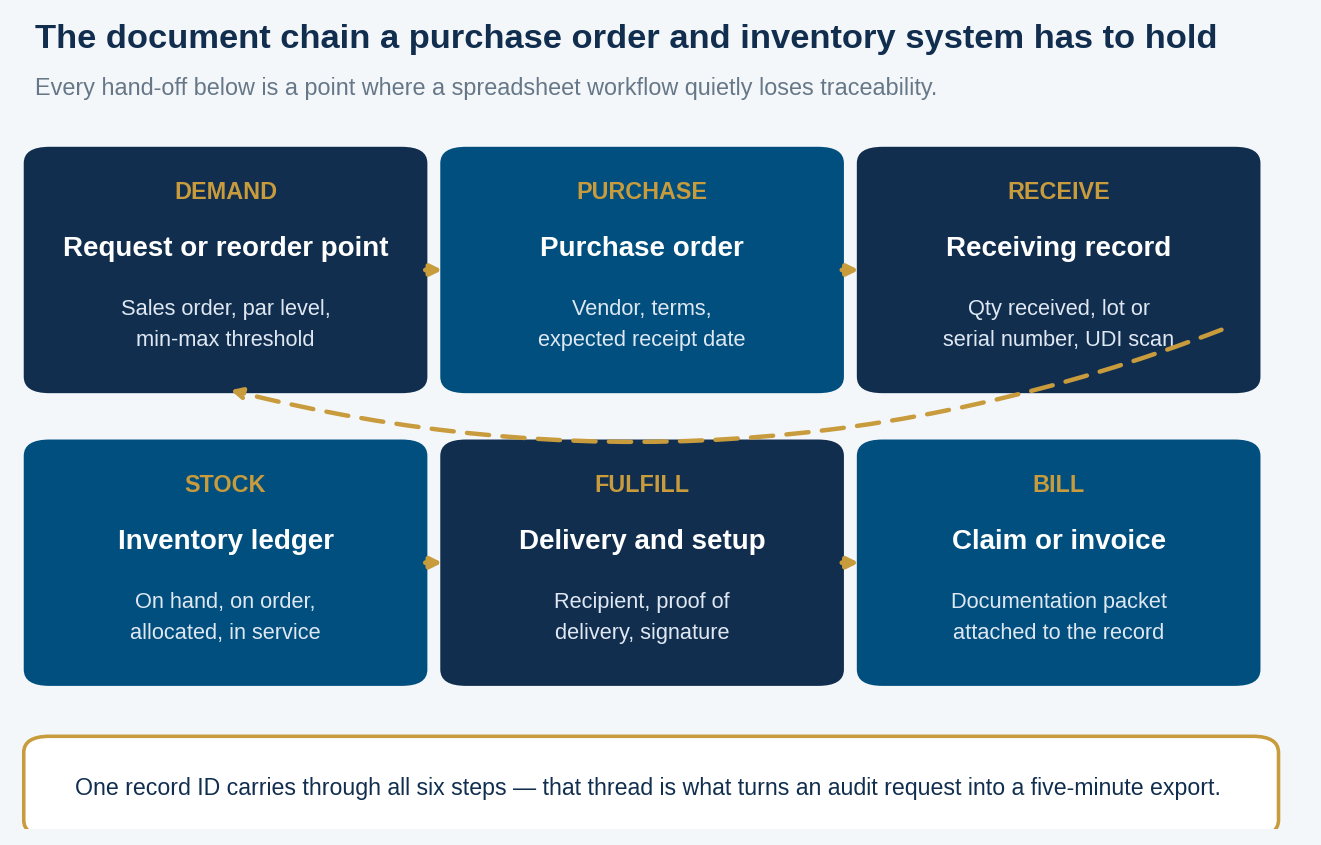
Figure 1: The six-step document chain a purchase order and inventory system has to hold without losing traceability.
In the DME context each of those links carries a regulatory weight. CMS quality standards require suppliers to maintain the written order and supporting documentation from the treating practitioner and make it available on request, and to obtain manufacturer specifications, warranties, and instructions for non-custom items. The FDA’s Unique Device Identification system requires most device labels to carry a UDI in both human-readable and machine-readable form. If your receiving step does not capture the identifier that the device already carries, you have thrown away the one piece of data that makes downstream traceability automatic.
The design consequence is simple to state and easy to skip: model the documents as first-class records with their own identifiers and relationships, not as attachments bolted onto a transaction. Every subsequent feature — audit export, recall response, warranty claim, dispute resolution — becomes a query rather than a project.
- The document chain, not the quantity count, is the actual product — design it first and the reports build themselves.
- Capture manufacturer and device identifiers at receiving; retrofitting traceability onto historical stock is far more expensive than capturing it once.
- Data modelling and migration together consumed the largest share of effort in our phase model — screens are the cheap part.
- Custom is defensible when spreadsheets are the system of record, not when they are merely a convenience on the side.
Lesson two: model states, not quantities
The most damaging early mistake I see is a single “quantity on hand” field. Real operations have units that are ordered but not received, received but not inspected, in stock, allocated to a specific order, delivered but not yet billed, out for service, awaiting return, and retired. Each of those is a different answer to “do we have one?”
Model them as explicit states with defined transitions, and record who moved a unit between them and when. Two things follow. First, your availability number becomes accurate enough to promise against, which is what your salespeople actually need. Second, every question an auditor or a customer asks — where was this unit on this date — has an answer that does not require a person to remember anything.
The cost of getting this wrong is asymmetric. Adding a state later means backfilling history for every unit already in the system, and that history usually does not exist. Spend the extra week in discovery mapping states before anyone writes a line of application code. Our note on workflow mapping before automation makes the same argument in a different domain.
Lesson three: the effort lands where nobody expects
Clients budget for screens. The screens are the cheapest part. Here is roughly how the effort distributed across the phases of an inventory build of this kind.
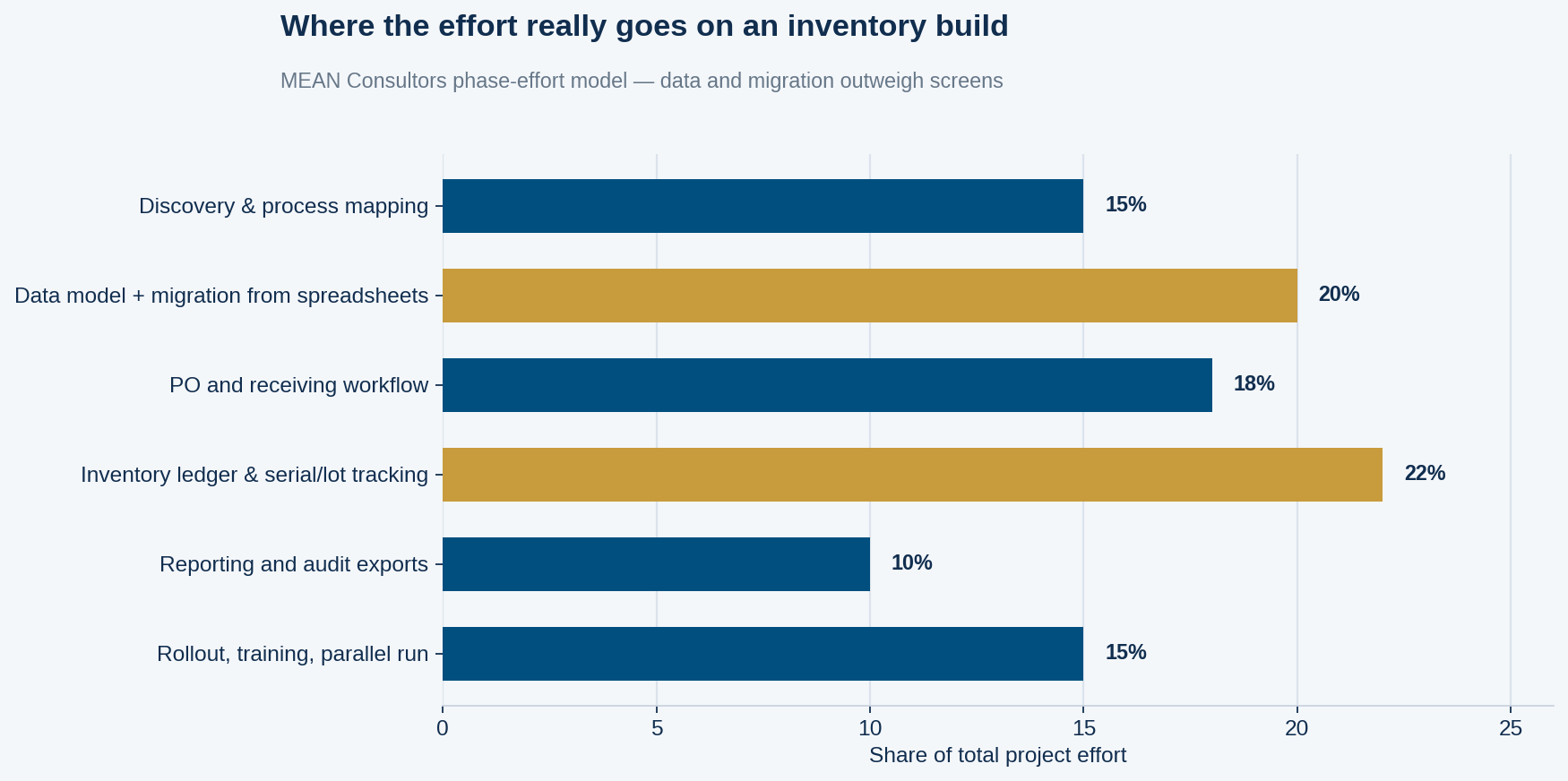
Figure 2: MEAN Consultors phase-effort model for a purchase order and inventory build. Data work outweighs interface work by a wide margin.
Migration deserves particular respect. Years of spreadsheet history contain duplicated part numbers, three spellings of every vendor name, quantities that reconcile to nothing, and units that were sold twice. You cannot import that and you should not discard it. The workable middle path is to import a clean opening position, archive the historical files in a searchable form, and run a physical count to establish a trustworthy starting point. Our data migration checklist covers the mechanics.
Lesson four: integrations decide the maintenance burden
A purchase order and inventory system is rarely an island. It has to talk to accounting, often to billing or claims, sometimes to vendor portals, and increasingly to whatever field or clinical system your staff already live in. Each connection is a permanent maintenance obligation, not a one-time build.
Two rules keep that burden proportionate. First, pick a single system of record for each entity — one authority for vendors, one for items, one for stock — and let everything else read rather than write. Bidirectional synchronisation is where these systems go to die. Second, treat every integration as fallible: queue the writes, log them, and give someone a screen where failures are visible and re-runnable. Silent failures in an inventory integration surface three weeks later as a count nobody can explain. The patterns are covered in API integration for business systems and, at platform level, in connecting your CRM, ERP, and e-commerce platform.
Lesson five: adoption is a design problem
The system that fails is not the one with bugs. It is the one where receiving takes forty seconds per unit instead of eight, so the warehouse quietly goes back to the clipboard and enters everything on Friday afternoon from memory.
- Time the highest-frequency task with a stopwatch and design against that number, not against the feature list.
- Make barcode and identifier scanning the default input path, with typing as the exception.
- Let the system accept an incomplete record and flag it, rather than blocking work until every field is filled.
- Put exception handling in front of the people who encounter exceptions, not in an admin panel they cannot reach.
- Train on the actual floor with actual stock, never in a conference room with sample data.
- Keep a visible list of what the system cannot do yet, so workarounds are deliberate instead of secret.
If you are scoping something like this, our software development team starts with the process map and the data model, and we will tell you plainly when a packaged product would serve you better. The financial framing is in calculating ROI on a custom software investment.
Frequently Asked Questions
What makes a purchase order and inventory system “custom” rather than configured?
Custom means the data model itself is designed around your obligations — your states, your identifiers, your document relationships. Configuration means fitting your process into someone else’s model using available fields. If the packaged model can hold your reality, configure it; that is almost always the cheaper path.
How long does a build like this take?
It varies with catalogue complexity and the number of integrations, but the distribution of time is consistent: expect roughly a third of the schedule to go to discovery and data modelling before meaningful application work begins. Projects that skip that third do not finish faster; they finish twice.
Can we keep using QuickBooks or our existing accounting system?
Usually yes, and usually you should. Accounting stays the authority for financial records while the inventory system owns physical stock and its documentation. The integration passes receipts and invoices in one direction rather than trying to keep both systems mutually authoritative.
What should we capture at receiving?
At minimum: the purchase order reference, quantity, condition, date, receiver identity, and every identifier the item already carries — manufacturer part number, serial or lot number, and the device identifier where one exists. Identifiers captured at receiving cost seconds; reconstructing them later can be impossible.
How do we handle inventory that is out on loan or in service?
As a distinct state with its own transitions, not as a deduction from stock. You need to answer where the unit is, who holds it, when it is due back, and what condition it left in. Treating it as “gone” loses an asset you still own and still owe maintenance on.
What is the biggest risk in a project like this?
Migration and adoption, in that order. The technology is well understood. The dirty historical data and the habits of the people doing receiving are what determine whether the system is trusted six months after launch.
Do we need barcode or RFID hardware?
Barcode scanning pays for itself almost immediately in receiving accuracy and speed, and most items you handle already carry a scannable identifier. RFID is worth evaluating only when you need to read many units at once without line of sight — otherwise the added cost rarely clears the bar.
We map the process and the data model before quoting a build — and we will tell you when packaged software is the better call.