
CRM, ERP, and E-commerce Integration Blueprint: How to Connect Your Core Systems
Last updated: July 30, 2026 · By Joseph Olivas, Founder, MEAN Consultors · 9 min read
By the time a business calls me about integration, the symptoms are familiar: someone is exporting orders to a spreadsheet every morning, inventory numbers never quite match between systems, and the sales team is looking at customer data that is a week out of date. Each system works fine on its own; the problem is that they do not talk to each other. This is one of the most common — and most fixable — sources of operational drag in a growing company. Here is the blueprint I use to connect a CRM, an ERP, and an e-commerce platform into one coherent system.
Why disconnected systems cost more than you think
Every time data has to be moved by hand between systems, three things happen: someone spends time doing it, errors creep in, and the data is stale the moment it is entered. Multiply that across orders, customers, products, and invoices, and the hidden cost is substantial. Integration removes the manual step entirely. When your e-commerce platform records a sale, that order should automatically reserve stock in the ERP, post the revenue, and update the customer’s record in the CRM — with no human retyping anything. This is the core promise of good custom software and integration work: your systems become one system.
Start with the architecture: use a hub, not a web
The single most important decision is architectural. You can connect systems in one of two ways. Point-to-point wires each system directly to every other one. It feels simple with two systems, but it does not scale: the number of connections grows quadratically, and every system change risks breaking several brittle links. Hub-and-spoke routes everything through a central integration layer — middleware or an iPaaS platform — so each system connects once, to the hub.
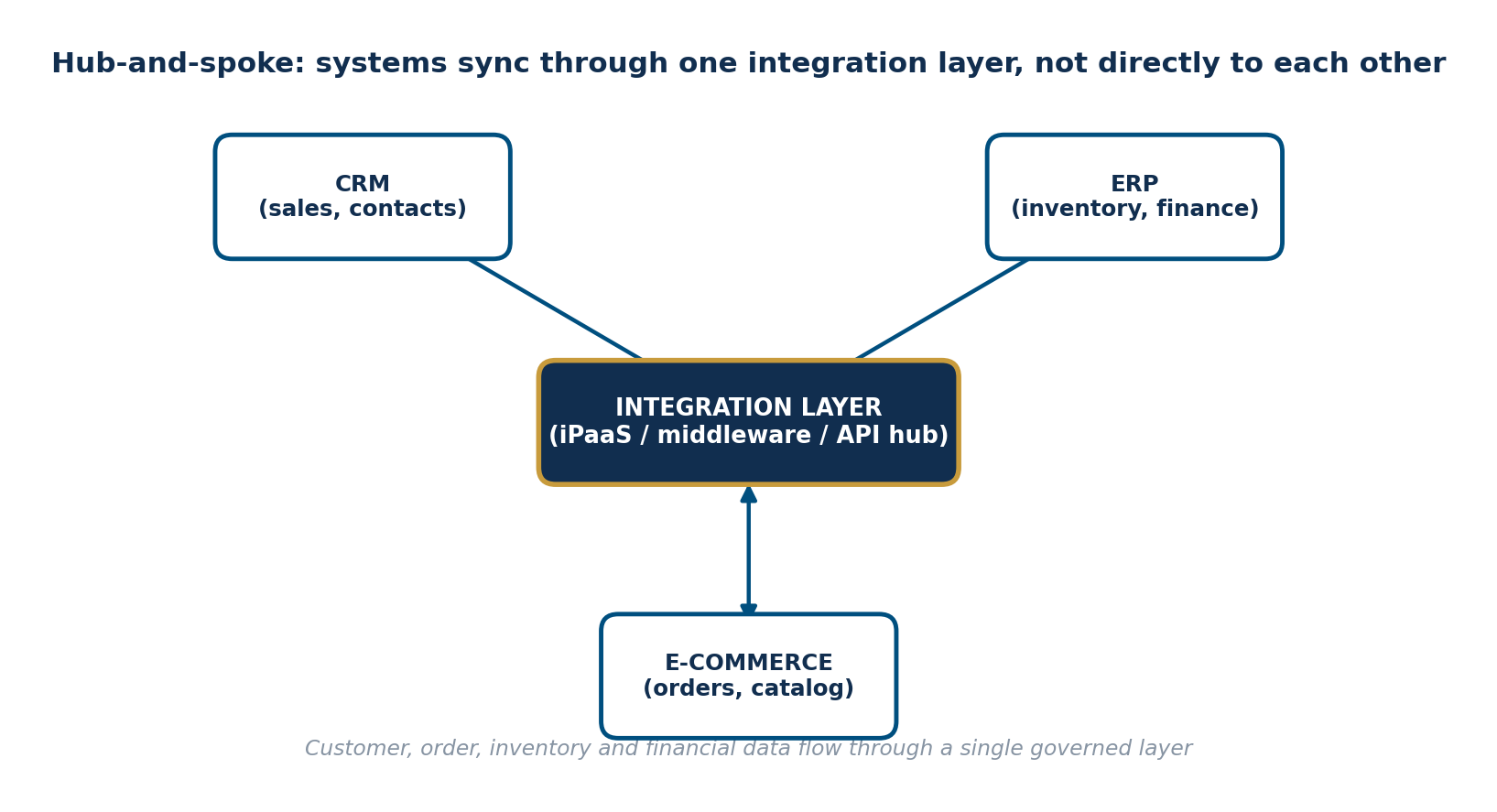
Figure 1: A hub-and-spoke integration layer. Each system connects once to the hub, not directly to every other system.
The difference compounds as you grow. With three systems, point-to-point needs three connections and hub-and-spoke also needs three — a wash. But add a warehouse system, a marketing platform, and an accounting tool, and point-to-point explodes while the hub stays linear.
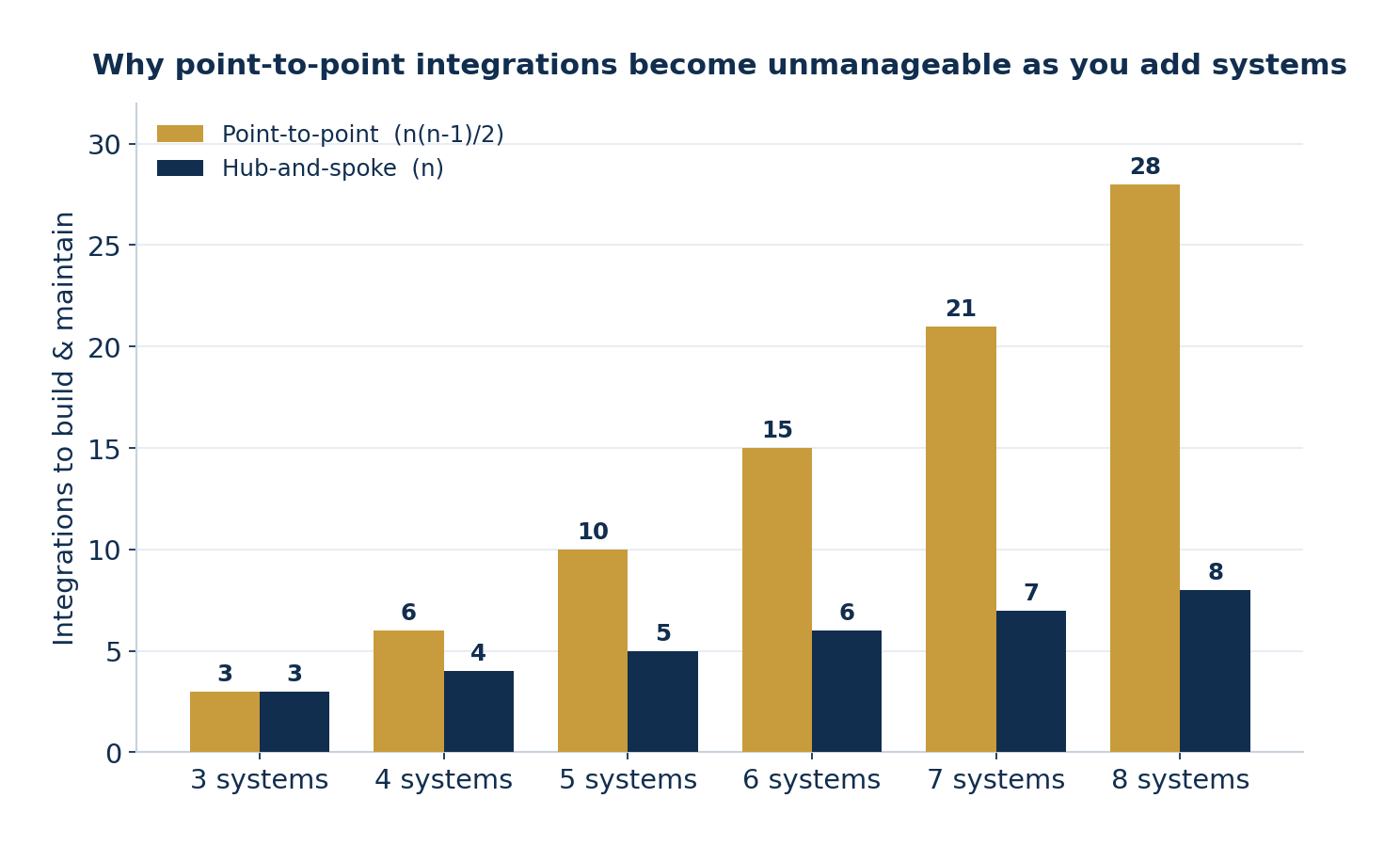
Figure 2: Point-to-point connections grow with n(n-1)/2; a hub keeps them at n. At eight systems that is 28 integrations versus 8.
- Point-to-point integrations grow quadratically — 8 systems need 28 direct connections; a hub needs just 8.
- A central integration layer gives you one place to monitor, secure, and change every data flow.
- Choose the architecture before you build anything; retrofitting a hub onto a tangle of direct links is expensive.
Define the source of truth for every field
Before a single line of integration code is written, you have to answer one question for every important piece of data: which system owns it? This is the concept of a system of record. Your ERP is usually the source of truth for inventory, pricing, and financials. Your e-commerce platform owns the online catalog and the order itself at the moment of purchase. Your CRM owns the customer relationship — contacts, deals, and communication history. When two systems both think they own the same field, they overwrite each other, and you get the classic integration mess where nobody trusts the data.
| Data | System of record | Flows to |
|---|---|---|
| Inventory levels | ERP | E-commerce (available-to-sell) |
| Product pricing | ERP | E-commerce, CRM (quotes) |
| Online orders | E-commerce | ERP (fulfillment), CRM (deal) |
| Customer contact & history | CRM | E-commerce (account), ERP (billing) |
| Invoices & payments | ERP / accounting | CRM (deal status) |
Map the workflows that move the business
Integration is not about syncing everything; it is about automating the specific workflows that carry real value. Identify those first and build them one at a time. The order-to-fulfillment flow is almost always the highest-value one to build first, because it touches revenue directly and eliminates the most manual work.
- Order-to-fulfillment: e-commerce order creates an ERP sales order, reserves inventory, and triggers shipping.
- Customer sync: new e-commerce accounts and orders create or update CRM contacts and deals.
- Inventory sync: ERP stock levels push to the storefront so you never oversell.
- Pricing and catalog: product and price changes flow from the ERP out to the store.
- Financial status: invoice and payment status flows back to the CRM so sales sees what is paid.
Each of these depends on solid APIs on both ends. If you are new to how systems expose data to each other, our primer on how your business systems should talk to each other covers the fundamentals, and our comparison of REST versus GraphQL API architecture helps when you are choosing how a custom connector should be built.
Build for failure from day one
Networks drop, APIs rate-limit, and systems go down for maintenance. A production integration has to expect this. That means every sync needs retry logic, a queue for records that fail so nothing is silently lost, logging so you can see exactly what happened, and alerts so a human finds out before a customer does. The blueprint treats error handling as a first-class feature, not a nice-to-have — because the failure you did not plan for is the one that loses an order.
Frequently Asked Questions
What does it mean to integrate CRM, ERP, and e-commerce systems?
It means connecting your three core business systems so they share data automatically instead of relying on manual re-entry. When a customer places an order on your e-commerce platform, the order flows to your ERP to reserve inventory and record the sale, and the customer and deal information updates in your CRM. Integration replaces copy-paste and CSV exports with a governed, automatic flow of data between systems.
Should I connect my systems directly or use an integration layer?
For anything beyond two systems, use an integration layer (middleware or an iPaaS platform) rather than wiring each system directly to every other one. Direct point-to-point connections multiply fast and become a maintenance nightmare, while a hub-and-spoke layer keeps the number of integrations linear and gives you one place to monitor, secure, and change the flows.
How long does a CRM, ERP, and e-commerce integration take?
It depends heavily on the systems, data quality, and number of workflows, but a focused first-phase integration connecting the most valuable data flows typically takes a few weeks to a few months. The biggest time sink is rarely the code; it is agreeing on the data model — deciding which system is the source of truth for each field and cleaning up inconsistent existing data.
What is a system of record and why does it matter?
A system of record is the single authoritative source for a given piece of data. For example, your ERP might be the system of record for inventory and pricing, while your CRM owns customer contact details. Defining this up front prevents the classic integration failure where two systems disagree about the same customer or product and each keeps overwriting the other.
What happens if an integration fails mid-sync?
A well-designed integration expects failures and handles them gracefully with retries, error queues, and alerts, so a temporary outage does not silently lose an order. This is why robust error handling and logging are part of the blueprint, not an afterthought. You should always be able to see what synced, what failed, and why, and re-run failed records safely.
Do I need custom development or can off-the-shelf connectors do it?
Many common pairings — a popular e-commerce platform to a mainstream ERP, for instance — have off-the-shelf connectors that cover standard flows well. Custom development becomes worthwhile when your workflows are non-standard, when you have older or industry-specific systems, or when the off-the-shelf connector cannot model your business rules. Often the right answer is a hybrid: connectors where they fit and custom logic where they do not.
MEAN Consultors designs and builds CRM, ERP, and e-commerce integrations that eliminate manual re-entry and keep your data in sync.