
301 Redirects and a Website Rebuild: How to Avoid Traffic Loss
Last updated: August 27, 2026 · By Joseph Olivas, Founder, MEAN Consultors · 9 min read
I have been called in after enough failed launches to know how the conversation starts. The new site looks great, everyone signed off, and three weeks later organic traffic is down 40% and nobody can explain it. The design is not the problem. In nearly every case, the problem is a spreadsheet that was never built: the redirect map.
Redirects are the least glamorous part of a rebuild and the part that decides whether you keep the rankings you spent years earning. This guide covers how we handle them on web development projects at MEAN Consultors — what to inventory, how to map, when to deploy, and what to watch afterward.
Why rebuilds lose traffic in the first place
When you change a URL, you are not just changing an address. You are changing the identifier Google has associated with a set of ranking signals: links from other sites, internal links, click history, and its own understanding of what that page is about. If the old identifier returns a 404, those signals have nowhere to go.
Google’s own guidance is unambiguous on the mechanics here. Its documentation on redirects and Google Search states that 301 and other permanent redirects do not cause a loss in PageRank, and that a permanent server-side redirect is the best way to ensure both Google and people reach the right page after a URL changes.
That single sentence reframes the whole problem. If permanent redirects preserve signals, then post-launch traffic loss is not a tax you pay for rebuilding. It is a defect. And defects have specific, findable causes:
- URLs that changed but got no redirect at all, and now return 404
- Redirects pointing at the homepage or a category page instead of the closest equivalent page
- Temporary 302s used where 301s were needed, leaving old URLs indexed
- Long redirect chains built up over multiple past migrations that were never flattened
- Redirects deployed days or weeks after launch, leaving a window of 404s for Googlebot to crawl
- New pages that technically resolve but no longer contain the content that earned the ranking
That last one deserves emphasis. A redirect passes signals to a destination; it cannot manufacture relevance. If a 1,400-word service page is replaced by a 200-word page with a contact form, the redirect worked and the ranking still falls. Content parity matters as much as the redirect itself.
The sequence that prevents the problem
Redirect work fails when it is treated as a launch-week task. It is a discovery-phase task. Here is the order we run it in.
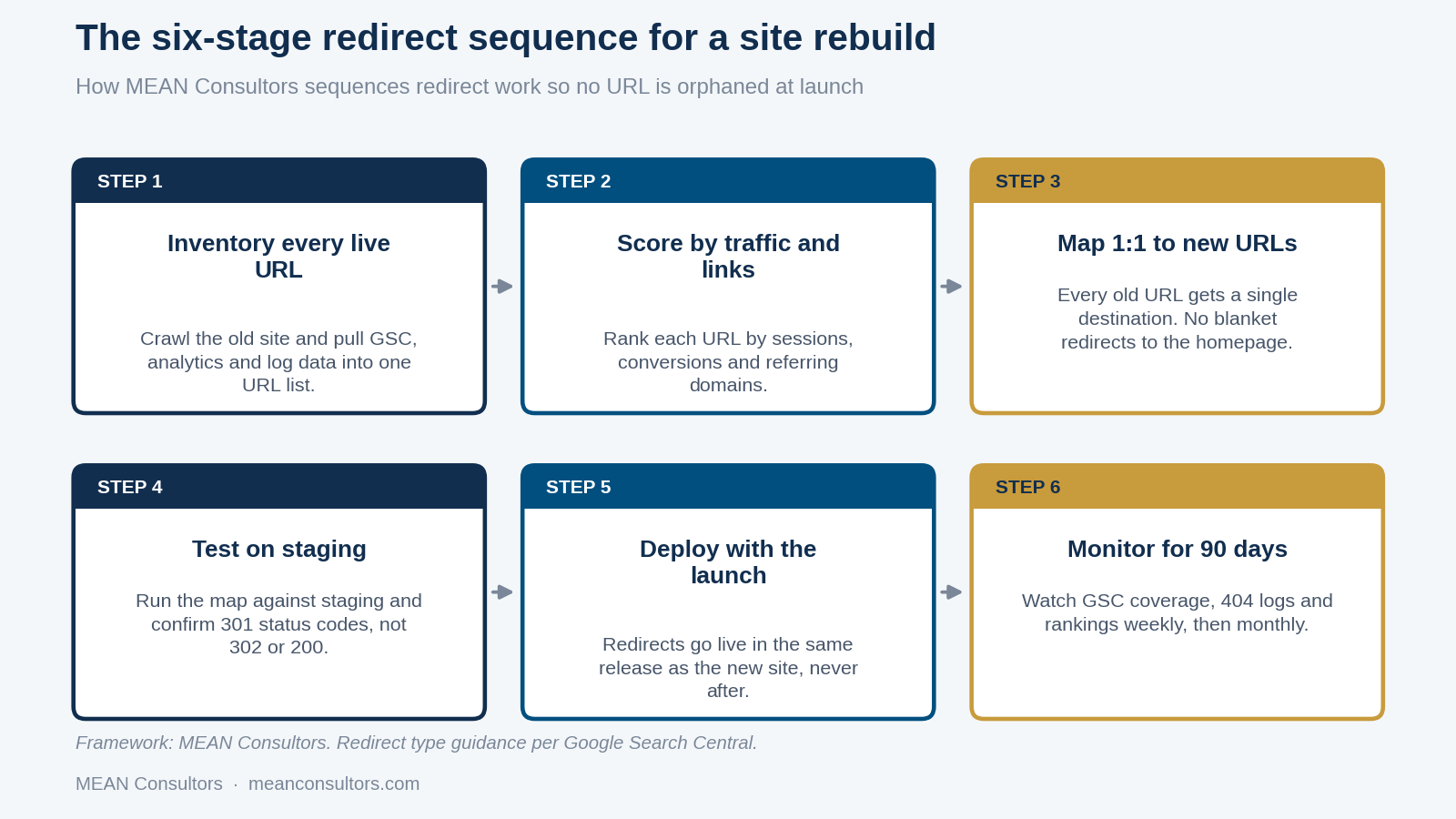
Figure 1: The redirect sequence MEAN Consultors runs on every rebuild, starting in discovery rather than launch week.
1. Inventory every live URL before design starts
You need one list with four sources merged into it: a full crawl of the existing site, the Pages report in Google Search Console, your analytics landing-page report over at least 12 months, and your server access logs if you can get them. Each source catches something the others miss. The crawl finds pages nobody links to internally. Search Console finds pages that get impressions you never noticed. Analytics finds seasonal pages. Logs find URLs that only external sites and bots still request.
2. Score before you map
Do not treat all URLs as equal work. Score each one on organic sessions, assisted conversions, and referring domains. That score decides whether a human maps it or a pattern rule handles it, and it also decides what you fight to preserve in the new information architecture.
3. Map one to one
Every scored URL gets exactly one destination, and the destination should be the closest content match that exists on the new site. If no close match exists, that is a content decision to make now, not a redirect decision to fudge later. Options in order of preference: build the equivalent page, redirect to the nearest parent that genuinely covers the topic, or deliberately return a 410 Gone for content you are retiring on purpose.
4. Test on staging, checking status codes not just landings
A browser will happily show you the new page whether the server sent a 301, a 302, or a JavaScript redirect. Test with a tool that reports the actual HTTP status for every row in the map. We run the full list and fail the build on any row that does not return a single 301 to a 200.
5. Deploy redirects in the same release as the site
Not after. Googlebot can crawl thousands of URLs in the hours between launch and a follow-up deploy, and every 404 it finds in that window is a signal you then have to undo.
6. Monitor for 90 days
Weekly for the first month, then monthly. You are watching Search Console’s coverage report for a spike in “Not found (404)”, your server logs for 404s with real referrers, and your ranking set for pages that moved and did not come back.
- Google confirms permanent redirects do not cost PageRank, so post-launch traffic loss points to a mapping defect rather than to redirects as a category.
- Redirect planning belongs in discovery, because the URL inventory should influence the new information architecture — not the other way around.
- Redirects must ship in the same release as the new site; a gap of even a few hours puts 404s in front of Googlebot.
- Content parity is part of the redirect: a correct 301 to a thinner page will still lose the ranking.
Redirect chains: how many hops you can actually afford
Sites that have been rebuilt more than once accumulate chains. The 2019 URL redirects to the 2022 URL, which redirects to the 2026 URL. Each layer was reasonable at the time and the stack is now a liability.
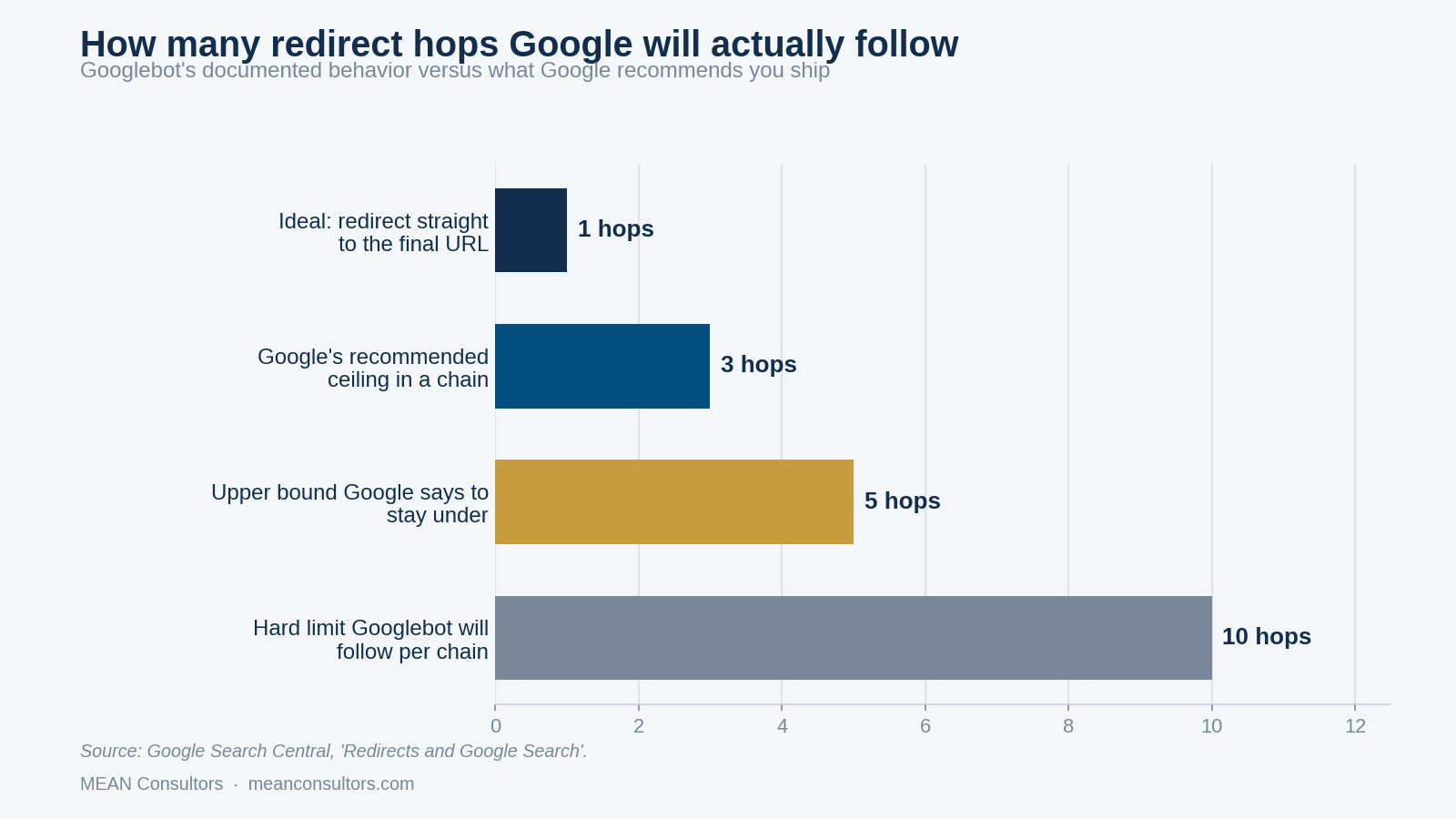
Figure 2: What Google documents about redirect chains — the hard crawl limit is far higher than the number you should actually ship.
Google’s site migration guidance says Googlebot can follow up to 10 hops in a chain of multiple redirects, but advises redirecting to the final destination directly and, where that is not possible, keeping the chain low — ideally no more than three and fewer than five. The gap between “will follow 10” and “ship 1” is the point. The crawl limit is a safety net, not a budget.
There is also a user cost that has nothing to do with crawling. Each hop is a full round trip on a mobile connection. A three-hop chain on a slow network can add most of a second before the browser starts fetching the page the visitor actually asked for.
The fix is mechanical: after your new map is written, run it through itself. Any destination that appears as a source elsewhere in the map gets collapsed so the original source points straight at the final URL.
A decision table for URLs with no obvious match
Most redirect maps stall on the same handful of ambiguous cases. This is the table we work from so the calls are consistent across a project rather than made ad hoc by whoever is on the row.
| Situation on the old site | Correct handling | Why |
|---|---|---|
| Page has a direct equivalent on the new site | 301 to the equivalent | The default case; signals and intent both transfer. |
| Three thin pages consolidated into one strong page | 301 all three to the new page | Consolidation is fine when the new page genuinely covers all three topics. |
| Page had traffic but the service is discontinued | 301 to the nearest live service page, with a note on that page | Keeps the visitor in a useful place; avoids a dead end for link equity. |
| Page is expired, seasonal, or event-based with no successor | 410 Gone | Tells Google the removal is intentional so it drops the URL cleanly. |
| Page is a duplicate that was already canonicalized elsewhere | 301 to the canonical target | Finishes a job the canonical tag was only advising on. |
| Parameterized or filtered URL with no standalone value | 301 to the clean parent URL | Removes crawl waste without discarding any real ranking. |
| Old URL still has strong referring domains but no traffic | 301 to the most topically relevant live page | The links are the asset here, not the sessions. |
If you are still deciding whether the rebuild is worth doing at all, the trade-offs in the signs you actually need a website redesign are worth reading before you commit to changing URLs at all. And if the driver is a tight budget, redesigning on a budget without losing SEO covers where to spend and where not to.
Implementing redirects without creating new problems
Where the redirect lives matters. In rough order of preference:
- Server or edge configuration — Nginx, Apache, or a CDN edge rule. Fastest, most reliable, version-controlled with the rest of your infrastructure.
- Application-level routing — fine when the map is dynamic or database-driven, but keep it in one place, not scattered through controllers.
- CMS plugin — acceptable for small maps and easy for non-technical editors, but it runs after the application boots, so it is slower and it breaks when the plugin does.
- Meta refresh or JavaScript redirect — avoid. These are not server-side redirects, they are slower, and they do not communicate permanence cleanly.
A few implementation details that cause real incidents. Match on the path, not the full URL with query strings, unless the parameters carry meaning. Preserve query strings when they carry campaign tracking, or you will silently break attribution for every paid and email link pointing at old URLs. Redirect the trailing-slash and non-slash variants consistently rather than letting both resolve. And handle protocol and host normalization in a single rule so http, https, www and non-www all collapse to one canonical form in one hop — not four chained hops, which is how most accidental chains are born.
Redirects and canonical tags also get conflated constantly. They are not substitutes: a canonical is a hint about which of several accessible URLs to index, while a redirect removes the choice entirely. Canonical tags and duplicate content covers where each one belongs.
What to watch after launch, and for how long
Google’s site move documentation sets expectations that most stakeholders do not have: for a medium-sized site it can take a few weeks or more for Google to gradually start showing the new URLs instead of the old ones, and longer for large sites. Plan the reporting conversation around that timeline before launch, not during the panic.
| Window after launch | What you check | What normal looks like |
|---|---|---|
| Days 1–3 | Server 404 logs, uptime, top-50 URL spot check | A trickle of 404s from bots and old parameterized URLs; no 404s on scored pages. |
| Weeks 1–4 | Search Console coverage, crawl stats, index counts | Old URLs move to “Page with redirect”; new URLs start getting indexed; impressions wobble. |
| Weeks 4–8 | Rankings for the scored URL set, organic sessions | Rankings largely restored; residual volatility on the most competitive terms. |
| Weeks 8–12 | Trend versus pre-launch baseline, conversion rate | Traffic at or above baseline; conversion rate ideally better on the new templates. |
If week eight arrives and a specific set of pages is still down, resist the urge to change everything. Go back to those exact URLs and check three things in order: does the old URL return a single 301, does the destination return 200, and does the destination page actually contain the content that used to rank. In our experience one of those three answers is always no.
For the full pre-launch and post-launch sequence around a move, including the non-redirect items, work through our website migration checklist for SEO alongside this guide.
Frequently Asked Questions
Do 301 redirects lose link equity?
No. Google’s documentation states plainly that 301 and other permanent redirects do not cause a loss in PageRank. The traffic drops people blame on ‘redirect decay’ are almost always caused by something else: missing redirects, redirects pointed at the wrong page, chains that are too long, or a new page whose content no longer matches the query that used to rank.
How long should I keep old redirects in place?
Treat them as permanent. Google needs weeks to months to fully swap the new URLs into its index, and inbound links on other people’s sites will keep pointing at the old URLs for years. There is no upside to removing a redirect rule; the cost of keeping it is a few kilobytes of configuration.
Should I use 301 or 302 for a rebuild?
301 for anything permanent, which is every URL change in a rebuild. A 302 tells Google the move is temporary and to keep the old URL indexed. Using 302s during a launch is one of the most common and most damaging redirect mistakes we see.
Can I just redirect everything to the homepage?
No. Google treats a bulk redirect to an irrelevant page as a soft 404 and the ranking signals from the old page are not carried anywhere useful. A visitor who clicked a search result for a specific service and lands on your homepage usually leaves. Every URL that had traffic or links needs a real 1:1 destination.
How many redirect hops are safe?
Googlebot will follow up to 10 hops in a chain, but Google advises redirecting straight to the final destination and, where a chain is unavoidable, keeping it to no more than three and under five. Chains also slow the page down for real users, since each hop is another round trip.
Do I need to change anything in Google Search Console?
If the domain stays the same and only the URLs change, no move tool is involved — you just monitor. If you are moving to a new domain, use the Change of Address tool in Search Console after the redirects are live, and keep both properties verified so you can watch the handoff.
What if my old site has thousands of URLs I can’t map by hand?
Score first, map second. Pull the URL list from your crawl, Search Console and analytics, then sort by sessions, conversions and referring domains. In most site inventories a small share of URLs carries the overwhelming majority of the value. Map those by hand, use pattern-based rules for the structured remainder, and give the true dead weight a 410.
MEAN Consultors builds and tests the full URL map before a line of the new site ships, so your rankings survive the launch.