
Zapier vs. Make vs. Custom Automation: When to Graduate From No-Code
Last updated: August 25, 2026 · By Joseph Olivas, Founder, MEAN Consultors · 10 min read
I run an automation practice, so you might expect me to argue that everything should be custom-built. I do not. Most of the automation wins available to a small or mid-size business are genuinely well served by Zapier or Make, and I have talked clients out of custom builds more often than into them. What I care about is the graduation point — the moment when staying on no-code starts costing more than moving off it — because that is where businesses waste the most money in both directions.
So let us be concrete about the three options and the actual thresholds.
How the three options actually differ
The marketing makes these sound like the same product at different price points. They are not the same shape of tool.
| Dimension | Zapier | Make | Custom automation |
|---|---|---|---|
| Mental model | Linear trigger → action steps | Visual scenario graph with routers and iterators | Code, queues, and scheduled jobs |
| Who builds it | Anyone in ops | A technical ops person | A developer |
| Time to first working flow | Minutes | An hour or two | Days to weeks |
| Billing unit | Tasks (roughly, one action) | Operations (roughly, one module run) | Compute and maintenance |
| Branching and loops | Possible but awkward | Native and comfortable | Unrestricted |
| Error handling | Retries and alerts | Retries, error routes, rollback patterns | Whatever you design |
| Integration breadth | Widest app catalogue by a distance | Broad, plus a strong generic HTTP module | Anything with an API |
| Marginal cost of volume | Steep | Moderate | Near zero after build |
| Marginal cost of change | Near zero | Low | A developer ticket |
Read the last two rows together, because they are the whole trade-off. No-code platforms are cheap to change and expensive to scale. Custom automation is expensive to change and cheap to scale. Your decision is really a bet about which of those two costs will dominate over the next two years.
The pricing reality, in units you can compare
Both platforms publish entry-tier pricing, and at list prices the shapes are quite different. Zapier’s Professional tier starts around $29.99 per month on monthly billing and includes 750 tasks; the Team tier steps up to roughly $103.50 per month for 2,000 tasks. Make’s Core tier sits near $10.59 per month for 10,000 operations, with Pro and Teams tiers at roughly $18.82 and $34.12 for the same included volume plus additional capabilities.
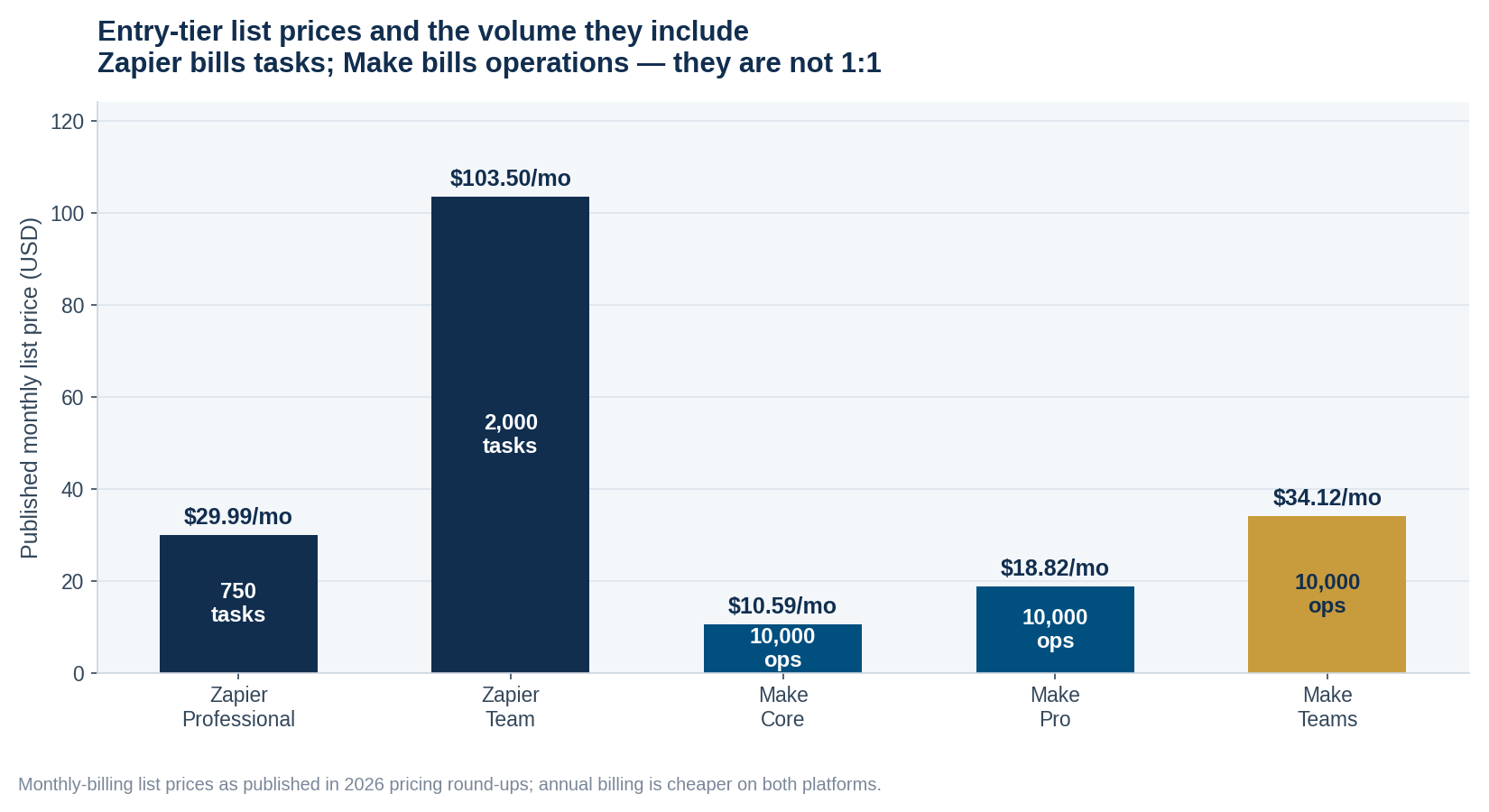
Figure 1: Published entry-tier monthly list prices and the volume each includes. Annual billing is cheaper on both platforms.
Those numbers are hard to compare until you normalise them. Dividing list price by included volume gives an effective cost per 1,000 billable units — a calculation the pricing pages do not do for you, and one that reframes the choice.

Figure 2: Effective cost per 1,000 billable units at entry tiers, derived from published list prices. Tasks and operations are not equivalent units.
- At entry tiers, Zapier’s effective cost per 1,000 billable units works out to roughly $40–$52, while Make’s lands near $1–$3.
- That gap is not a like-for-like ratio: one Zapier task can equate to several Make operations, because Make bills each module run in a scenario. Expect the real-world gap to be meaningfully smaller than the headline — but still large.
- The practical implication is that Zapier’s premium buys you simplicity and catalogue breadth, and you should be deliberate about whether you still need those things at volume.
The three graduation thresholds
You should move off no-code when you cross one of these, not when a developer tells you the platform is “not scalable.”
Threshold 1 — Volume economics
When your monthly platform bill starts to look like a meaningful fraction of what a purpose-built integration would cost to build and run, the maths has flipped. The trigger is not a specific dollar figure — it depends entirely on your build cost and your appetite for maintenance — but the calculation is straightforward: compare twenty-four months of subscription against build cost plus twenty-four months of hosting and maintenance. If the subscription wins, stay. We laid out how to run that comparison properly in our piece on the automation payback period.
Threshold 2 — Logic complexity
This one is more important than volume and gets noticed later. The signals:
- A single scenario has more than a dozen steps and three or more branches.
- Only one person in the company understands it, and they are nervous about touching it.
- You are storing state in a spreadsheet or a lookup table because the platform cannot hold it.
- You have workflows whose only job is to fix what another workflow got wrong.
- A failure mid-scenario leaves your data in an inconsistent state and someone has to reconcile it manually.
- You cannot test a change without running it against production data.
That last pair is the real tell. Once a broken run creates data inconsistency that a human must repair, you have an application, and applications need version control, environments, and tests. Continuing in a visual builder at that point is not cheaper — the cost has just moved from your invoice to your team’s evenings.
Threshold 3 — Compliance and reliability requirements
Some requirements simply cannot be met on a shared platform. If your workflow touches regulated data and your vendor will not sign the appropriate agreement, the decision is made for you. Likewise if you need guaranteed processing order, exactly-once semantics, sub-second latency, or an audit trail that satisfies an external examiner. These are not scale problems — a ten-transaction-per-day workflow can hit them on day one.
The answer is usually hybrid
The framing of “no-code versus custom” is a false binary, and the architecture I recommend most often is neither. Keep the connective tissue in a no-code platform, and move only the hard core into code.
Concretely: let Make handle the triggers, the app connections, and the notifications, and have it call a single custom endpoint you own for the part that involves real business logic — the pricing calculation, the eligibility check, the reconciliation, the thing that must be right. You keep the flexibility and breadth of the platform for the boring 80%, and you get testability, version control, and unlimited logic for the 20% that actually matters. Your billable-unit consumption drops too, because one API call replaces fifteen modules.
This is how most of our AI and automation engagements are actually shaped. We are rarely replacing a client’s Zapier account; we are extracting the two workflows that were causing 90% of the pain and leaving the rest alone.
A decision guide you can apply this week
| Your situation | Start here | Why |
|---|---|---|
| Under 10 simple flows, non-technical team | Zapier | Fastest path, widest catalogue, nobody needs training |
| Branching logic, data transformation, higher volume | Make | Native routers and iterators, far cheaper per unit |
| High volume, simple logic | Make, then optimise the flows | Fix polling and filtering before considering a build |
| Complex logic, moderate volume | Hybrid: platform + custom endpoint | Testability where it matters, flexibility everywhere else |
| Regulated data or strict reliability needs | Custom, or platform with a signed agreement | Requirement is categorical, not economic |
| Nobody has mapped the process yet | Neither — map it first | Automating a broken process makes it break faster |
That last row is the one I would underline. The most expensive automation mistakes I see are not platform choices; they are automating a process that nobody had documented, which encodes the dysfunction and makes it harder to see. We wrote about why that backfires in workflow mapping before automation.
It is also worth being clear about what these tools are and are not. Zapier and Make are deterministic integration platforms — they move and transform data between systems. That is a different category from AI automation, which makes judgement calls on unstructured input, and from robotic process automation, which drives user interfaces. We drew the boundaries in RPA vs. AI automation, and choosing the wrong category is a more expensive error than choosing the wrong vendor within it.
If you do decide to move
- Do not port everything. Audit first — a third of most no-code estates is dead flows nobody turned off.
- Run in parallel. Keep the old flow live and disabled-but-ready for at least two weeks after cutover.
- Instrument before you cut over. If you cannot compare success rates before and after, you will not know whether the migration worked.
- Migrate the noisiest flow first, not the easiest one — it proves the approach and delivers the relief that funds the rest.
- Keep the platform account. Even after a custom build, a no-code account is the cheapest way to handle the next twelve one-off requests.
Frequently Asked Questions
Is Make always cheaper than Zapier?
At published entry-tier list prices, Make’s effective cost per included billable unit is roughly an order of magnitude lower. But the units are not equivalent — Make bills each module run within a scenario as an operation, so a single logical automation can consume several operations where Zapier would count one task. A complex Make scenario can therefore narrow the gap considerably. Count your actual consumption on both platforms with a representative workflow before concluding anything about your own bill.
How many tasks or operations will my workflows actually use?
The dominant factor is usually your trigger design, not your business volume. A scenario polling an API every five minutes burns billable units around the clock whether or not anything happened, while a webhook-triggered version consumes them only on real events. Before you buy a tier, model your top three workflows: events per month times steps per event, plus polling overhead. Most teams overestimate volume and underestimate polling.
When is custom automation genuinely cheaper than a subscription?
When the twenty-four-month total of subscription fees exceeds the build cost plus twenty-four months of hosting and maintenance — and you should include maintenance honestly, because custom code needs attention when the APIs it depends on change. In our experience the crossover usually arrives via logic complexity rather than volume: teams build custom because the workflow became unmaintainable, and the cost saving is a bonus rather than the driver.
Can I use Zapier or Make with sensitive or regulated data?
It depends entirely on the regulation and on what the vendor will contractually commit to. For health data in the U.S., you need a business associate agreement covering the specific service; for other regimes, check data residency and subprocessor terms. If the vendor will not sign what your compliance obligation requires, no amount of configuration fixes it and you need a different architecture.
What is the biggest mistake people make with no-code automation?
Automating a process nobody has documented. The platform will faithfully encode whatever dysfunction exists, execute it faster, and make it harder to see because it now happens invisibly. Map the process on paper, decide which steps should exist at all, and only then automate what survives. The second biggest mistake is having no monitoring — silent failures in an automation are worse than a manual process, because at least a human notices when they stop.
Should I build my own automation platform?
Almost certainly not. Building individual custom automations for specific high-value workflows is often correct. Building a general-purpose platform with a visual builder, connector catalogue, retry semantics, and observability means competing with well-funded products at something that is not your business. Build the workflow, buy the platform.
Do AI features change this calculation?
They shift the boundary. Both platforms now offer AI steps that handle classification, extraction, and summarisation inside a no-code flow, which pushes the graduation point later for workflows involving unstructured input like emails or documents. What has not changed is the reliability question: an AI step introduces variance, so the more you rely on one inside a critical automation, the more you need the error handling, review queues, and audit trail that push you toward custom infrastructure.
We audit your existing automations, find the two flows causing most of the pain, and tell you honestly whether they need a custom build or just a better trigger.