
How to Automate Invoice and Order Processing Without Custom Code
Last updated: July 20, 2026 · By Joseph Olivas, Founder, MEAN Consultors · 8 min read
Manual invoice and order entry is one of the most common — and most quietly expensive — bottlenecks I see in growing businesses. Someone opens a PDF, retypes the line items into the accounting system, chases an approval, and files it away. Multiply that by hundreds of documents a month and you have a full-time job hiding in plain sight. The good news: you no longer need a developer or a six-figure ERP module to fix it. Modern no-code tools handle the whole flow. Here is exactly how to set it up.
Why manual processing costs so much
The case for automating starts with a number most owners never calculate: the fully loaded cost of processing a single invoice by hand. According to the Institute of Finance & Management (IOFM), manual processing runs about $6.30 per invoice, versus roughly $1.45 when automated — and other benchmarks put the manual figure as high as $10 to $22 once error correction and chasing approvals are counted. Speed suffers too: APQC’s 2025 data shows best-in-class accounts-payable teams clear an invoice in 3.1 days, while everyone else averages 17.4 days.
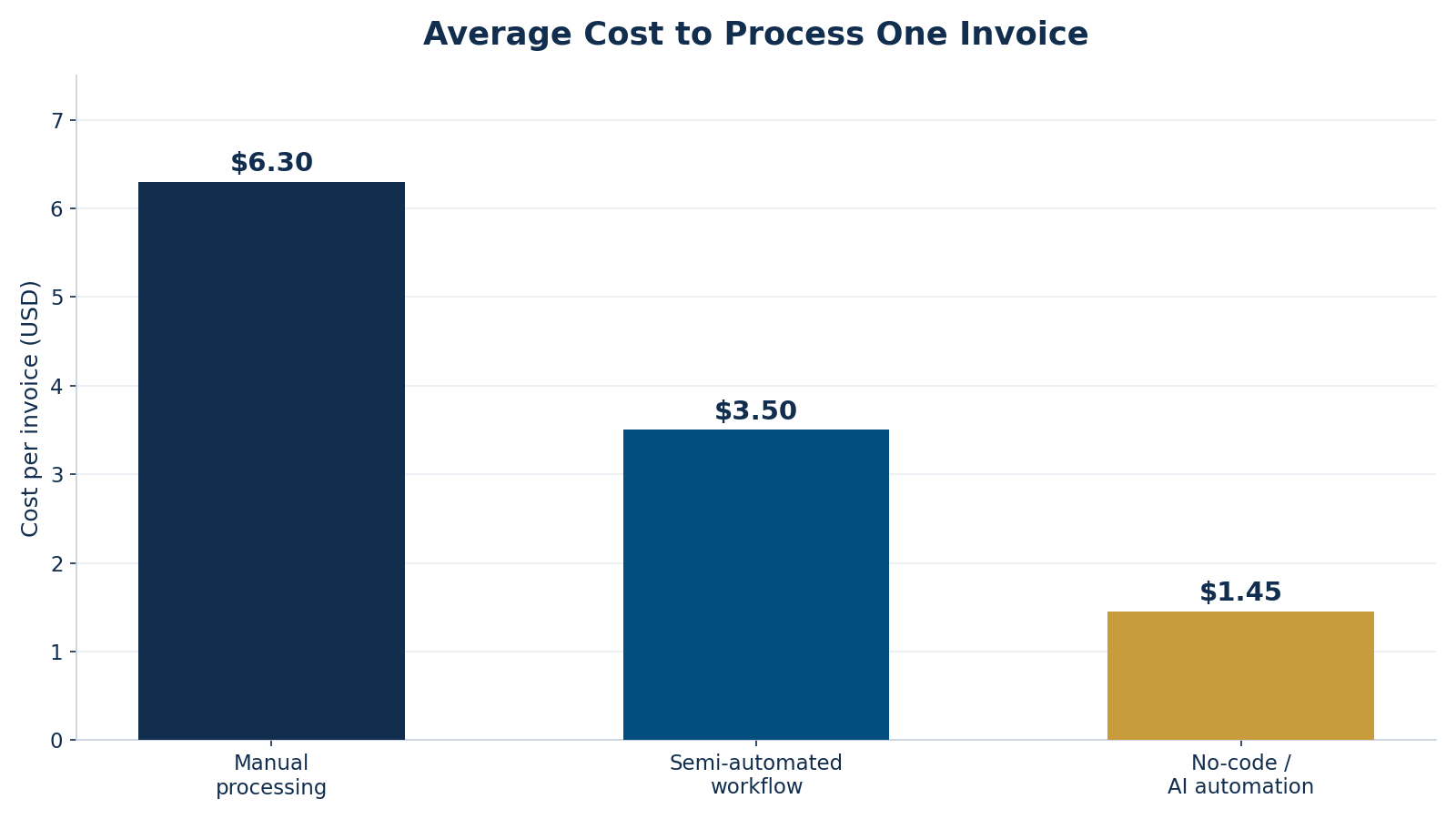
Figure 1: Cost per invoice drops sharply as you move from manual entry to no-code AI automation (IOFM benchmark).
That gap is exactly the kind of repetitive, rules-based work that automation was made for — and it is worth knowing which of your tasks qualify. Our overview of the most automatable business tasks puts invoice and order processing near the top of the list for good reason.
- Automating invoice processing typically eliminates 60–80% of manual cost per document.
- Best-in-class teams process invoices in about 3 days versus 17+ days for manual workflows.
- No-code platforms now handle capture, extraction, validation, and sync — no developer required.
What “no-code” actually means here
You are not building software; you are configuring it. No-code and low-code adoption has moved from experiment to mainstream — Gartner projects that 70% of new enterprise applications will use no-code or low-code technology by 2025, up from under 25% in 2020, and that these tools can cut development time by 50–90%. For invoice and order automation you are assembling three off-the-shelf capabilities: a document-capture layer with AI-powered OCR, a workflow builder that applies your business rules, and a connector to your accounting or AI automation and ERP tools. None of that requires code — it requires mapping your process correctly.
How to build the automation, step by step
The flow below is the pattern I set up most often. Each stage is handled by no-code tooling, and only genuine exceptions ever reach a human.
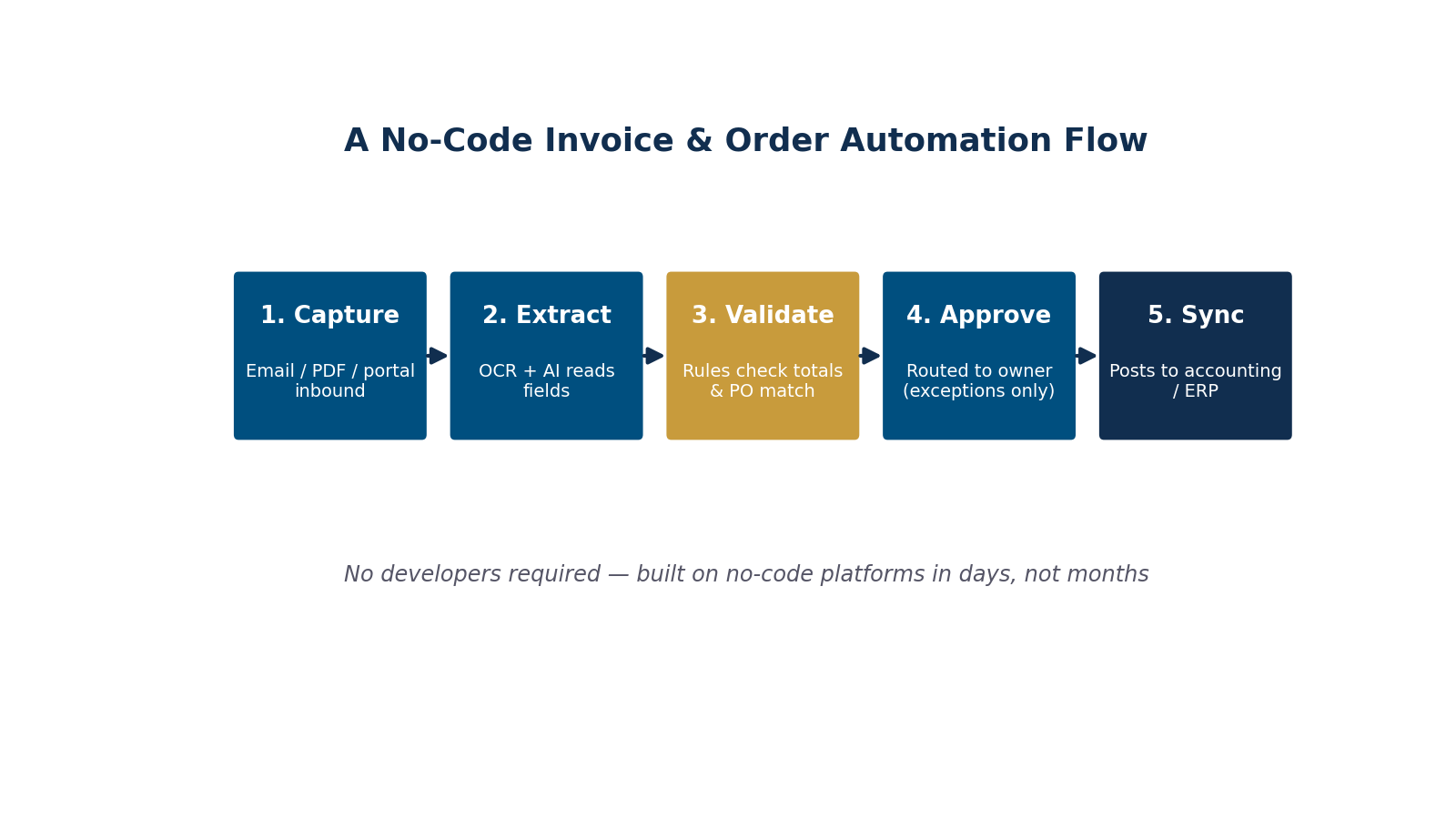
Figure 2: A no-code invoice and order automation flow — five stages, no developers, live in days.
- Capture: Route inbound invoices and orders from email, PDF, or supplier portals into one intake queue automatically.
- Extract: Let AI-powered OCR read the vendor, dates, line items, and totals — no manual typing.
- Validate: Apply rules that match each document to its purchase order and flag totals that fall outside tolerance.
- Approve: Auto-approve clean documents; route only exceptions to the right person with one-click sign-off.
- Sync: Post the finished record straight into your accounting system or ERP, with a full audit trail.
The single most important step is validation. An automation that captures data perfectly but skips the rules just moves errors faster. Before you turn anything on, map your current process end to end so you know every exception the system must handle — the same discipline we cover in workflow mapping before automation.
What it saves: a real-world model
To make the payoff concrete, here is what the IOFM cost figures translate to at different volumes, using $6.30 manual versus $1.45 automated — a $4.85 saving per document:
| Invoices / month | Manual cost / year | Automated cost / year | Annual savings |
|---|---|---|---|
| 200 | $15,120 | $3,480 | $11,640 |
| 500 | $37,800 | $8,700 | $29,100 |
| 1,000 | $75,600 | $17,400 | $58,200 |
Frequently Asked Questions
Do I really not need a developer to automate invoice processing?
For the vast majority of small and mid-size businesses, no. No-code platforms with built-in AI capture and pre-built accounting connectors handle the entire flow through configuration. You only need custom development if you have highly unusual document formats or a legacy system with no available connector.
How accurate is AI-powered invoice data extraction?
Modern AI-OCR routinely extracts standard fields with high accuracy, and accuracy improves as the system learns your recurring vendors. The key is designing the validation layer so any low-confidence extraction is automatically flagged for a quick human check rather than posted blindly.
How long does it take to set up?
A focused no-code invoice or order automation can go live in days to a few weeks, depending on how many document types and approval paths you have. Most of the time is spent mapping your process and rules — not building the automation itself.
Will it work with my existing accounting software?
Almost certainly. Leading no-code automation platforms ship with connectors for popular accounting tools and ERPs, so the cleaned data syncs directly into your books. If a native connector does not exist, a general-purpose integration layer can usually bridge the gap without code.
What is the difference between automating invoices and automating orders?
The mechanics are nearly identical — capture, extract, validate, approve, sync — but the rules differ. Order processing validates against inventory, pricing, and customer terms, while invoice processing validates against purchase orders and payment terms. A single no-code platform can run both flows side by side.
MEAN Consultors builds no-code invoice and order automation that plugs into your existing accounting tools — live in days, not months.