
How to Plan a Website Rebuild While Keeping the Business Running
Last updated: August 28, 2026 · By Joseph Olivas, Founder, MEAN Consultors · 9 min read
Almost every rebuild conversation I have starts the same way: the site looks dated, it is slow, and nobody on the team wants to touch it. Then comes the real question — how do we replace it without going dark on the one channel that brings in leads? That worry is well placed. I have inherited more than one project where the previous rebuild launched clean visually and quietly erased a third of the organic traffic, because nobody owned the URLs.
The good news is that this is a solved problem. A rebuild only threatens the business when it is planned as a single flip of a switch. Planned as a parallel track — old site earning, new site being assembled next to it, with a rehearsed cutover — it is one of the lower-risk projects a business can run.
Build the new site beside the old one, never on top of it
The single decision that keeps a business running through a rebuild is where the work happens. The live site stays live, indexed, and untouched. The new site is assembled on a staging environment that search engines cannot reach and that your team can break freely. Nothing moves to production until the whole thing passes QA and the redirect map is proven.
That sounds obvious, and yet the most common failure I see is a rebuild done in place on the production site over several weeks — half-finished pages indexed, navigation in flux, a robots.txt that gets toggled and then forgotten. Our web development team keeps the two environments strictly separate for exactly this reason, and the cost of that discipline is close to zero.
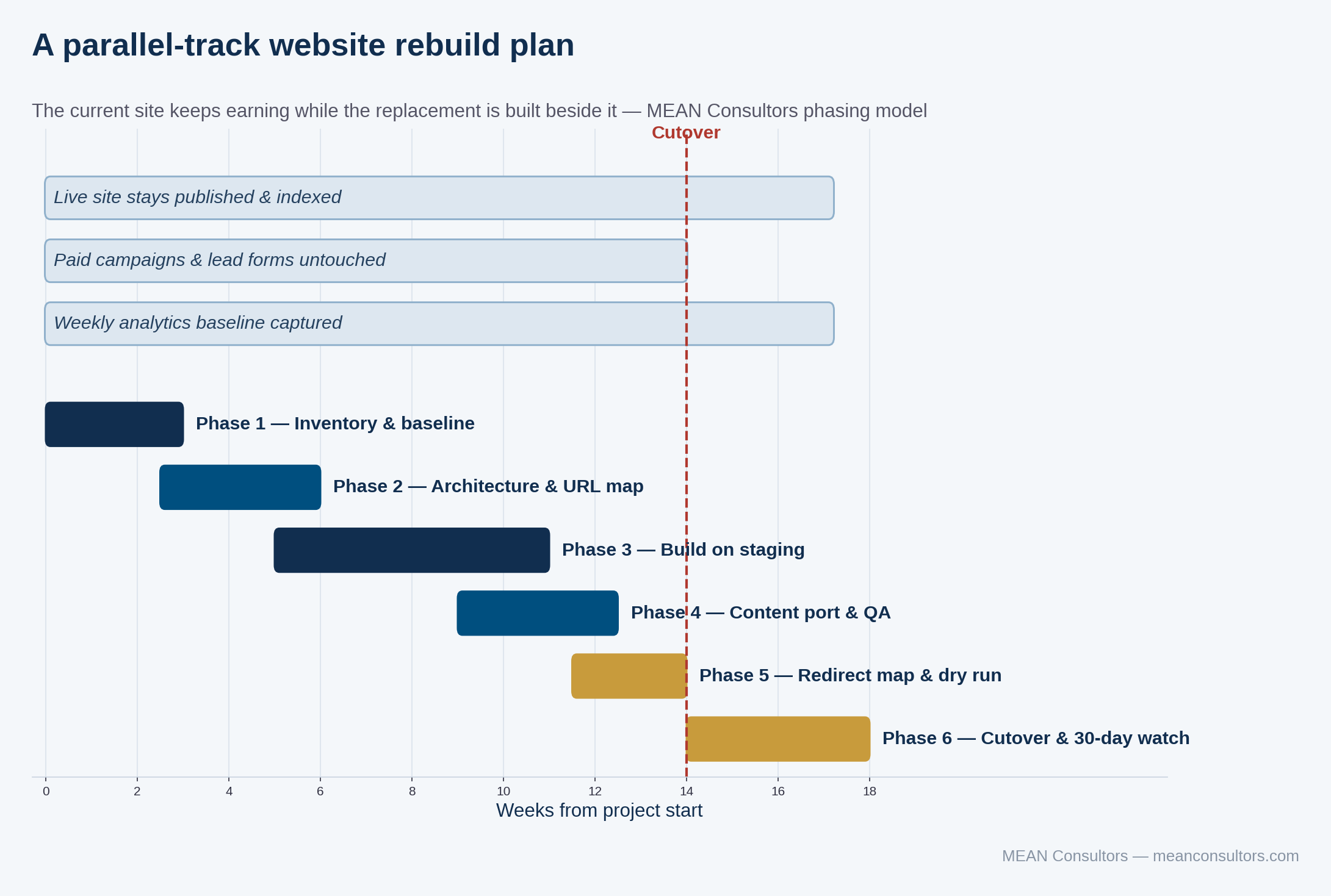
Figure 1: A parallel-track rebuild plan — the live site keeps earning through every phase up to cutover.
Notice what runs across the top of that timeline. The live site stays published. Paid campaigns keep pointing at pages that still exist. Analytics keeps collecting the baseline you will need in order to judge the launch. None of those things pause because a rebuild is underway.
- Staging is not a nicety — it is what makes a rebuild reversible. If there is no environment where you can break things, there is no safe rebuild.
- The current site should be generating leads on the day before launch. If traffic is already collapsing mid-project, something in the process is wrong.
- Cutover is a rehearsed event with a rollback plan, not a Friday-afternoon deployment.
Start with an inventory, not a design
The first two weeks of a rebuild should produce a spreadsheet, not a mockup. You need three lists before anyone opens a design tool:
- Every URL on the current site, pulled from a crawl plus your sitemap plus Search Console, deduplicated.
- Every one of those URLs annotated with its last 12 months of organic sessions, entrances, conversions, and inbound links.
- Every integration the site touches — forms, CRM, booking, payment, chat, email platform, tag manager, analytics, review widgets, tracking pixels.
That third list is the one teams forget, and it is where rebuilds actually break. A form that posts to a webhook nobody documented does not announce itself; it just silently stops delivering leads the week after launch. Walk the integrations list with whoever owns each downstream system before you scope anything.
The first two lists tell you which pages have earned the right to keep their URL. A page with three years of accumulated links and steady conversions is an asset. Moving it costs something. Moving it for no reason costs something for nothing.
Sequence the work by revenue risk, not by visual impact
Rebuild backlogs tend to get ordered by what is most visible. That is exactly backwards. The items that can cost you money are rarely the ones anyone is looking at.
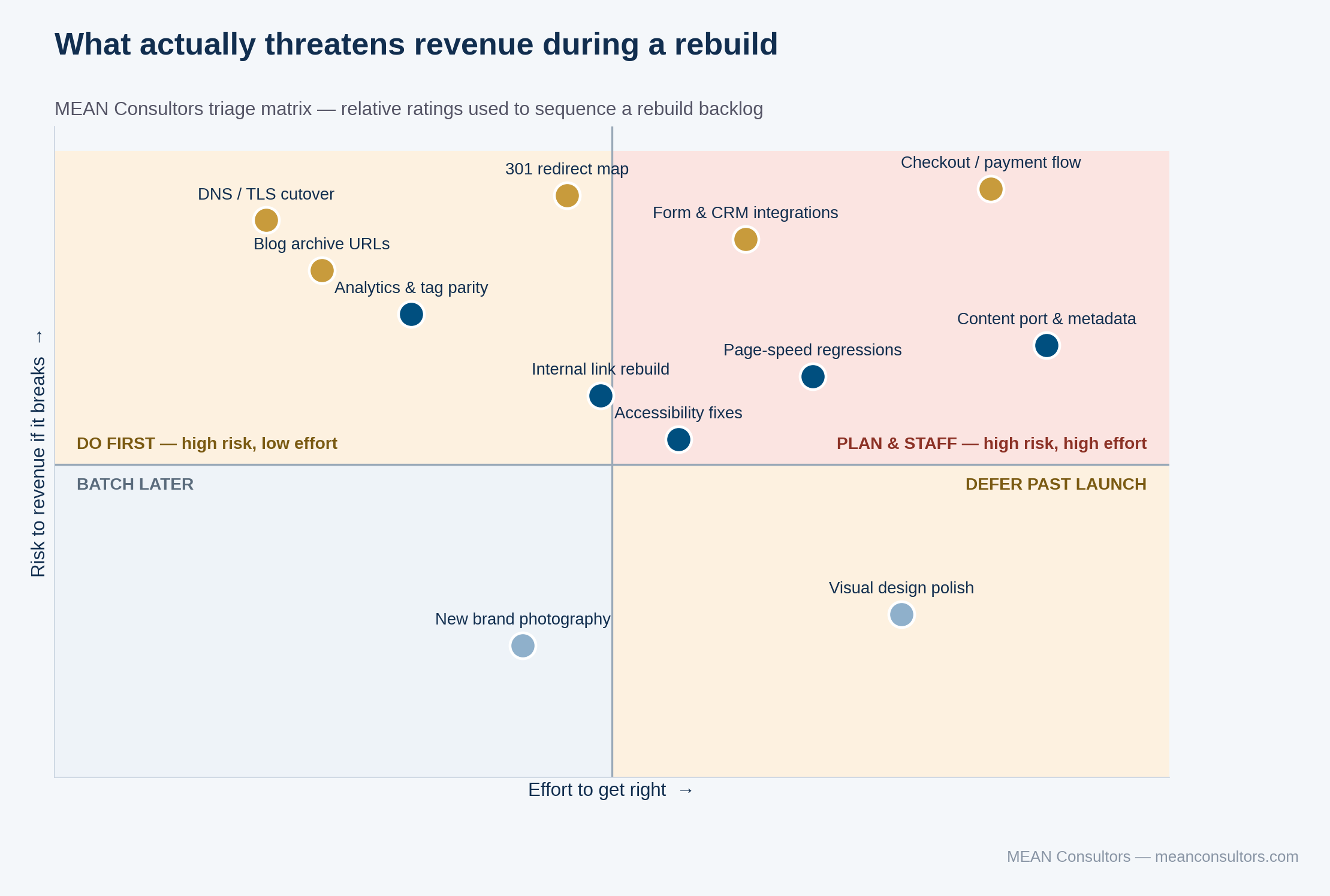
Figure 2: Sequencing a rebuild backlog by revenue risk rather than by how visible each item is.
Redirect mapping, DNS and TLS cutover, and blog archive URLs all sit in the upper-left quadrant: high risk, low effort. They are cheap to get right and expensive to get wrong, which makes them the first things to lock down. New brand photography sits in the lower left. It matters, but not on launch week.
| Workstream | Owns it | Launch blocker? | What “done” looks like |
|---|---|---|---|
| URL inventory & redirect map | SEO / dev lead | Yes | Every old URL resolves to a 200 or an intentional 301; zero unmapped 404s in a full crawl |
| Analytics & conversion tracking | Marketing | Yes | Every goal fires on staging and matches the live site’s definitions |
| Forms & CRM integrations | Marketing ops | Yes | Test submission lands in the right inbox, CRM record, and autoresponder |
| Content port & on-page metadata | Content owner | Yes | Titles, H1s, and body content preserved or deliberately improved — never silently trimmed |
| Page-speed budget | Dev lead | Yes | Core Web Vitals on staging meet or beat the current site on the top 20 pages |
| Accessibility remediation | Dev lead | Partly | Keyboard navigation and contrast pass on templates; deeper fixes may follow launch |
| Photography & illustration | Brand | No | Placeholders acceptable at launch if they are on-brand |
Keep the URLs you have earned
Google’s guidance on site moves is unambiguous about the mechanics: map old URLs to new ones, use server-side permanent redirects, update your internal links to point at the new URLs directly rather than through redirect chains, and keep those redirects in place for at least a year. Google also notes that large sites can split a move into smaller steps and move one section at a time to observe the effect before committing the rest.
What that guidance does not say — because it is a business decision, not a technical one — is that the best redirect map is a short one. Every URL change is a small tax. Change the ones where the current structure is genuinely broken, and leave the rest alone. I have watched teams renovate a perfectly good URL structure purely because the new CMS defaulted to a different pattern. That is a self-inflicted wound.
If you are also consolidating pages, be deliberate about it. Three thin service pages merged into one strong page is usually a win, provided the merged page actually contains the substance of all three and all three old URLs redirect to it. Merging by deletion is not consolidation. For the mechanics of the map itself, we walk through the details in our guide to 301 redirects during a website rebuild, and the broader pre-launch sequence lives in our website migration checklist.
Decide what content moves before you decide what it looks like
Content is where rebuild schedules go to die. The design gets approved in week six and then the project sits for a month because nobody wants to own the decision about the forty blog posts from 2019.
Make the call early with a simple triage. Every page gets one of four labels: port as-is, rewrite, merge into another page, or retire and redirect. Assign a name and a date to every page in the rewrite and merge buckets during discovery, not after the design is done. Pages with real traffic and real links almost never belong in the retire bucket — if a page still earns visits, it earns a rewrite instead.
Google’s guidance on creating helpful, people-first content is worth rereading during this phase. A rebuild is one of the rare moments when you can fix depth problems across an entire site at once. It is a waste to spend that opportunity moving thin pages from one template to another.
Rehearse the cutover
Two weeks out, run the launch as a dress rehearsal against staging. Crawl the live site, feed every URL through the redirect map, and confirm each one lands on a live page with a 200 status. Fire every form. Check every tracking tag. Confirm the staging environment’s noindex and robots directives are removed from the production build — that one omission has cost more traffic than any other single mistake I have seen.
- Full crawl of the old site run through the redirect map, with a written record of every unmapped URL and its resolution.
- Analytics and conversion goals validated on staging against the live site’s definitions.
- Every form submitted end to end, including the CRM record and the autoresponder.
- Search Console property prepared for the new structure, sitemap regenerated and ready to submit.
- Rollback documented: who runs it, what the DNS and database steps are, and the decision threshold that triggers it.
- A content freeze in effect so the thing you tested is the thing you launch.
Then launch mid-week, mid-morning, with the people who can fix things awake and available. Submit the new sitemap. Watch server logs and Search Console coverage daily for two weeks and weekly for the following month.
The first 30 days after launch
Expect a modest ranking wobble as Google recrawls. What you are watching for is not a dip, it is a pattern. A gentle decline that recovers over two to four weeks is the system working. A sharp cliff in a specific section is a mapping bug, and you can usually find it in an afternoon by comparing pre-launch and post-launch entrance pages.
Keep a short daily list: new 404s in Search Console, crawl errors in the server log, form submissions compared to the prior month, and Core Web Vitals on the top 20 pages. If something is wrong, all four of those will tell you before your monthly report does. Speed in particular deserves attention here, because a rebuild that ships heavier than what it replaced undoes much of its own value — our notes on page speed and conversion rate cover why that matters commercially.
Frequently Asked Questions
How long does a website rebuild take for a small business?
Most small and mid-size business rebuilds run 12 to 20 weeks from kickoff to cutover. The build itself is rarely the long pole — content decisions, stakeholder reviews, and integration testing are. If you compress the schedule, compress the design exploration, not the redirect mapping or the QA window.
Will my Google rankings drop after a website rebuild?
A short dip of a few weeks is common while Google recrawls and reprocesses the new URLs. A lasting drop is not normal and almost always traces to a specific mistake: unmapped URLs returning 404, missing or altered title tags and headings, blocked staging robots.txt carried into production, or a large chunk of body content that was quietly cut. Google’s own site move documentation says to keep the old URLs redirecting for at least a year.
Should I change my URLs during a rebuild?
Only where the old structure is actively hurting you. Every URL you change is a redirect you have to maintain and a small amount of authority you risk losing. If a URL is short, readable, and ranking, keep it. Change URLs when the taxonomy is genuinely wrong — for example, when services are buried three levels deep under a generic /pages/ folder.
Can I rebuild my website in phases instead of all at once?
Yes, and for larger sites it is usually the safer choice. Move one well-defined section first — a services area or a blog archive — confirm that traffic and conversions hold for two to three weeks, then move the rest. Google explicitly supports splitting a move into smaller steps for large sites.
What should I do the week before launch?
Freeze content changes, run the full redirect map against a crawl of the live site, verify analytics and conversion tracking fire on the staging build, confirm forms deliver to the right inboxes and CRM, check that staging noindex directives are removed, and rehearse the rollback. Nothing on that list is optional.
How do I know the rebuild actually worked?
Decide the answer before you launch. Capture a 90-day baseline for organic sessions, entrance pages, conversion rate by page, and average page load time. Compare the same 90-day window after launch. Without a baseline you will spend the next quarter arguing about whether things feel better.
MEAN Consultors plans and executes website rebuilds as a parallel track — your current site keeps earning until the day the new one is proven.