
Automating Order Management for Distribution and DME Businesses
Last updated: August 15, 2026 · By Joseph Olivas, Founder, MEAN Consultors · 10 min read
Distribution and DME businesses share a specific operational shape that makes them unusually good candidates for automation, and unusually bad candidates for generic automation tools. High order volume, low margin per order, orders arriving in half a dozen inconsistent formats, and — in DME’s case — a documentation burden where getting the paperwork wrong means you do not get paid at all.
I have spent a lot of time inside these workflows, and the thing that strikes me every time is how much skilled human attention is consumed by transcription. Someone opens a PDF purchase order, reads a line item, types it into an ERP, reads the next line, types that. It is work that a competent adult finds tedious, that produces errors under volume, and that scales only by hiring. This piece covers what to automate, in what order, and where these projects tend to fail.
The real cost of a manually processed order
Most distributors do not know what an order costs them to process, because the cost is distributed across salaries rather than showing up as a line item. When you do calculate it, the number is usually higher than expected — and the variance by channel is dramatic.
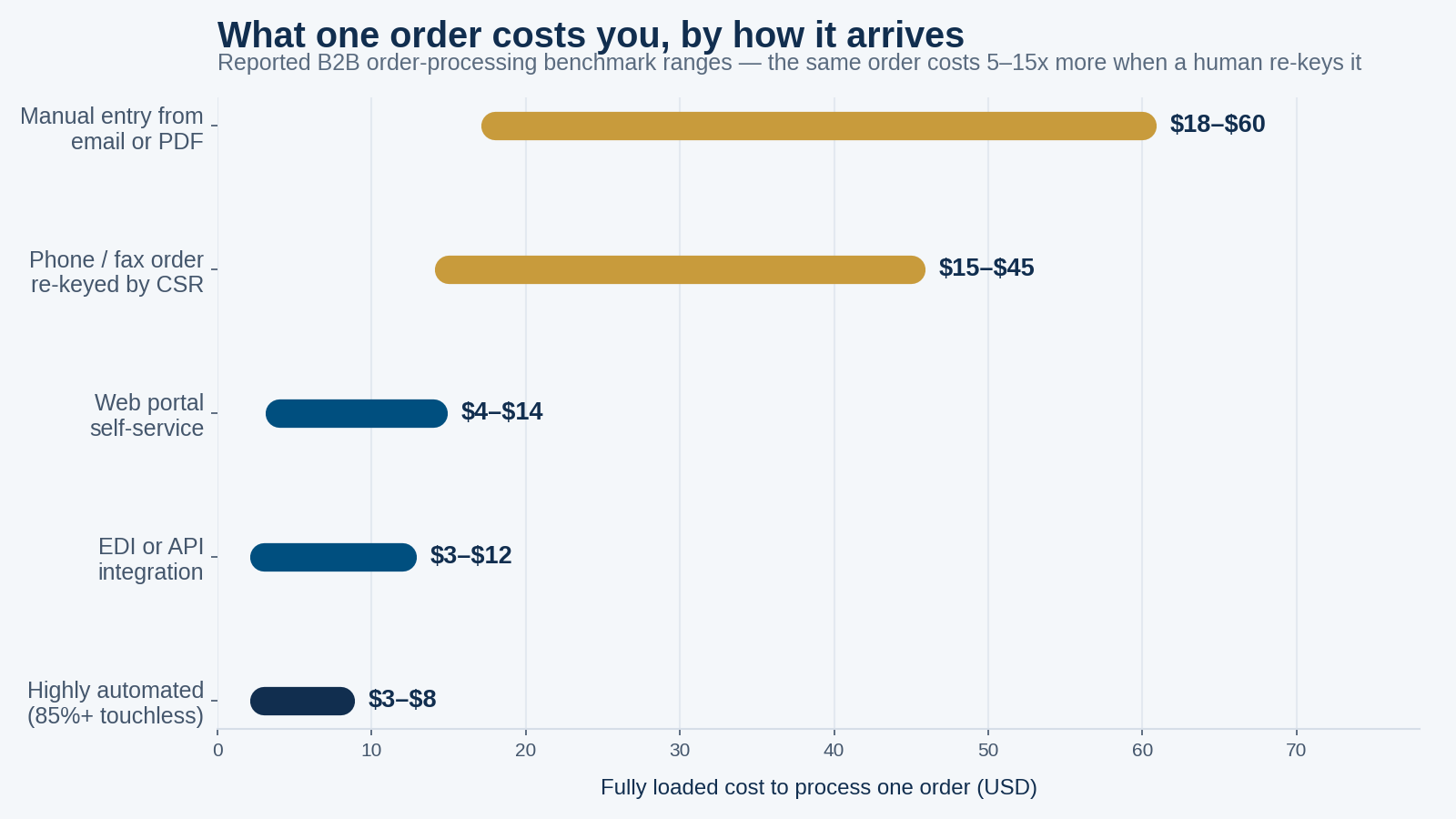
Figure 1: Reported benchmark ranges for fully loaded cost per B2B order by intake channel. The spread within each channel reflects order complexity and organisation size.
Published B2B order-processing benchmarks put manually keyed email and PDF orders in a range of roughly $18 to $60 fully loaded, against $3 to $12 for orders arriving through EDI or an API integration. Organisations processing a high proportion of orders without human review land at the bottom of that range. The same order, containing the same information, costs several times more purely because of how it arrived.
Error rates follow the same pattern. Manual data entry benchmarks generally sit in the range of one to three percent per field. That sounds tolerable until you count fields: a single order line involves a SKU, a quantity, a price, a ship-to address, a payment term. Compound the per-field rate across a multi-line order and the probability that a given order contains at least one error becomes uncomfortably high.
- A manually keyed order costs roughly 5–15x what the same order costs arriving via EDI or API.
- Per-field manual entry error rates compound across multi-line orders into meaningful per-order error probability.
- The expensive consequence of an order error is rarely the correction itself — it is the reship, the credit memo, or the denied claim.
- In DME specifically, a documentation gap is not an inconvenience; it is a claim that does not get paid.
And the downstream cost of an error dwarfs the cost of the entry. A wrong SKU becomes a reship, a return, a restocking cost and a customer service conversation. A wrong price becomes a credit memo and an awkward call. In DME, a missing or non-compliant document becomes a denied claim, an appeal, and cash that arrives months late or never. You are not just paying for typing; you are paying for the tail of everything typing gets wrong.
Where automation actually fits in the order lifecycle
Order management is not one process, and the return on automating each stage differs enormously. Mapping the lifecycle before choosing tools is the single highest-leverage hour you can spend.
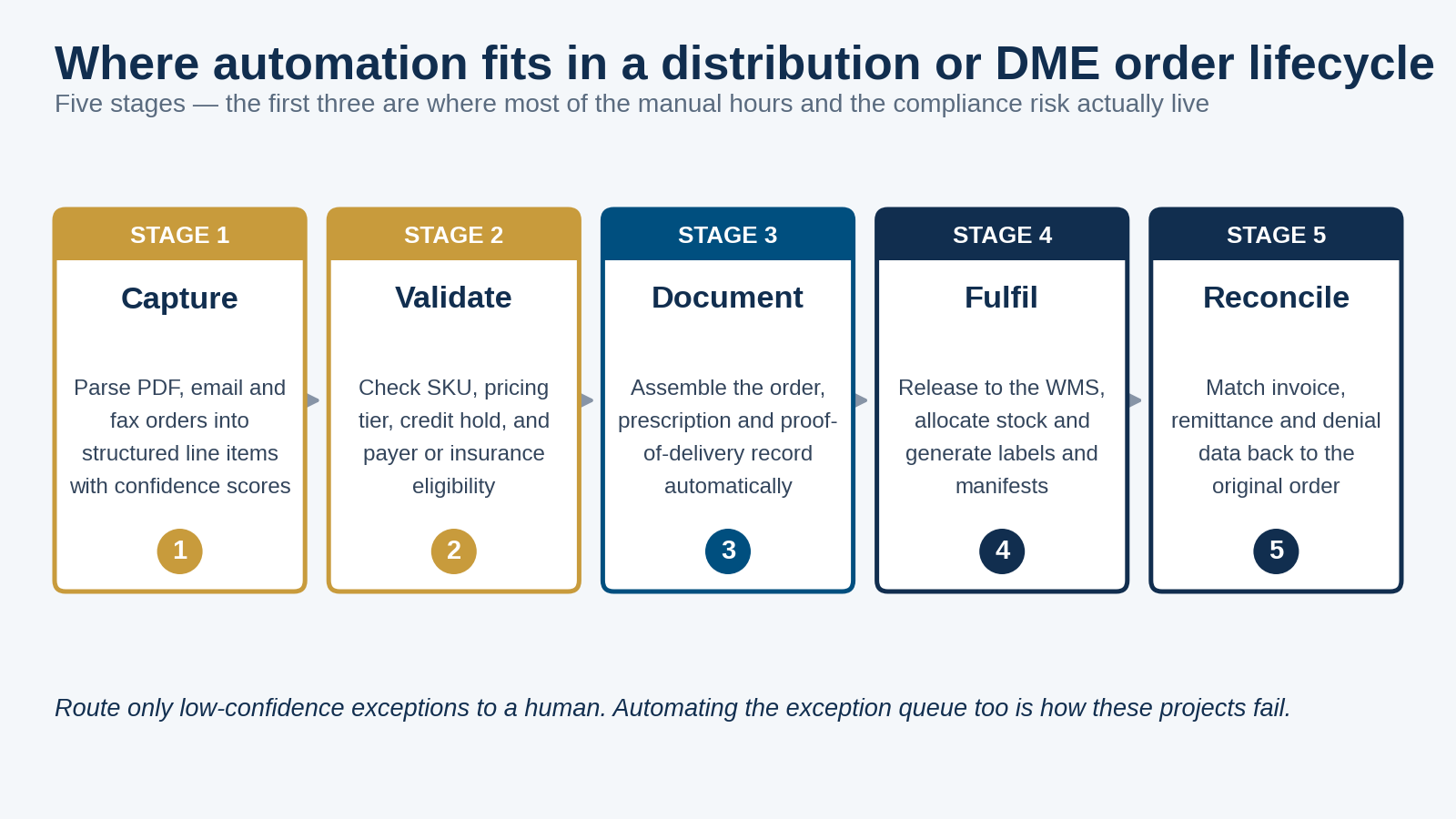
Figure 2: The five stages of a distribution or DME order lifecycle. The first three concentrate most of the manual effort and nearly all of the compliance risk.
Stage 1 — Capture
Orders arrive as email body text, PDF attachments, scanned faxes, spreadsheet uploads and phone calls. Modern document extraction handles this far better than the OCR tools of a decade ago, because language models can interpret layout and context rather than matching fixed templates. The critical design requirement is a confidence score per extracted field, so the system knows what it is unsure about. Extraction without confidence scoring just moves errors downstream where they are harder to catch.
Stage 2 — Validate
This is where automation earns its keep and where most implementations underinvest. Before an order enters fulfilment, check it against the rules a good CSR would apply: does the SKU exist and is it still active, does the price match the customer’s contracted tier, is the account within its credit limit, is the ship-to address deliverable, and — for DME — does the payer cover this item for this patient under this diagnosis. Catching a problem here costs minutes. Catching it after shipment costs a return.
Stage 3 — Document
For distribution this is packing lists and commercial paperwork. For DME it is the compliance core of the business: the standard written order with all required elements, the supporting medical documentation, and proof of delivery. Medicare’s documentation requirements for DMEPOS suppliers are specific and audited, and records must be retained for years. Assembling this as a by-product of the workflow — rather than as a scramble when an audit letter arrives — is one of the most defensible reasons to automate in this industry.
Stage 4 — Fulfil
Release to the warehouse system, allocate stock, generate labels and manifests, notify the customer. Most distributors already have a WMS doing much of this; the automation opportunity is usually in the handoff rather than the fulfilment itself.
Stage 5 — Reconcile
Match invoices, remittances and — in DME — denials back to the original order. Denial data is the most underused feedback signal in the business. Systematically categorising why claims are denied tells you exactly which validation rule to add at stage 2, which turns reconciliation from a back-office chore into a continuous improvement loop.
What makes DME different
Distribution automation is largely a cost and accuracy problem. DME adds a regulatory dimension that changes the priorities, and any automation partner who does not understand this will build you the wrong system.
| Requirement | Why it complicates automation | What good automation does |
|---|---|---|
| Standard written order | Must contain specific required elements before delivery; incomplete orders are not billable | Validates required elements at intake and blocks incomplete orders from progressing |
| Medical necessity documentation | Supporting records live with the prescriber, not with you | Automates the chase — tracks what is outstanding and follows up on a schedule |
| Proof of delivery | Must be retained and produced on audit | Captures POD digitally at delivery and files it against the order automatically |
| Payer-specific rules | Coverage criteria and prior authorisation vary by payer and change over time | Maintains rules as configuration, not code, so they can be updated without a release |
| Recurring rental billing | Capped rental periods and continued-use requirements must be tracked per item | Schedules billing and continued-use checks automatically against each rental clock |
| Records retention | Documentation must be retrievable years after the fact | Stores an immutable, indexed record linked to every order |
The pattern here is that DME automation is as much about evidence as it is about efficiency. A system that processes orders quickly but cannot produce the supporting documentation on request has automated your way into a larger problem. Build the audit trail in from the start.
How to sequence the work
The failure mode I see most often is trying to automate the whole lifecycle in one project. It takes too long, the requirements shift underneath you, and nothing delivers value until everything does. Sequence it instead.
- Measure first. Count orders by intake channel, time a sample of manual entries, and pull your error and denial rates. Without a baseline you cannot tell whether the project worked.
- Start with capture on your highest-volume messy channel. Usually email and PDF. It is where the hours are, and it is self-contained enough to ship in weeks.
- Add validation rules incrementally, driven by your actual error data. Do not try to encode every rule up front. Add the rule that prevents the error you are actually making.
- Design the exception queue deliberately. This is the part teams treat as an afterthought and then discover is where all the remaining work lives.
- Automate documentation assembly next, particularly in DME where it directly protects revenue.
- Close the loop with reconciliation. Feed denial and error categories back into validation rules.
- Push customers toward structured channels in parallel. Every customer you move to a portal or EDI is an order that never needs extracting in the first place.
That last point deserves emphasis. The cheapest order to process is the one that arrives already structured. Automation of unstructured intake is necessary because customers will not all change how they order — but a self-service portal for your top accounts often delivers a better return than a more sophisticated extraction model. We cover the underlying integration work in our CRM, ERP and e-commerce integration blueprint.
What to measure
Automation projects go wrong quietly when nobody agreed in advance what success looks like. These are the metrics worth tracking, and I would insist on a baseline for each before any build starts.
| Metric | What it tells you | Why it matters |
|---|---|---|
| Touchless order rate | Share of orders processed with zero human intervention | The single clearest measure of automation effectiveness |
| Cost per order | Fully loaded processing cost by intake channel | Translates the project into financial terms leadership recognises |
| Order-to-fulfilment cycle time | Elapsed time from receipt to warehouse release | Directly affects customer experience and working capital |
| Order accuracy rate | Orders shipped without an error requiring correction | Drives returns, credits and customer retention |
| Exception queue volume and ageing | How many orders need a human, and how long they wait | Rising volume or ageing means your rules need work |
| Denial rate by category (DME) | Why claims are rejected, grouped by cause | Each category maps to a validation rule you could add |
If you want to build the financial case before committing, the mechanics are the same as any process automation investment — we walk through the calculation in how to calculate ROI on a business automation project, and the timeline question in automation payback period.
Where these projects go wrong
Four failure modes account for most of the disappointing outcomes I have seen.
Automating a broken process. If your order workflow has accumulated exceptions and workarounds over fifteen years, automating it faithfully just makes the mess run faster. Map and simplify first — often the process redesign delivers more value than the software.
Ignoring the exception queue. A system that handles 80% of orders automatically and dumps the rest into an unstructured inbox has not saved as much as the headline suggests. The exceptions are the hard ones, and they need a properly designed interface with the extracted data pre-filled and uncertainty flagged.
Treating accuracy as binary. Extraction systems have confidence levels, and your workflow should use them. A field the model is 99% sure about and a field it is 60% sure about should not be treated identically. Set thresholds, tune them with real data, and review them periodically.
Skipping change management. The people who currently process orders manually have deep knowledge of the exceptions, and they will be the ones handling the exception queue afterwards. Involve them in the design. Teams that treat this as an IT project delivered to operations get resistance and workarounds; teams that build it with operations get better rules and faster adoption. Our broader take on this is in why workflow mapping before automation matters, and the tooling question in automating invoice and order processing without custom code.
Frequently Asked Questions
What does order management automation actually mean?
It means moving orders through capture, validation, documentation, fulfilment and reconciliation with software rather than manual keying. In practice the core is extracting structured line-item data from emails, PDFs and faxes, checking that data against pricing, credit, inventory and eligibility rules automatically, and routing only genuinely ambiguous orders to a person for review.
How much does manual order entry cost per order?
Published B2B benchmarks put fully loaded manual processing of email and PDF orders in the region of $18 to $60 per order, compared with roughly $3 to $12 for EDI or API orders. Your own figure depends on order complexity, labour costs and how many touches each order requires — which is why measuring your baseline before automating matters.
What should a DME business automate first?
Order intake and documentation validation, in that order. Intake is where the manual hours concentrate, and documentation validation is where revenue is actually lost — an order that reaches delivery without a complete standard written order and supporting medical documentation is a claim at risk of denial. Fixing that at intake is far cheaper than appealing later.
Can AI reliably read faxed and scanned orders?
Modern document extraction handles poor-quality scans and faxes considerably better than older template-based OCR, because it interprets layout and context rather than matching fixed positions. Reliability is not absolute, though, which is why confidence scoring matters: the system should flag fields it is uncertain about for human review rather than passing a low-confidence guess downstream.
Do we need to replace our ERP to automate order management?
Usually no. Most order automation sits in front of the ERP, capturing and validating orders before writing clean structured data into the system you already run. Replacing an ERP is a far larger, riskier project. If your ERP genuinely cannot accept programmatic order creation, that is worth evaluating — but treat it as a separate decision.
How long does an order management automation project take?
It depends on scope, but the sequencing matters more than the total. A focused first phase automating capture on your highest-volume channel is typically a matter of weeks rather than quarters, and it delivers measurable value before the rest is built. Attempting the entire lifecycle in one release is the most common cause of projects that overrun and underdeliver.
What is a realistic touchless order rate?
It varies with how consistent your order formats and customer base are. What matters more than hitting a specific number is measuring the rate from day one and improving it deliberately — each percentage point comes from a specific validation rule or extraction improvement you can identify from your exception queue.
Will automation mean laying off our order entry team?
In the distribution businesses I have worked with, it more often redirects that team than eliminates it. The people who processed orders manually become the ones handling exceptions, managing customer relationships and improving the rules — work that uses their product knowledge rather than their typing speed. It also removes the need to hire proportionally as volume grows, which is usually where the real economics sit.
We build order capture, validation and documentation automation for distribution and DME operations — starting with the channel costing you the most.