
SSL, HTTPS, and Trust Signals: Why Security Is Also an SEO Issue
Last updated: August 16, 2026 · By Joseph Olivas, Founder, MEAN Consultors · 8 min read
I get asked some version of this question every month: “We already have the padlock — is there anything else to do?” Almost always, yes. In the audits I run at MEAN Consultors, a valid certificate is table stakes; what actually costs businesses rankings and revenue is everything around the certificate. Half-migrated sites, canonical tags still pointing at http://, a checkout page loading one insecure script, a redirect chain three hops deep. None of those trip the padlock warning in an obvious way, and all of them quietly degrade how search engines and customers treat the site.
This is a security topic that lives inside an SEO conversation, which is exactly why it falls between the cracks. Your developer thinks the SEO team owns it. Your SEO thinks the developer handled it at launch. Below is how I think about it, what I check, and the order I fix things in.
Is HTTPS actually a ranking factor?
Yes — and it has been since Google announced it. In its HTTPS as a ranking signal announcement, Google was unusually specific: the signal was described as lightweight, affecting fewer than 1% of global queries, and carrying less weight than high-quality content. Nothing since has upgraded it to a heavyweight factor.
So if you are hoping that installing a certificate will move you from page three to page one, it will not. What it will do is remove a reason for you to lose. Think of HTTPS the way you think of a valid business license: nobody hires you because you have one, but not having one ends the conversation.
The bigger shift is happening in the browser, not the search algorithm. Google announced in its HTTPS by default post that Chrome will turn on “Always Use Secure Connections” by default, rolling out to Enhanced Safe Browsing users first and reaching all Chrome users by October 2026. From that point, a public page served over plain HTTP gets an interstitial warning before it loads. That is not a ranking penalty — it is worse. It is a user-facing bounce generator on every single insecure URL you still have live.
How we weight HTTPS issues in a pre-launch audit
Because “the padlock is green” tells you almost nothing, we score HTTPS as a set of separate findings rather than a pass/fail. Every custom web development project we ship goes through the same HTTPS Readiness Score before it goes live, and a single 100-point finding blocks the launch outright regardless of what else is clean.

Figure 1: The severity weighting we apply to HTTPS findings in a pre-launch audit — certificate and mixed-content failures block launch; the rest are ranked by how much crawl and trust damage they cause.
The weighting is deliberately lopsided. An expired certificate is an outage. Mixed content on a checkout page is a conversion emergency. A missing HSTS header, by contrast, is a real gap but not one that costs you traffic tomorrow. Ordering the work this way keeps teams from spending a sprint on security headers while the sitemap is still advertising HTTP URLs to Google.
| Finding | What breaks | Who notices first |
|---|---|---|
| Expired or mismatched certificate | Full-page browser interstitial; crawling stops | Customers, within minutes |
| Mixed content on checkout or forms | Blocked scripts, broken payment widgets, no padlock | Customers at the worst possible moment |
| No HTTP-to-HTTPS 301 | Two crawlable copies of every URL; split signals | Search engines |
| Canonicals pointing to HTTP | Google may index the insecure version | Search engines |
| Internal links hard-coded to HTTP | Unnecessary redirect hops on every click | Crawl budget, then page speed |
- Google has publicly described HTTPS as a lightweight ranking signal affecting under 1% of queries — do not budget for it as a ranking strategy.
- The indirect costs are the expensive ones: duplicate HTTP and HTTPS URLs, wasted crawl, and blocked checkout scripts.
- Chrome’s October 2026 default change makes an insecure public URL a user-facing warning, not just a technical debt item.
The duplicate content problem nobody sees
Here is the failure mode I run into most. A site migrated to HTTPS years ago. The certificate is fine. But the server never stopped answering on port 80, and there is no redirect. That means http://example.com/pricing and https://example.com/pricing both return a 200 status with identical content. To a crawler, that is two URLs. Multiply by every page on the site and you have doubled your crawlable surface area with zero new content.
Google is generally good at picking a canonical version on its own, but “generally good” is not a strategy, and the guesswork consumes crawl capacity you would rather spend on new pages. If you want the fuller picture of how crawlers allocate attention, I wrote about that in crawl budget and why Google might be ignoring your best pages. And the canonical-tag mechanics that resolve it are covered in canonical tags explained.
The fix is not complicated — it is a single server-level 301 from HTTP to the HTTPS equivalent of the same URL. What makes it go wrong is doing it in the wrong order, or redirecting everything to the homepage instead of the matching page, which throws away every deep link you have ever earned.
The safe order of operations for an HTTPS migration
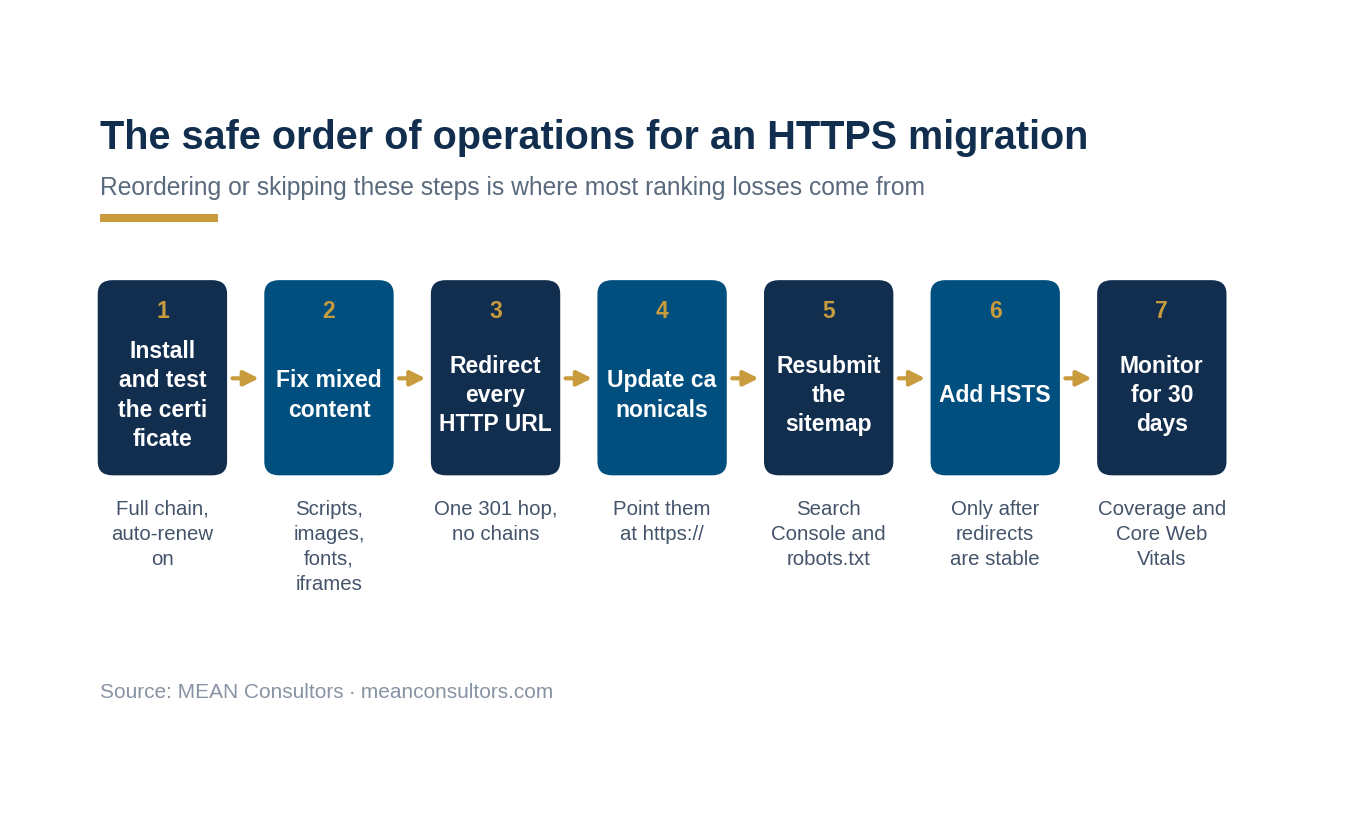
Figure 2: The sequence we follow on every HTTPS migration. Steps performed out of order — especially adding HSTS before redirects are stable — are the usual cause of post-migration traffic drops.
Two steps in that sequence deserve extra attention.
Mixed content comes before redirects. If you force HTTPS while the page still calls an insecure script, the browser blocks the script and you have swapped a security warning for a broken page. Fix the asset references first, then flip the switch.
HSTS comes last. HTTP Strict Transport Security tells browsers to refuse the insecure version for a set period. That is exactly what you want — once you are certain everything works. Set a long max-age on a site with a broken subdomain and you have locked visitors out of it for months with no quick undo.
- Certificate covers every hostname you actually serve, including the www and non-www variants
- Auto-renewal is configured and someone gets an alert if it fails
- Every HTTP URL 301s to its exact HTTPS equivalent — one hop, not a chain
- No page loads any script, stylesheet, image, font, or iframe over HTTP
- Canonical tags, hreflang, and Open Graph URLs all use https://
- XML sitemap lists only HTTPS URLs and has been resubmitted in Search Console
- Internal links use relative or HTTPS-absolute paths, never hard-coded HTTP
- HSTS added only after 30 days of clean redirect behavior
Trust signals customers actually read
SSL is the floor, not the ceiling. The reason security belongs in a marketing conversation is that visitors make a trust judgment in the first few seconds, and the padlock is only one input. Baymard Institute’s ongoing cart abandonment research puts the average abandonment rate at roughly 70%, with payment-security concerns cited by about 19% of abandoners — behind unexpected costs, but well ahead of most things teams spend their optimization time on.
What that tells me is that the perception of security is a conversion variable, and it is one you can influence directly:
There is an SEO version of this too. Google’s guidance on assessing page quality leans heavily on whether a page makes it clear who is responsible for the content and how to reach them. A site that hides its ownership behind a contact form and a stock photo is harder to trust for both audiences at once.
What to check this week
You do not need a full audit to find out whether you have a problem. Three checks take under an hour:
1. Type your homepage URL with http:// in front of it. Watch the address bar. It should land on the HTTPS version of the same page in one hop. If it stays on HTTP, or bounces through several URLs, or dumps you on the homepage from a deep page — that is your first ticket.
2. Open your most important conversion page and check the browser console. Mixed-content warnings show up there immediately. Do this on the actual checkout or quote form, not the homepage, because the third-party scripts live on the conversion pages.
3. Search site:yourdomain.com in Google and look at the protocol on the results. If HTTP URLs are still indexed, your redirects or canonicals are not doing their job. Pair this with a broader sweep using our technical SEO audit checklist, and if security is the wider concern, work through the website security checklist for small businesses.
If those three checks surface anything, the underlying work usually sits with whoever manages your hosting and templates — which is why we tend to handle it as part of ongoing web development and maintenance rather than as a one-off SEO ticket.
Frequently Asked Questions
Does SSL improve SEO rankings directly?
Only marginally. Google confirmed HTTPS as a ranking signal but described it as lightweight, affecting fewer than 1% of global queries and carrying less weight than content quality. The measurable SEO benefit comes from what a correct HTTPS setup prevents: duplicate HTTP and HTTPS URLs, wasted crawl budget, redirect chains, and browser warnings that drive bounces.
Will my rankings drop when I migrate from HTTP to HTTPS?
A correctly executed migration typically causes a short period of fluctuation while Google recrawls and reassigns signals, then recovers. Lasting drops almost always trace back to a specific error — redirecting all pages to the homepage, leaving canonicals on HTTP, or blocking the HTTPS version in robots.txt — rather than to the protocol change itself.
What is mixed content and why does it matter?
Mixed content is an HTTPS page that loads at least one resource — a script, stylesheet, image, font, or iframe — over insecure HTTP. Modern browsers block active mixed content outright, which can break payment widgets, form validation, and analytics. It also removes the padlock, which is exactly the wrong signal on a checkout page.
Do I need an expensive SSL certificate, or is a free one fine?
For the overwhelming majority of business sites, a free automated certificate from a trusted authority provides identical encryption to a paid one. Paid certificates mainly add organization validation, higher warranty amounts, and support — which can matter for large e-commerce or regulated industries. Browsers do not rank or display them differently for standard validation.
What is HSTS and should I turn it on?
HSTS is a response header that tells browsers to only ever connect to your domain over HTTPS for a specified period. It closes a small but real attack window. Turn it on only after your redirects have been stable for several weeks, and start with a short max-age before extending it — a long max-age on a misconfigured subdomain is difficult to reverse quickly.
What changes for my site in October 2026?
Google has said Chrome will enable “Always Use Secure Connections” by default, meaning users get a bypassable warning before Chrome loads a public HTTP page. If any of your live URLs, redirects, ad landing pages, or QR-code destinations still resolve over HTTP, visitors will hit that warning. Auditing for stray HTTP URLs now is cheaper than diagnosing a traffic drop later.
How often should we re-check all of this?
Certificate expiry should be monitored continuously with automated alerting. The wider set of checks — mixed content, redirects, canonicals, sitemap protocol — is worth running quarterly and after any theme change, plugin addition, or platform migration, because those are the events that reintroduce HTTP references.
MEAN Consultors runs the full HTTPS Readiness Score as part of our web development and maintenance work — certificates, redirects, mixed content, canonicals, and the crawl impact of all three.