
Multi-Location SEO and Duplicate Content: How to Structure Location Pages That Rank
Last updated: July 18, 2026 · By Joseph Olivas, Founder, MEAN Consultors · 8 min read
Multi-location SEO is where a lot of good businesses quietly sabotage themselves. The instinct is efficient and understandable: build one great “Our Services in [City]” template, duplicate it fifty times, find-and-replace the city name, and publish. The problem is that search engines see fifty near-identical pages and treat them as one. Below is how to structure location pages so each one earns its own rankings — without tripping the duplicate-content wire.
First, the Duplicate-Content Myth
Let’s clear up the fear that drives most bad decisions here. There is no “duplicate content penalty” in the punitive sense. As Google has stated plainly, duplicate content on a site does not typically trigger a manual action unless it is deceptive or manipulative. What actually happens is quieter and, for a multi-location business, more damaging: when Google finds several pages that are substantially the same, it picks one as canonical and filters the rest out of results. So your Orlando and Tampa pages don’t get penalized — they simply never show up, because Google decided they were copies of your Jacksonville page.
That distinction matters because the fix is not “avoid getting penalized.” The fix is “make each page different enough that Google wants to rank all of them.” That is a content and structure problem, and it is solvable. Our SEO team untangles exactly this for multi-location clients.
The Right URL Structure for Location Pages
Structure comes first, because it determines how link equity and topical relevance flow through the site. The pattern that works for the vast majority of U.S. multi-location businesses is a dedicated locations hub that links out to one page per location, with service sub-pages nested under each location only when you genuinely serve distinct services there.
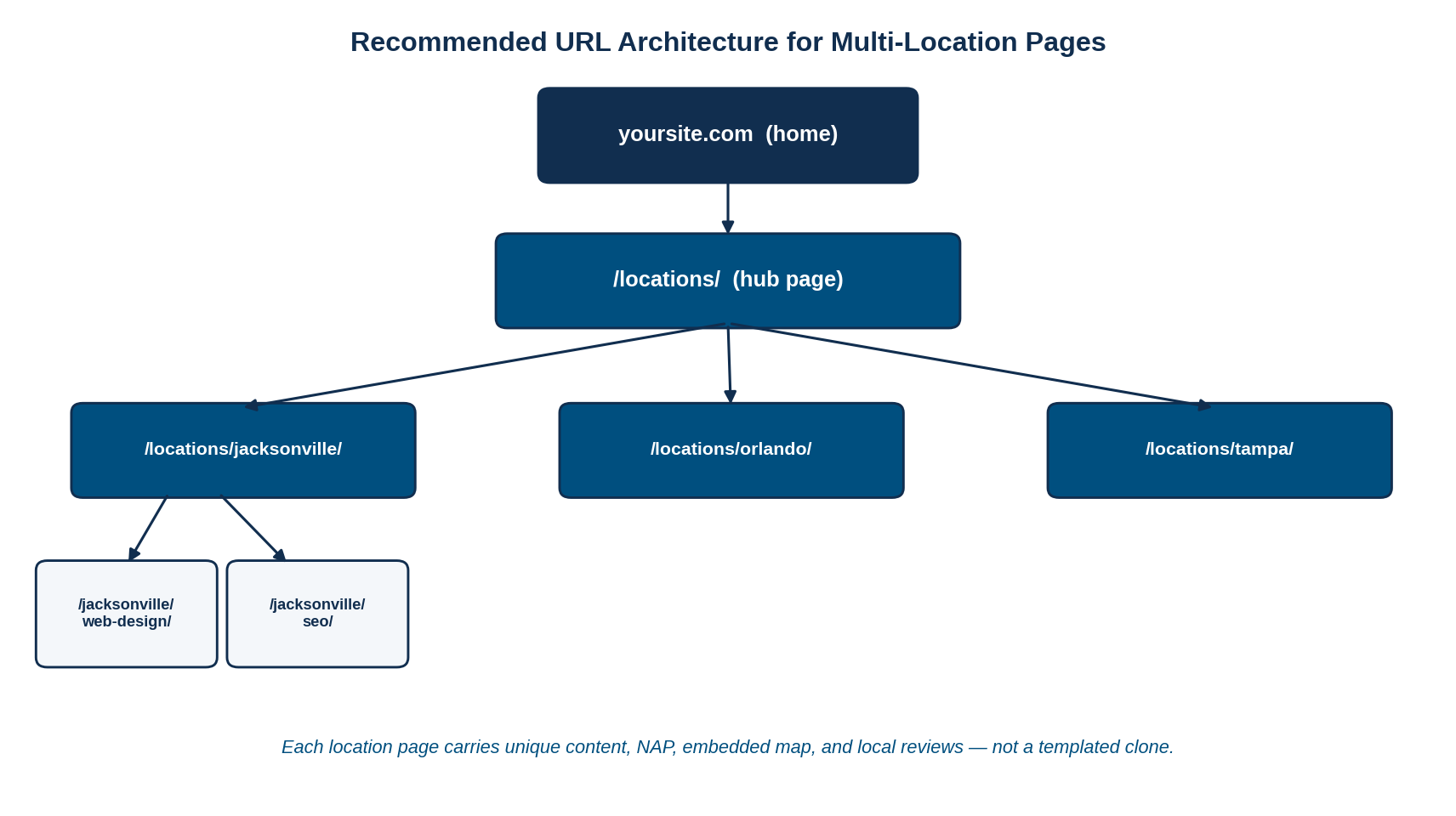
Figure 1: A clean, crawlable URL architecture for multi-location location pages.
A few structural rules keep this clean and avoid duplicate-content and cannibalization traps:
- Use one indexable URL per physical location — never stack multiple locations on a single page.
- Keep URLs readable and consistent: /locations/city-name/, not query strings or ID numbers.
- Link every location page from a central hub and from the main navigation or footer so they get crawled.
- Only create /city/service/ sub-pages when the service content is meaningfully different — otherwise you create the very duplication you’re trying to avoid.
rel=canonical to point all location pages at one “main” page to “avoid duplicates.” That tells Google to ignore every other location page — the opposite of what you want. Each location page should be self-canonical.What Actually Makes a Location Page Unique
Once the structure is right, the ranking work is in the content. A location page ranks when it proves — to both a searcher and to Google — that the business genuinely operates in that city. Swapping the city name in a headline does not prove that. The chart below shows, in our experience, how the elements of a strong location page weight toward ranking and toward staying out of the duplicate-content filter.

Figure 2: Relative weight of the factors that make a location page rank uniquely (MEAN Consultors estimate).
| Element | Duplicate-content risk | How to make it unique |
|---|---|---|
| Page body copy | High | Write local context: neighborhoods served, local projects, city-specific FAQs |
| Business name, address, phone | Low | Use the exact, consistent NAP for that location |
| Reviews / testimonials | Medium | Pull reviews from customers at that specific location |
| Map & directions | Low | Embed that location’s Google map and driving directions |
| Schema markup | Low | Use LocalBusiness schema with each location’s unique data |
- Unique on-page copy is the single heaviest factor — roughly a quarter of what makes a location page rank.
- Consistent NAP and a matching Google Business Profile are the foundation; inconsistency here undercuts everything else.
- Reviews, an embedded map, and LocalBusiness schema turn a generic page into a verifiably local one.
Scaling Location Pages Without Losing Quality
The hard part is doing this across ten, fifty, or two hundred locations without the content collapsing back into templates. The answer is not to write every page from scratch by hand, and it is not to spin one template either — it is a structured content model where a shared skeleton is filled with genuinely unique, location-specific data for each page. This is exactly the kind of workflow where thoughtful AI automation earns its keep: automating the assembly and data population while a human ensures the local substance is real. Consistency also matters off-site — the citations and directory listings that reinforce each location, which we cover in our guide to local citations that still matter in 2026.
Frequently Asked Questions
Does Google penalize duplicate content on location pages?
Not in the punitive sense — there is no automatic “duplicate content penalty.” Instead, Google filters near-identical pages, choosing one as canonical and dropping the rest from results. For a multi-location business, that means most of your location pages simply never rank, which is functionally just as bad.
Should each location have its own page?
Yes. Every physical location should have one dedicated, indexable URL with unique content, its exact NAP, an embedded map, and LocalBusiness schema. Stacking multiple locations on a single page or listing them only in a directory widget makes it far harder for any of them to rank.
How much unique content does a location page need?
There is no fixed word count, but each page needs enough genuinely local substance that it isn’t a clone: local context, city-specific services or projects, local reviews, and a unique intro. As a practical floor, aim for a few hundred words of location-specific copy rather than a single swapped-out city name.
Should I use canonical tags on location pages?
Each location page should be self-canonical — its canonical tag should point to itself. A frequent and costly mistake is canonicalizing all location pages to one “primary” page, which tells Google to ignore every other location. Use self-referencing canonicals and make the pages unique instead.
What’s the best URL structure for multiple locations?
A locations hub that links to one page per city works best: /locations/ as the hub, then /locations/city-name/ for each location. Add /locations/city-name/service/ sub-pages only when the service content is genuinely different for that market.
MEAN Consultors structures and writes location pages that rank — without the duplicate-content traps that keep multi-location sites invisible.