
Is My Website Ready for AI Search? A Technical Readiness Checklist
Last updated: September 5, 2026 · By Joseph Olivas, Founder, MEAN Consultors · 9 min read
Over the past year, the question I hear most from business owners has shifted from “why aren’t we ranking?” to “why does ChatGPT recommend our competitor and not us?” The honest answer is usually not about content quality. It is about plumbing. AI engines can only cite what they can fetch, parse, and attribute, and a surprising number of otherwise good websites quietly block or confuse them. This checklist is the technical audit I run before any web development engagement that has AI visibility as a goal.
Why technical readiness is a separate problem from content
If you have read our guide to generative engine optimization, you know that GEO is largely about writing direct, well-sourced answers. That is true, but it assumes the engine can see the answer in the first place. Google’s own documentation on AI features and your website is explicit: AI Overviews and AI Mode draw on the standard Search index, so the same crawling, rendering, and indexing requirements apply. There is no special submission form. If a page is blocked, slow to render, or missing from the index, it cannot appear in an AI answer no matter how well it is written.
The other engines are less forgiving, not more. ChatGPT, Claude, and Perplexity each operate their own crawlers with their own user-agents, and several of them fetch raw HTML without executing JavaScript. A React or Vue site that looks perfect in a browser can present an empty <div id="root"> to those bots. That is a web development problem, and it has a web development fix.
The eight-point AI search readiness checklist
Below is the rubric we use internally, weighted by how often each item turns out to be the thing blocking citation in our client audits. The weights add up to 100, so you can score your own site and know roughly where you stand.
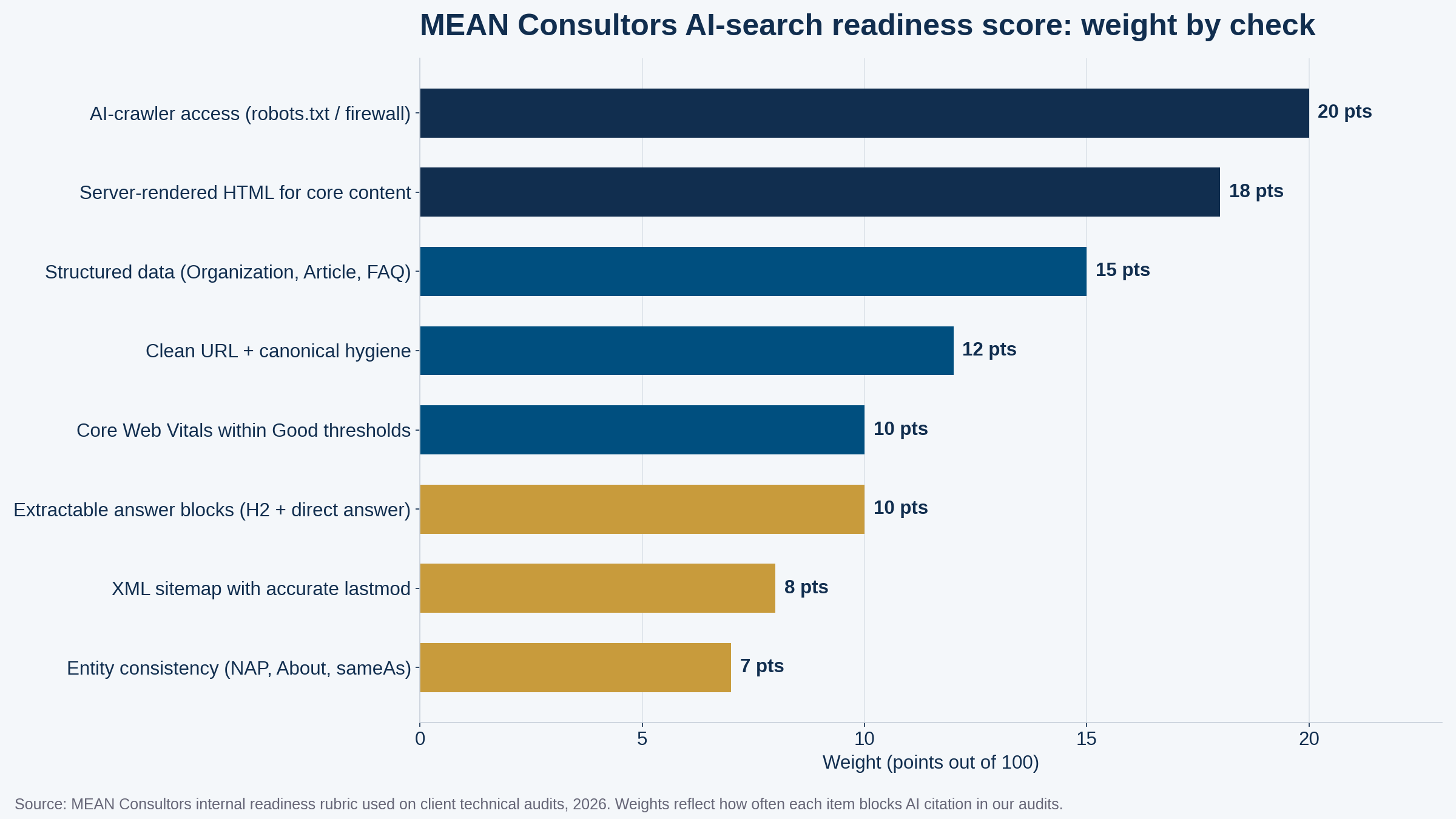
Figure 1: The eight technical checks in the MEAN Consultors AI-search readiness rubric, weighted by how often each blocks AI citation in our audits.
| Check | Weight | How to test it in 10 minutes |
|---|---|---|
| 1. AI-crawler access | 20 | Read robots.txt; grep server or CDN logs for GPTBot, ClaudeBot, PerplexityBot, Google-Extended |
| 2. Server-rendered core content | 18 | Disable JavaScript in the browser (or use curl) and confirm headings and body copy remain |
| 3. Structured data | 15 | Run Google’s Rich Results Test and Schema.org validator on a service page and a blog post |
| 4. URL and canonical hygiene | 12 | Confirm one canonical URL per page, no parameter duplicates, HTTPS everywhere |
| 5. Core Web Vitals | 10 | Check the Core Web Vitals report in Search Console; aim for all-Good field data |
| 6. Extractable answer blocks | 10 | Every H2 that poses a question is followed by a 40–80-word direct answer |
| 7. XML sitemap accuracy | 8 | Sitemap lists only indexable URLs and lastmod reflects real edits |
| 8. Entity consistency | 7 | Business name, address, About page, and sameAs links agree across the site and the web |
- Crawler access and server-side rendering together account for 38 of 100 points because they are binary: fail either one and nothing else matters.
- Structured data is the highest-leverage fix that does not require a rebuild; it can usually be added to an existing CMS in days.
- A score below 60 typically means the site needs development work, not just content edits, before GEO efforts will pay off.
Check 1: Can AI crawlers actually reach your pages?
This is the first thing I look at and the most common failure. There are two places a block hides. The first is robots.txt. Many sites added a blanket Disallow for AI bots in 2023 or 2024, often through a plugin toggle, and nobody revisited it. OpenAI documents its crawlers on its bots page, and the key distinction is that OAI-SearchBot powers search citations while GPTBot is used for model training. You can allow the first and disallow the second if you want to be found but not trained on.
The second hiding place is your firewall or CDN. Cloudflare, Sucuri, and several managed hosts now ship with “block AI bots” rules that are on by default. These do not show up in robots.txt at all; the crawler simply gets a 403. The only way to catch this is to look at the access logs or the WAF event list for the user-agents above. On the SEO side we treat this exactly like a noindex tag: a silent, total exclusion.
- robots.txt does not disallow OAI-SearchBot, ClaudeBot, PerplexityBot, or Googlebot on pages you want cited
- Firewall and CDN rules are reviewed for default AI-bot blocks
- Rate limiting is not so aggressive that crawlers hit 429 responses on normal crawl patterns
- Staging and password-protected copies are not what the crawler finds via stray links
Check 2: Is your core content in the HTML, or only in JavaScript?
Google’s JavaScript SEO documentation confirms that Googlebot renders pages in a headless Chromium, though rendering is queued and can lag the crawl. Most third-party AI crawlers do not render at all. So the test is simple: open a service page, disable JavaScript, and reload. If the headline, body copy, pricing table, and FAQ are still there, you pass. If you see a spinner or a blank frame, every non-Google engine sees the same thing.
The fix depends on your stack. WordPress and other server-rendered CMSs pass by default unless a page builder injects content client-side. Single-page apps need server-side rendering (Next.js, Nuxt, Angular Universal) or static generation for marketing pages. This is one of the strongest arguments for keeping the marketing site and the application on separate rendering strategies, a point we make in our comparison of static site generators and dynamic websites.
Check 3: Does your structured data tell engines who you are and what this page is?
Structured data will not force a citation, but it is the cleanest way to hand an engine the facts it needs to attribute you correctly: the organization name, the author, the publish date, the question-and-answer pairs. For a business site, the minimum viable set is Organization (or LocalBusiness) on the homepage, Article or BlogPosting on every post, FAQPage where you have visible FAQs, and Service on each service page. Our schema markup guide covers implementation in detail; the point here is that it must validate, and the FAQ markup must match the visible text one-to-one. Mismatched or hidden FAQ schema is worse than none.
Checks 4 and 5: URL hygiene and Core Web Vitals
Duplicate URLs waste crawl budget and split whatever signals a page has earned. Every page should resolve to exactly one canonical HTTPS URL, with parameter variants, trailing-slash variants, and www/non-www variants all redirecting or canonicalizing to it. Our canonical tags explainer walks through the common failure modes.
Performance matters for a less obvious reason than user experience. Slow servers get crawled less, and AI crawlers with strict timeouts will simply abandon a page that takes six seconds to respond. The Core Web Vitals thresholds published by web.dev (LCP under 2.5 seconds, INP under 200 milliseconds, CLS under 0.1) are a reasonable target. If you are not there yet, our Core Web Vitals guide prioritizes the fixes.
Check 6: Are your answers extractable?
This is the one technical check that sits on the border with content. AI engines quote passages, not pages. A passage is easiest to lift when a question-style heading is immediately followed by a self-contained answer of roughly 40 to 80 words, with the entity named explicitly rather than referred to as “it” or “we.” Structurally, that means real <h2> and <h3> tags (not styled paragraphs), real <table> elements for comparisons (not images), and real <ul> lists. We covered the writing side in how to get cited by ChatGPT, Perplexity, and Google AI Overviews; the development side is making sure your CMS and theme produce clean semantic HTML instead of nested divs.
Checks 7 and 8: Sitemaps and entity consistency
Your XML sitemap should list only canonical, indexable URLs and carry a lastmod that changes when the content actually changes. Engines use it to decide what to re-fetch, so a sitemap that stamps today’s date on every URL trains them to ignore it. Our sitemap and robots.txt guide covers the details.
Entity consistency is the quiet one. AI engines build a model of who you are from your About page, your Organization schema, your Google Business Profile, your LinkedIn page, and every directory listing that mentions you. If your legal name, brand name, address, and service descriptions disagree across those sources, the engine’s confidence in attributing anything to you drops. Add sameAs links in your Organization schema to your official profiles and make sure the names match exactly.
How we take a site from audit to AI-ready
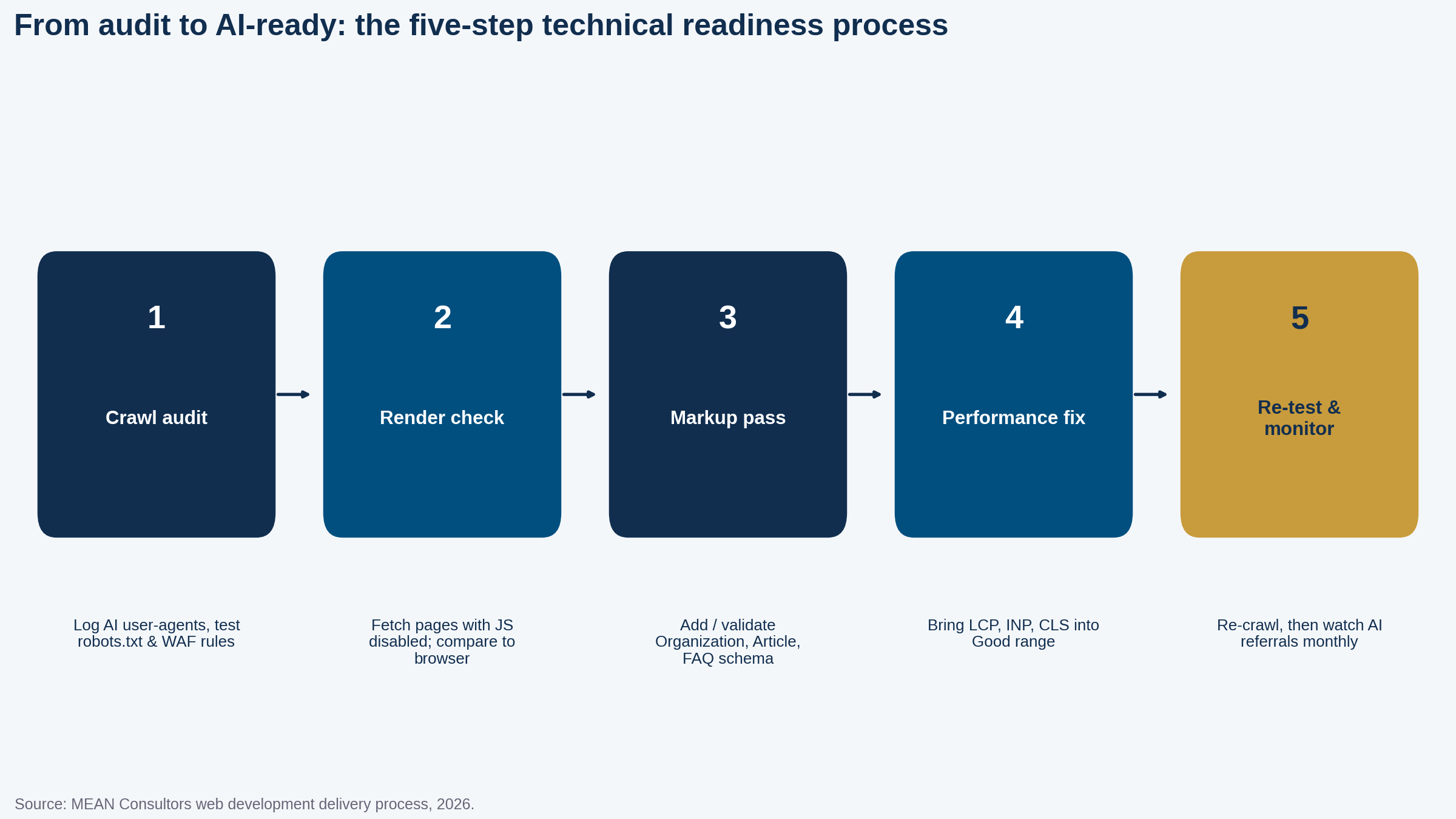
Figure 2: The five-step technical readiness process MEAN Consultors follows on web development engagements with AI visibility goals.
The order matters. We start with crawler access because it is binary and cheap to fix. Rendering comes second because it determines whether any of the later work is visible to non-Google engines. Markup and performance follow, and only then do we re-crawl the site with the same user-agents the engines use and begin tracking referrals from ChatGPT, Perplexity, and Google AI features in analytics. If you want to measure the result properly, our post on measuring GEO performance covers the tracking setup.
For most small and mid-size business sites, the full technical pass takes two to four weeks. Sites built on single-page-app frameworks without server rendering are the exception; those sometimes need a marketing-site rebuild, which is a larger conversation about the right tech stack for the job.
Frequently Asked Questions
How do I check if my website is ready for AI search?
Start with three tests: fetch a key page with JavaScript disabled and confirm the main content is still in the HTML; check robots.txt and your firewall logs to confirm AI crawlers such as GPTBot, ClaudeBot, and PerplexityBot are not blocked; and run the page through Google’s Rich Results Test to confirm structured data validates. If any of the three fails, the site is not fully ready.
Do I need to allow AI crawlers in robots.txt?
If you want to be cited in AI answers, yes. Google AI Overviews use the normal Googlebot crawl, but ChatGPT, Claude, and Perplexity each use their own user-agents. Blocking them (or letting a firewall block them by default) removes your content from those engines’ source pool. You can allow them while still blocking training-only agents if that is your policy.
Does structured data help with AI search?
Google states that its AI features rely on the same indexing signals as regular Search, and structured data helps machines understand who published a page, what it is about, and how its sections relate. It is not a ranking guarantee, but in our audits, pages with valid Organization, Article, and FAQ markup are consistently easier for engines to attribute and quote.
Is a JavaScript-heavy website a problem for AI search?
It can be. Google renders JavaScript, but many AI crawlers fetch raw HTML and do not execute scripts. If your headings, answers, and pricing tables only appear after client-side rendering, those crawlers see an empty shell. Server-side rendering or static generation for core content solves this.
How long does it take to make a website AI-search ready?
For a typical small-business site of 20 to 60 pages, the technical fixes usually take two to four weeks: one week for the crawl and render audit, one to two weeks for markup, rendering, and performance fixes, and a final week for validation. Content restructuring runs in parallel and can take longer.
Will fixing these technical items guarantee I get cited by ChatGPT or Google AI Overviews?
No. Technical readiness removes the barriers that make citation impossible; it does not create the demand or authority that makes citation likely. Once the site is accessible and well-structured, the work shifts to producing direct, well-sourced answers on topics people actually ask about.
MEAN Consultors’ web development team runs the full eight-point technical audit and fixes what blocks AI engines from citing you.