
ADA & WCAG Website Compliance: What Businesses Need to Know in 2026
Last updated: August 18, 2026 · By Joseph Olivas, Founder, MEAN Consultors · 9 min read
Every few months I get the same email from a business owner. A law firm has sent a demand letter claiming their website is inaccessible to people with disabilities, and the letter cites standards the owner has never heard of. The site was built by a reputable agency. Nobody did anything careless. And yet here we are.
Accessibility has quietly become one of the highest-risk, lowest-attention areas of web development for U.S. small and mid-size businesses. The good news is that most of what regulators and plaintiffs look for is fixable, measurable, and far cheaper to address before a complaint arrives than after. Here is the practical version of what you need to know going into 2026.
ADA and WCAG are not the same thing — and that distinction matters
The Americans with Disabilities Act is a civil rights law. It prohibits discrimination in places of public accommodation, and U.S. courts have widely applied it to websites and mobile apps that serve the public. What the ADA statute does not do is spell out technical requirements for a web page.
The Web Content Accessibility Guidelines, published by the World Wide Web Consortium, fill that gap. WCAG is the technical standard: a list of testable success criteria organized into three conformance levels — A, AA, and AAA. When a demand letter, settlement agreement, or federal rule references an accessibility standard, it is almost always WCAG Level AA.
Two dates anchor the current landscape. WCAG 2.2 became a W3C Recommendation in October 2023, adding nine new success criteria on top of WCAG 2.1 — including requirements around focus appearance, dragging alternatives, and target size. And in April 2024 the U.S. Department of Justice published a final rule under ADA Title II requiring state and local government entities to conform to WCAG 2.1 Level AA, with compliance deadlines that landed in 2026 and 2027 depending on population size.
If you are a private business, the Title II rule does not bind you directly. It matters anyway, for two reasons: it makes WCAG Level AA the de facto federal benchmark, and it means any public-sector client or partner will increasingly ask you to meet it contractually. When we scope a build or a rebuild through our web development services, WCAG 2.2 AA is now the default target rather than an upsell.
What actually gets flagged in real complaints
Automated scanners will happily hand you a report with 400 issues. That report is not a plan. In our remediation work, a small number of issue categories account for the overwhelming majority of both legitimate user harm and legal exposure — and they are not evenly matched to how hard they are to fix.
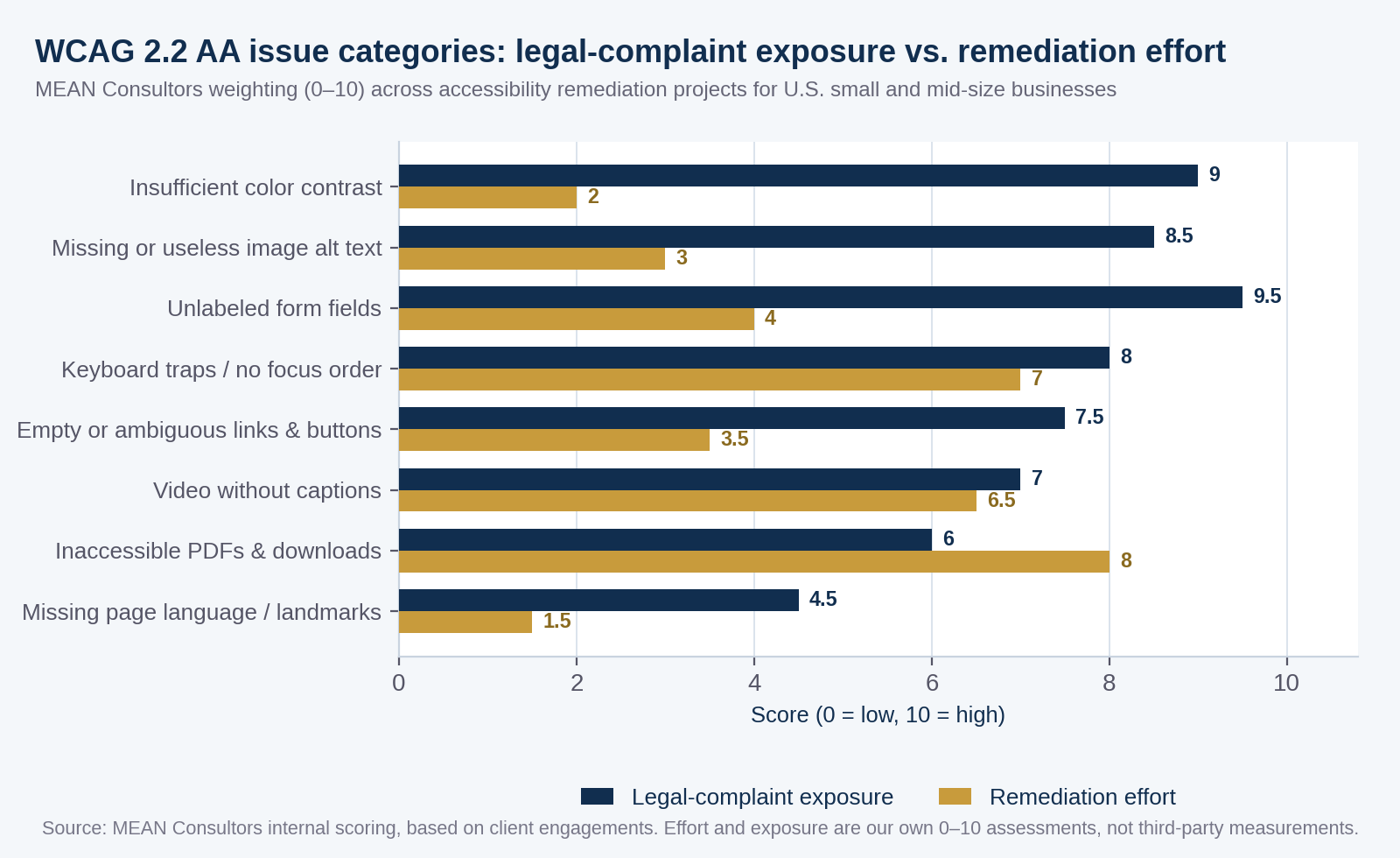
Figure 1: How we weight accessibility issue categories when we triage a site — exposure against effort.
Read the gap between the two bars, not the bars themselves. Insufficient color contrast and unlabeled form fields sit in the top-left quadrant of that comparison: high exposure, low effort. Those are the ones to fix this month. Inaccessible PDFs are the inverse — genuinely hard to remediate, and rarely the centerpiece of a complaint unless the document is essential to a transaction.
| Issue | Typical WCAG criterion | What it costs to fix on a mid-size site |
|---|---|---|
| Text below 4.5:1 contrast | 1.4.3 Contrast (Minimum), AA | Design token change; hours, not days |
| Form inputs with no programmatic label | 1.3.1, 4.1.2, AA | Template edit per form; 1–3 days |
| Images with missing or decorative-only alt text | 1.1.1 Non-text Content, A | Content work; ongoing editorial process |
| Keyboard focus lost or trapped in modals | 2.1.2, 2.4.7, 2.4.11, AA | Component rework; 1–2 weeks |
| Video without captions or transcript | 1.2.2, 1.2.3, A/AA | Per-asset cost; budget by minute of video |
| Target size under 24×24 CSS pixels | 2.5.8 Target Size (Minimum), AA (new in 2.2) | Mobile CSS pass; days |
- WCAG 2.2 Level AA is the practical target for 2026 — it is what the DOJ Title II rule anchors to and what settlement agreements typically reference.
- Contrast and form labeling are the highest-exposure, lowest-effort fixes on almost every site we audit; do those first.
- WCAG 2.2 added target size and focus appearance criteria that mostly bite on mobile, so a desktop-only audit will miss them.
Why accessibility overlay widgets are not a fix
You have probably seen the pitch: paste one line of JavaScript, get a little accessibility icon in the corner, and a vendor certificate of compliance. I understand the appeal. It is cheap and it takes an afternoon.
It also does not work for the failures that matter. An overlay runs in the browser after your page has loaded. It can toggle a high-contrast theme or enlarge text, but it cannot invent a meaningful label for a form field that has none, it cannot caption your video, and it cannot restructure a heading hierarchy that skips from H1 to H4. Worse, overlays frequently interfere with the assistive technology a user has already configured. The disability community has been loud and consistent on this point, and plaintiffs have named overlay-equipped sites in complaints.
Fix accessibility where the problem lives: in your templates, your components, and your content workflow. That is slower and it is the only approach that survives a real audit.
- Fix contrast in your design tokens or theme variables, so every new page inherits the fix
- Give every input a visible, programmatically associated label — placeholder text is not a label
- Make every interactive element reachable and operable with a keyboard, in a logical order
- Ensure a visible focus indicator with sufficient contrast against both the component and the background
- Write real alt text for images that carry meaning; mark decorative images as empty
- Keep heading levels sequential so screen reader users can navigate by structure
- Caption video and provide transcripts for audio-only content
- Test with an actual screen reader and keyboard, not only with a scanner
How to run a remediation project without stalling your roadmap
The mistake I see most often is treating accessibility as a one-time project with a finish line. Sites change weekly. A remediation sprint that is not followed by a process just resets the clock on your next demand letter. Here is the sequence we use.
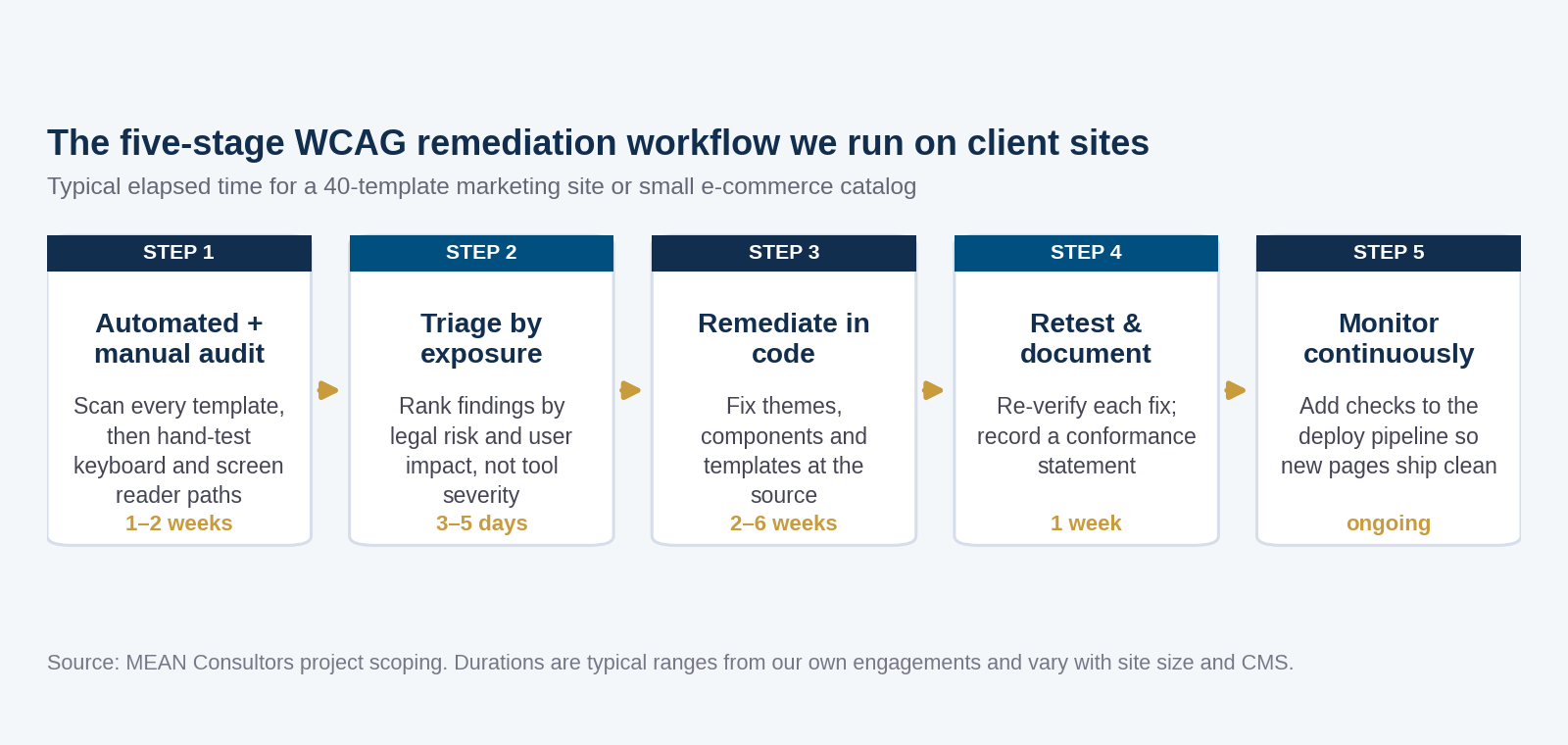
Figure 2: The five-stage remediation workflow, with the elapsed time we typically quote.
Two stages carry most of the value. Triage by exposure is where you decide what actually ships first, and it is a business decision as much as a technical one — a checkout form outranks a blog archive every time. Continuous monitoring is where the investment stops decaying: once accessibility checks run in the deploy pipeline, a developer who ships an unlabeled button finds out in minutes instead of in a letter. That is the same logic behind treating website updates as a recurring schedule rather than an annual scramble, and it belongs in the same maintenance budget as your security checklist.
One more practical note: document what you did. An accessibility conformance report — sometimes delivered as an ACR or VPAT — records which criteria you meet, which you partially meet, and what your remediation plan is for the rest. It will not make you immune to anything, but demonstrating an active, documented program is materially better than demonstrating nothing. It also shortens procurement cycles when an enterprise or public-sector buyer asks.
The business case that has nothing to do with lawsuits
I would rather sell this work on its merits. Roughly one in four U.S. adults reports some form of disability, and accessible design overlaps heavily with things you already want: semantic markup that search engines parse cleanly, captions that let people watch video with the sound off, forms that are easier for everyone to complete, and touch targets big enough to hit on a phone in one hand.
The overlap with technical SEO is real and underrated. Proper heading structure, descriptive link text, and meaningful alt attributes are accessibility requirements and ranking inputs at the same time — which is why we handle them jointly rather than as separate engagements alongside our SEO services. If you are already planning a redesign, folding WCAG 2.2 AA into the build costs a fraction of retrofitting it later, and a redesign is also the moment to make sure you are not losing SEO equity in the process.
Frequently Asked Questions
Is my private business website legally required to meet WCAG?
No U.S. federal regulation currently sets an explicit WCAG conformance level for private commercial websites. However, courts have repeatedly applied ADA Title III to websites, and settlements almost always specify WCAG Level AA. The 2024 DOJ rule under Title II does impose WCAG 2.1 AA on state and local government entities. In practice, WCAG 2.2 Level AA is the standard to build toward. Confirm your specific obligations with an attorney.
What is the difference between WCAG 2.1 and WCAG 2.2?
WCAG 2.2 is backward compatible with 2.1 and adds nine new success criteria. The ones that most often require work are 2.4.11 Focus Not Obscured, 2.4.13 Focus Appearance, 2.5.7 Dragging Movements, 2.5.8 Target Size (Minimum), and 3.3.8 Accessible Authentication. If you conform to 2.1 AA, the incremental work to reach 2.2 AA is usually modest and concentrated in mobile interactions and focus styling.
Do accessibility overlay widgets make my site compliant?
No. Overlays can adjust presentation but cannot fix the underlying failures that drive most complaints, such as missing form labels, absent captions, broken keyboard operability, or a non-semantic heading structure. They also sometimes conflict with a user’s own assistive technology. Remediate in your templates and components instead.
How much does WCAG remediation cost?
It depends almost entirely on how many distinct templates you have and how your front end is built. A small marketing site on a well-structured theme is often a two-to-four week engagement. A large e-commerce catalog with custom components, third-party checkout, and a video library is a multi-month program. The cheapest path is always to specify conformance during a build rather than retrofit afterward.
Can automated tools find all accessibility problems?
No. Automated scanners reliably catch contrast failures, missing alt attributes, and some structural issues, but they cannot judge whether alt text is meaningful, whether a focus order makes sense, or whether an error message is understandable. Plan on manual keyboard and screen reader testing for your critical paths, particularly forms and checkout.
How do I keep a site accessible after remediation?
Add automated accessibility checks to your continuous integration pipeline so regressions fail the build, write alt text and label requirements into your content editor’s checklist, and schedule a manual audit of critical paths at least annually. Treat it as part of ongoing maintenance, not a project that closes.
Does accessibility help SEO?
Indirectly but meaningfully. Semantic headings, descriptive link text, alt attributes, proper language declarations, and clean document structure all serve assistive technology and search crawlers at the same time. Captions and transcripts also create indexable text for video content. Accessibility is not a ranking factor by itself, but the work overlaps substantially with technical SEO.
We audit against WCAG 2.2 AA, triage findings by real exposure, and remediate in your templates — not with a widget.