
How Often Should You Update Your Website? A Maintenance Schedule
Last updated: August 17, 2026 · By Joseph Olivas, Founder, MEAN Consultors · 9 min read
“How often should we be updating the website?” is one of the most common questions I get after a project ships, and the honest answer is that it is the wrong question. There is no single update interval. A website is four different things at once — software, infrastructure, content and design — and each one decays on a different clock. This guide lays out the schedule I actually give clients, what belongs in each cadence, and how to tell when it is time to stop maintaining and start rebuilding.
Why a single update interval does not exist
When people ask how often to update a website, they usually mean one of two very different things: how often to apply technical updates, or how often to redesign. Those live on completely different timescales. Security patches need to be applied in days. A redesign is a multi-year decision. Treating them as one line item on a to-do list is how sites end up simultaneously over-designed and dangerously out of date.
The useful mental model is that your site has four decay clocks running in parallel. Security decays fastest, because it depends on third-party code that other people keep finding holes in. Performance decays next, as your stack ages relative to browsers and devices. Content decays on a business timescale — prices, services and proof points go stale. Architecture decays slowest, but when it goes, it goes all at once. Good web development and maintenance means running all four clocks deliberately instead of reacting to whichever one breaks first.
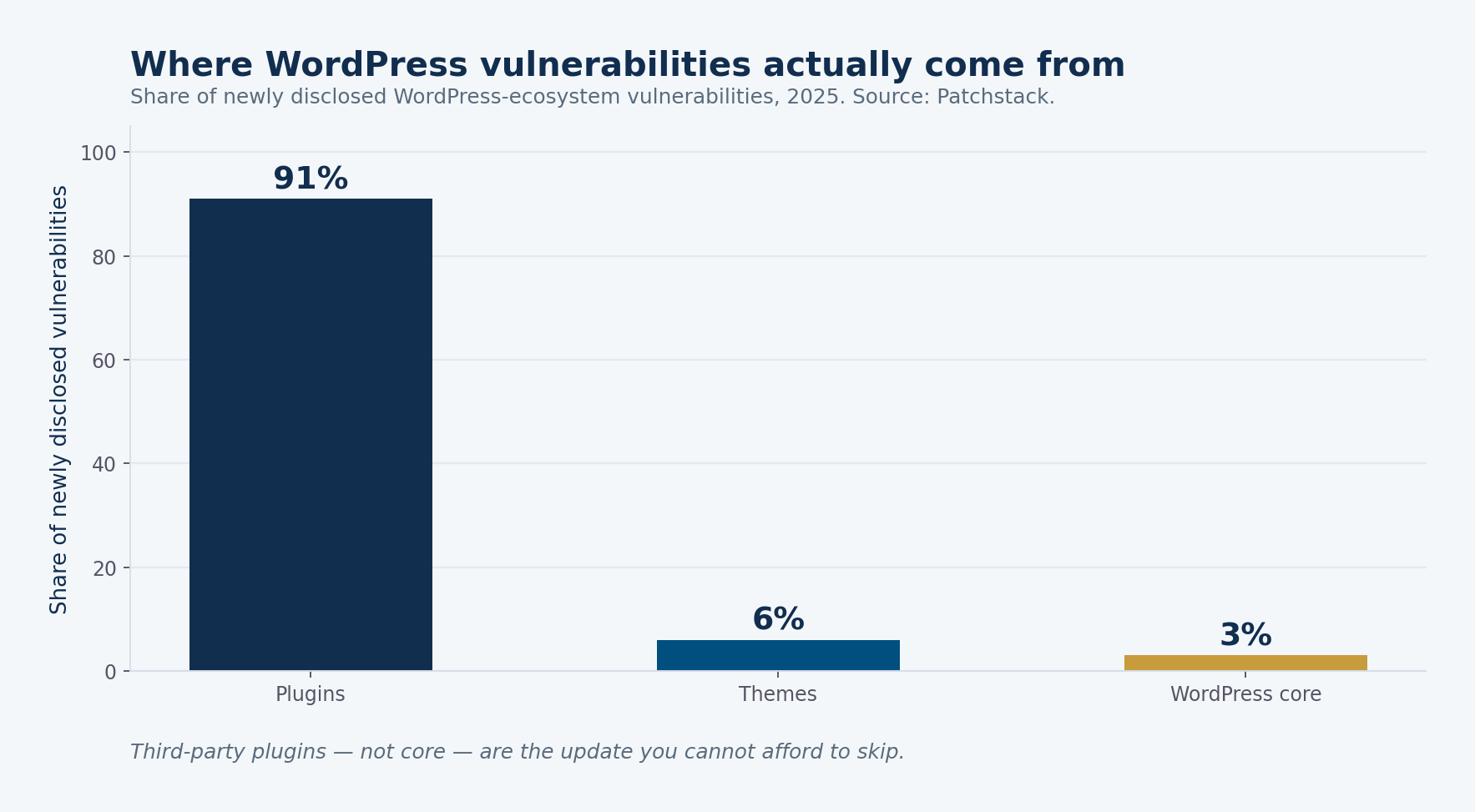
Figure 1: Third-party plugins, not CMS core, are where the security risk concentrates (Patchstack, 2025).
That chart is the single strongest argument for a maintenance schedule. In 2025, Patchstack recorded 11,334 new vulnerabilities across the WordPress ecosystem, up from 7,966 the year before, and roughly 97% of them originated in plugins and themes rather than core. Over half required no authentication at all to exploit. The core software you rarely think about is the part that mostly takes care of itself; the twenty plugins you installed once and forgot are the exposure.
- Security, performance, content and architecture decay at different rates — you need four cadences, not one.
- 91% of newly disclosed WordPress vulnerabilities in 2025 were in plugins, which is where your monthly pass should concentrate.
- The volume of disclosed vulnerabilities grew about 42% year over year, so a schedule that was adequate in 2024 is not adequate now.
The four-cadence maintenance schedule
Here is the schedule I hand to clients at project handoff. It is deliberately boring. The value is not in any individual task but in the fact that each task has a fixed home, so nothing quietly becomes nobody’s job.

Figure 2: The four-cadence maintenance schedule MEAN Consultors ships with every web project.
| Cadence | What it covers | Typical time | What it prevents |
|---|---|---|---|
| Weekly | Security patches, uptime and error log review, backup verification | 20–40 minutes | Exploitation of newly disclosed vulnerabilities |
| Monthly | Plugin and dependency updates on staging, broken link sweep, Core Web Vitals check | 2–4 hours | Silent performance and compatibility drift |
| Quarterly | Full regression test, content and CTA refresh, access and permission audit | 1–2 days | Stale messaging, orphaned admin accounts, broken funnels |
| Annually | Platform or framework upgrade, design and UX review, rebuild decision | 1–3 weeks | Falling out of supported versions; accumulating technical debt |
Two notes on this table. First, the time estimates assume the schedule is actually being followed — the first monthly pass on a site that has been neglected for two years is not a four-hour job, it is a project. Second, the quarterly and annual work is where most teams under-invest, because nothing visibly breaks when you skip it. That is exactly why it needs a calendar slot rather than good intentions.
Weekly: the security cadence
Weekly work is short, mechanical and non-negotiable. Apply security releases. Skim uptime and server error logs for anything new. Confirm that last night’s backup actually exists somewhere that is not the same server as the site — an unverified backup is a rumour, not a recovery plan.
I recommend enabling automatic updates for CMS core security releases specifically. The argument against auto-updates is that they can break things, and that is true for feature releases and plugins. It is much less true for narrow security patches, and the risk of leaving a known, publicly disclosed hole open for two weeks is far greater than the risk of a patch-level regression. If you want the full inventory of what to harden beyond patching, our website security checklist for small businesses covers the fifteen gaps we find most often.
Monthly: plugins, dependencies and performance
The monthly pass is where the plugin problem gets managed, and it is the cadence that most benefits from a staging environment. Update on staging, click through the paths that generate revenue — contact form, checkout, booking, whatever yours is — then promote. This takes an hour longer than updating in production and saves you the afternoon where the checkout silently stopped submitting.
- Update plugins, themes and package dependencies on staging, never directly in production
- Test every revenue path end to end before promoting the changes live
- Remove any plugin you have not deliberately used in 90 days — deactivated is not deleted, and deactivated plugins still carry exploitable code
- Run a broken link and 404 sweep, and fix or redirect anything that returns an error
- Check field data for Core Web Vitals rather than lab scores, and investigate any metric that moved into the “needs improvement” band
- Confirm SSL certificate expiry is more than 30 days out
On performance specifically: Google’s documentation is clear that Core Web Vitals are measured on real user data, not synthetic tests, which means a site can score beautifully in a lab tool and still fail in the field. Monthly is the right interval to catch that drift — frequent enough to correlate a regression with a specific change, infrequent enough not to chase noise. If your numbers have slipped, our Core Web Vitals guide for 2026 walks through what actually moves each metric.
Quarterly: content, funnels and access
The quarterly pass is the one that connects maintenance to revenue. Three things happen here. You run a full regression test on staging — not just the revenue paths, but forms, integrations, search, and anything that talks to a third-party API. You review content: outdated pricing, discontinued services, team members who left, case studies that no longer represent your best work. And you audit access, removing contractors, agencies and former employees who still hold admin credentials.
That last one is dull and it is also how a meaningful share of breaches start. An orphaned admin account with a reused password is a more likely entry point than a sophisticated exploit. Quarterly is frequent enough that the list stays short.
Content refreshes deserve their own discipline, and the trigger should be that the information changed rather than that time passed. We covered the difference between a meaningful update and cosmetic churn in our guide to content refresh strategy, and the same logic applies to service pages and landing pages, not just blog posts.
Annually: platform upgrades and the rebuild question
Once a year, step back from the site and look at the stack underneath it. Is the PHP, Node or framework version still receiving security support? Is the CMS major version current, or two releases behind? Are the third-party services you depend on deprecating APIs you still call? These are the questions that, unanswered, turn into the sentence “we can’t update that without rebuilding the whole thing.”
This is also where the redesign conversation belongs. Three to four years is a fair planning assumption for a structural redesign, but the calendar should not be the trigger. Rebuild when the evidence says so: conversion rates that no longer respond to optimization, a CMS that cannot support what marketing needs, mobile experience that requires apology, or a maintenance burden that has grown faster than the site’s value. If the site still converts and updates cleanly, five years is fine.
One warning sign is worth naming: if your monthly update pass has started to feel risky — if the team hesitates before touching plugins because something always breaks — that is technical debt talking, and it usually means the annual upgrade has been skipped a few times in a row.
What skipping the schedule actually costs
The maintenance conversation is almost always framed as a cost, which is backwards. Maintenance is the cheaper of two options; the alternative is not “free” but “deferred and larger.” A compromised site typically means forensic cleanup, a restore that may lose recent data, blacklist removal from browsers and search engines, customer notification if data was exposed, and lost revenue for however long the site is down or flagged. Any one of those exceeds a year of routine updates.
The subtler cost is optionality. A site that is current can be extended: you can add a booking flow, connect a CRM, launch a new service line. A site that is four major versions behind cannot, because every change has to negotiate with a fragile foundation first. Maintenance is not just protection — it is what keeps the site capable of doing new things. That is the same reason we treat custom software maintenance as part of the build rather than an afterthought.
- Weekly security work, monthly dependency updates, quarterly content and access audits, annual platform upgrades — four cadences, four owners, four calendar slots.
- Automate CMS core security updates; put everything else through staging first.
- Redesign on evidence, not on the calendar — but never let the annual platform upgrade slip, because that is what turns an upgrade into a rebuild.
Frequently Asked Questions
How often should you update your website?
Run four cadences at once: security patches weekly, plugin and dependency updates monthly, a full staging regression test and content review quarterly, and a platform or framework upgrade annually. Most small business sites need a substantial redesign every three to four years, but the weekly and monthly work is what actually keeps the site safe and fast in between.
Is it safe to enable automatic updates?
For security releases of the CMS core, yes — auto-updates close the window attackers rely on. For plugins, themes and major framework versions, no. Those change functionality and can break layouts or checkout flows, so they should go through a staging environment first. A sensible default is automatic security-only updates plus a scheduled manual pass on everything else.
What happens if I never update my website?
Three things compound. Known vulnerabilities in outdated plugins become exploitable, and Patchstack found 91% of newly disclosed WordPress vulnerabilities in 2025 originated in plugins. Performance degrades as browsers and hosting stacks move on. And eventually the platform version falls out of support, at which point the only path forward is a rebuild rather than an upgrade — which costs far more than the maintenance would have.
How often should I redesign my website?
Structural redesigns every three to four years is a reasonable planning assumption, but the trigger should be evidence rather than the calendar: conversion rates flattening, mobile usability complaints, a brand change, or a CMS that can no longer support what marketing needs. If quarterly content and CTA refreshes keep the site converting, you can often stretch to five years.
Does updating my website help SEO?
Indirectly and significantly. Updates keep the site secure (hacked sites can be flagged and deindexed), keep performance within Core Web Vitals thresholds, and keep content accurate enough to stay competitive. Updating a page for its own sake does not help; updating it because the information changed does.
How much should website maintenance cost?
It depends on stack complexity and how much of it is bundled with hosting. The more useful framing is comparison: a monthly maintenance retainer is almost always a fraction of one emergency incident response, which typically involves forensic cleanup, restoring from backup, reputation remediation and lost revenue during downtime.
Who should be responsible for website updates?
Someone with a named calendar slot. The most common failure mode we see is not a lack of budget but a lack of ownership — updates fall to whoever built the site originally, who has since moved on. Assign the cadence to an internal owner or an external partner, and treat the weekly log review as a standing task, not an ad-hoc one.
MEAN Consultors builds and maintains business websites from Jacksonville, Florida — including the unglamorous weekly work that keeps them safe.