
Why Your Website Is Slow: 12 Performance Killers and How to Fix Them
Last updated: July 29, 2026 · By Joseph Olivas, Founder, MEAN Consultors · 9 min read
If your website feels sluggish, the cause is almost never a single mystery bug. It is usually a stack of small, fixable problems — oversized images, too much JavaScript, weak hosting, and no caching — that compound into a slow experience. Below I walk through the twelve issues I find most often when auditing business websites, why each one matters to your bottom line, and exactly how to fix it.
Why website speed is a business problem, not just a technical one
Speed is not a vanity metric. It maps directly to revenue. Google’s own mobile research found that as page load time climbs from one second to three seconds, the probability that a visitor bounces rises by 32%; stretch that to five seconds and the bounce probability jumps 90%. On mobile, roughly 53% of visitors abandon a page that takes longer than three seconds to load. When we rebuild slow sites at MEAN Consultors, faster load times are consistently the change that moves conversion rate the most, which is why performance is a core part of our web development service.
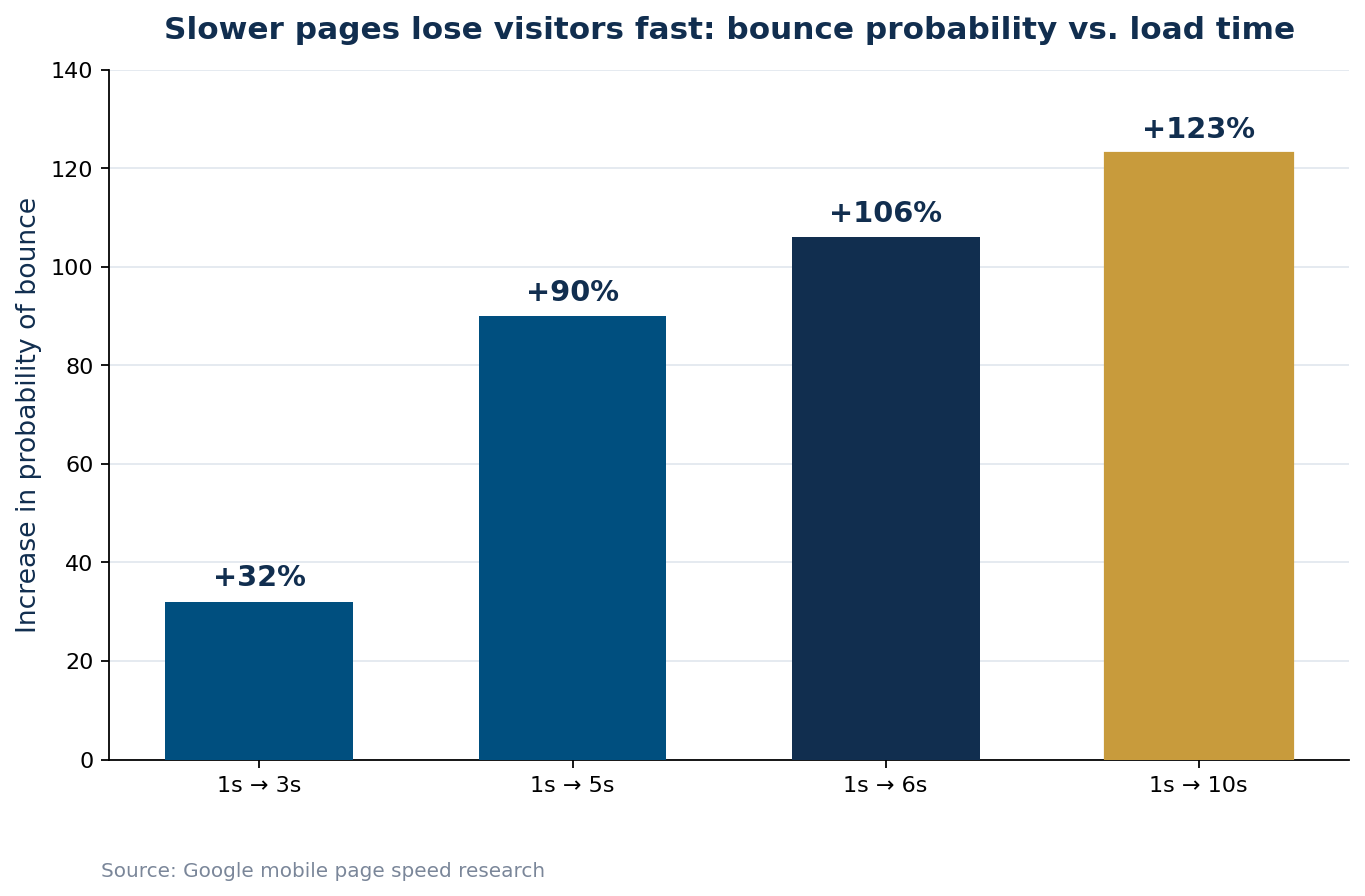
Figure 1: The longer a page takes to load, the more likely a visitor is to leave before it finishes.
The 12 most common performance killers (and how to fix each)
Here are the twelve issues I diagnose most frequently, ranked roughly by how often they are the primary culprit. The table gives you the symptom, the impact, and the fix so you can hand it straight to whoever maintains your site.
| # | Performance killer | Typical impact | How to fix it |
|---|---|---|---|
| 1 | Unoptimized images | Largest single source of page weight | Compress, resize to display dimensions, serve WebP/AVIF |
| 2 | Too much JavaScript | Blocks rendering and interactivity | Remove unused scripts, code-split, defer non-critical JS |
| 3 | Render-blocking CSS/JS | Delays first paint | Inline critical CSS, defer or async the rest |
| 4 | No browser or server caching | Repeat visits reload everything | Set cache headers, enable page/object caching |
| 5 | Cheap or overloaded shared hosting | Slow server response (TTFB) | Move to quality managed or cloud hosting |
| 6 | No CDN | Slow for distant users | Put static assets behind a CDN |
| 7 | Too many third-party scripts | Chat, analytics, ad tags stack up | Audit and remove; load tags asynchronously |
| 8 | Uncompressed text assets | HTML/CSS/JS sent full size | Enable Gzip or Brotli compression |
| 9 | Excessive HTTP requests | Each file adds latency | Bundle, combine, and remove unused assets |
| 10 | No lazy loading | Off-screen media loads immediately | Lazy-load below-the-fold images and iframes |
| 11 | Slow database / backend queries | Dynamic pages hang | Add indexes, cache queries, optimize plugins |
| 12 | Redirect chains | Extra round trips per hop | Point links directly to the final URL |
The pattern is clear: most slowness comes from shipping too many bytes and doing too much work in the browser. Nothing illustrates that better than JavaScript. According to the HTTP Archive’s 2024 Web Almanac, the median desktop page now ships about 620 KB of JavaScript and the median mobile page about 570 KB — well beyond the roughly 365 KB budget associated with a page that loads quickly at the 75th percentile.
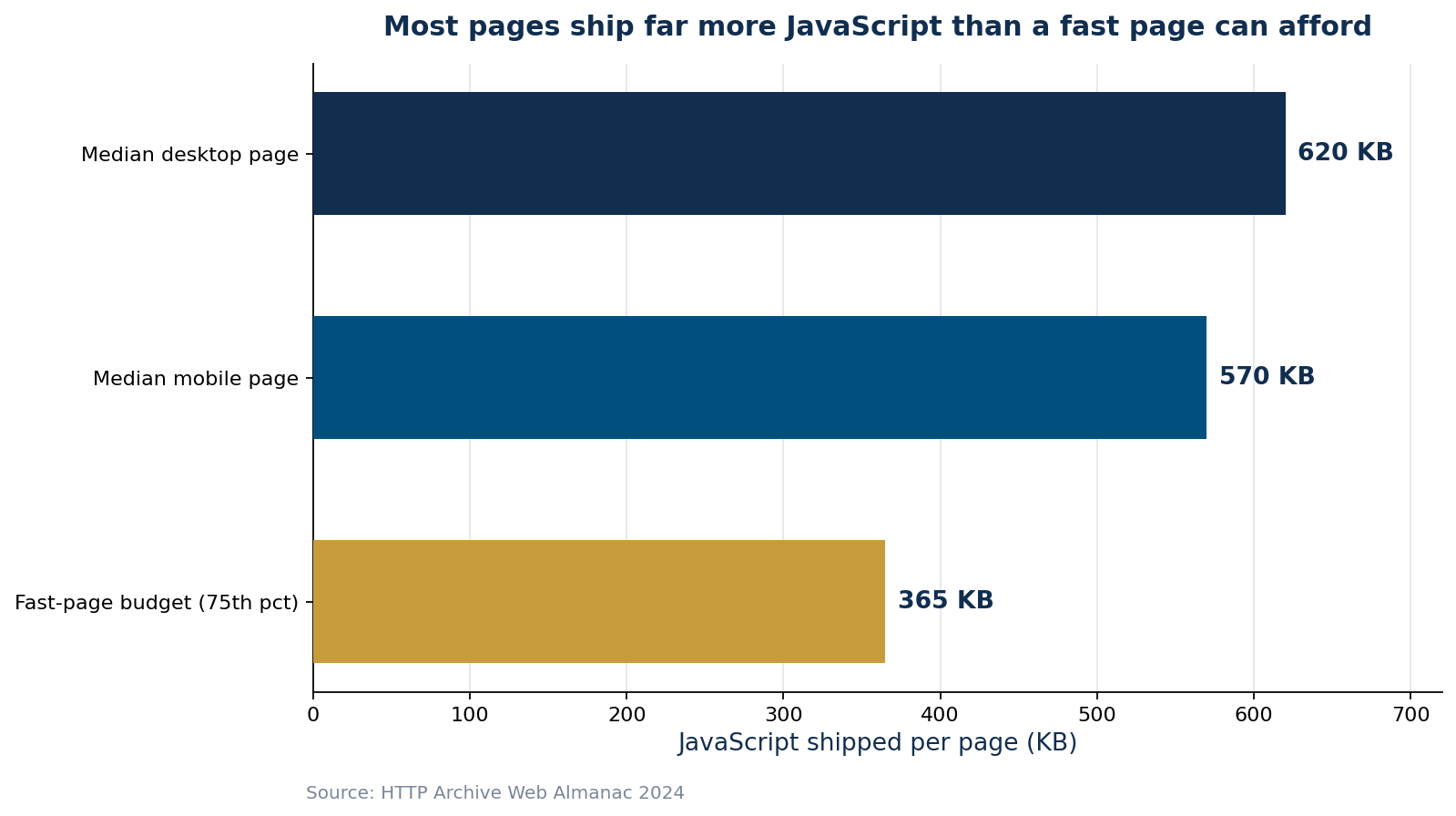
Figure 2: The typical page ships far more JavaScript than a genuinely fast page can afford.
- Bounce probability rises 32% as load time goes from 1 to 3 seconds and 90% by 5 seconds (Google).
- The median page ships ~620 KB of JavaScript — nearly double a fast-page budget (Web Almanac 2024).
- Images and JavaScript are almost always the two biggest levers; fix those first.
How to diagnose what is actually slowing your site
Guessing wastes money. Before changing anything, measure with real tools so you know which of the twelve killers you actually have. I run every site through Google PageSpeed Insights and Lighthouse, then confirm with field data from the Chrome User Experience Report. Those same tools power the metrics I break down in our guide to Core Web Vitals in 2026, which is the standard Google uses to judge whether a page delivers a good experience.
- Run PageSpeed Insights on your three most important pages, not just the homepage.
- Separate lab data (Lighthouse) from field data (real users) — they often disagree.
- Check the “Opportunities” and “Diagnostics” sections; they map directly to the killers above.
- Test on a throttled mobile connection, because that is how most people experience your site.
- Re-test after each fix so you know what actually worked.
When optimization is not enough
Sometimes the problem is structural: a bloated theme, a pile of conflicting plugins, or a cheap page builder that ships megabytes of unused code on every view. When the foundation is the bottleneck, incremental tuning only gets you so far. That is the same trade-off we cover in the hidden costs of cheap website builders — the upfront savings often show up later as a permanently slow, hard-to-fix site. In those cases a clean, purpose-built front end almost always outperforms endless patching.
A realistic optimization roadmap
When a client asks me to make their site faster, I do not attack all twelve killers at once. I sequence the work so the biggest wins land first and each change can be measured on its own. The order below is what I follow for a typical business website, and it also keeps the project affordable because the cheapest fixes usually deliver the largest early gains.
The first week is almost always about weight: compressing and correctly sizing images, enabling Gzip or Brotli compression, and turning on caching. These changes are low-risk, require no redesign, and frequently cut load time by a third or more. The second phase tackles JavaScript — auditing third-party tags, deferring non-critical scripts, and removing code that no longer earns its place. This phase takes more care because scripts can have hidden dependencies, so I test after every change. Only in the third phase, if the numbers still fall short, do I look at deeper structural issues like hosting quality, a content delivery network, or the backend queries behind dynamic pages. Because ongoing performance also depends on how a site is maintained over time, it is worth understanding what a website really costs to maintain per year before you commit to a platform.
Throughout, the discipline that matters most is measurement. Every fix gets a before-and-after reading on the same page and the same connection, so you always know which change moved the needle and which was noise. That is how a vague complaint — “the site feels slow” — becomes a short, prioritized list of specific, provable improvements.
Frequently Asked Questions
Why is my website suddenly slow when it used to be fast?
Sudden slowdowns are usually caused by a recent change: a new plugin or third-party script, a large uncompressed image added to a page, a hosting resource limit being hit, or a software update. Compare what changed around the time speed dropped, and test the affected pages in PageSpeed Insights to isolate the new bottleneck.
What is a good page load time in 2026?
Aim for a Largest Contentful Paint under 2.5 seconds and a fully interactive page in under 3 seconds on mobile. Roughly 53% of mobile visitors abandon pages that take longer than three seconds, so three seconds is a practical upper limit, not a goal.
Does website speed really affect Google rankings?
Yes. Page experience, measured through Core Web Vitals, is a confirmed Google ranking signal. Speed rarely outranks great content on its own, but between two similar pages the faster one has an edge — and speed strongly affects the engagement metrics that influence rankings indirectly.
Will a CDN fix a slow website?
A CDN helps by serving static files from servers closer to your visitors, which improves load times for geographically distant users. But it will not fix bloated JavaScript, huge images, or a slow backend. Treat a CDN as one layer of the solution, not a cure-all.
Should I optimize my current site or rebuild it?
Optimize first if the foundation is sound — compress images, clean up scripts, add caching, and upgrade hosting. Consider a rebuild when the slowness is structural: a heavy theme, conflicting plugins, or a page builder that ships excessive code on every page.
MEAN Consultors audits and rebuilds business websites for speed — from image and script optimization to a faster, purpose-built front end.