
Where Businesses Waste the Most Time (And Why Automation Fixes It)
Last updated: August 13, 2026 · By Joseph Olivas, Founder, MEAN Consultors · 8 min read
When I audit a business’s workflows, the owner usually expects me to find one big broken process. That’s almost never what we find. Instead it’s a hundred small leaks — five minutes retyping an order here, twenty minutes hunting for a file there — that quietly add up to entire salaries’ worth of lost hours every year. Here are the seven places the leaks are worst, and why automation, not harder work, is the fix.
The Data: Most of the Workday Isn’t the Actual Work
The research on this is remarkably consistent. Asana’s Anatomy of Work Index found that knowledge workers spend about 58% of their day on “work about work” — status meetings, app-switching, chasing approvals, searching for documents — leaving 33% for the skilled work they were hired to do and just 9% for strategy. McKinsey’s analysis of the social economy put a finer point on one slice of it: the average knowledge worker spends nearly two hours a day — about a fifth of the workweek — just searching for and gathering information.
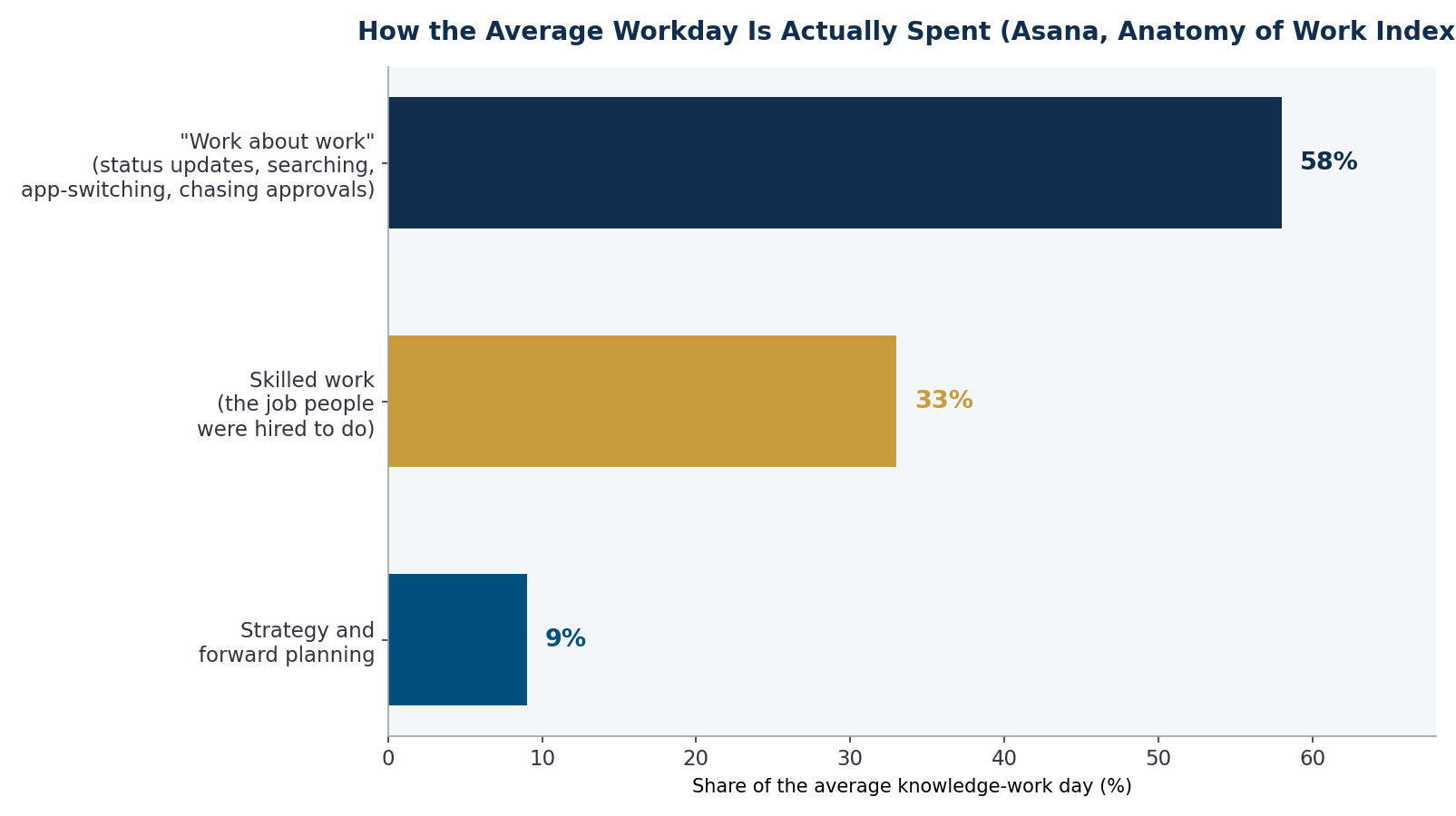
Figure 1: How the average knowledge-work day is actually spent (Asana, Anatomy of Work Index).
For a 10-person team at an average loaded cost of $35/hour, 58% coordination overhead represents over $400,000 a year in payroll going to work that produces nothing customers would pay for. You can’t eliminate all of it — some coordination is the price of working together — but a large share of it is mechanical, and mechanical is automatable.
The 7 Biggest Time Sinks (In the Order We Usually Find Them)
1. Manual data entry and re-entry between systems
Orders retyped from email into the ERP. Invoices keyed from PDFs into accounting. CRM records copied into spreadsheets for reporting. Every double-entry point costs time twice — once to do it and again to fix the inevitable typos. I quantified this one in detail in the real cost of manual data entry; it’s consistently the single largest recoverable time sink we find.
2. Searching for information
Files in five places, answers buried in email threads, tribal knowledge in one veteran’s head. That McKinsey two-hours-a-day figure lands here — and it’s the sink people notice least because it’s spread across every task.
3. Status updates and chasing approvals
“Where are we on this?” meetings, follow-up emails, quotes and POs sitting in inboxes for days. The work is done; the coordination around it isn’t.
4. Assembling reports by hand
Exporting from three systems, pasting into a spreadsheet, reconciling numbers that don’t match, formatting a deck — every week or month, forever. Hours of copying that a scheduled pipeline does in seconds.
5. Scheduling and calendar tennis
Six emails to book one call, multiplied across every customer-facing role in the company.
6. Answering the same questions repeatedly
“Where’s my order?” “What’s your pricing?” “How do I reset my password?” Internally and externally, the same twenty answers consume real staff hours every day.
7. Copy-paste bridges between apps that don’t talk
The invisible glue work: downloading a CSV from one tool to upload into another, forwarding attachments to the right folder, updating two trackers with the same status. Each instance is a two-minute task; the pattern is a part-time job.
- Roughly 58% of the average knowledge-work day goes to coordination overhead, not skilled work (Asana, Anatomy of Work).
- Knowledge workers spend close to two hours a day just finding information (McKinsey).
- The biggest sinks share three traits — repetitive, rule-based, cross-system — which is precisely the profile automation handles best.
Why Automation Fixes This (When Hiring and Hustle Don’t)
The instinctive responses to overload — work longer, hire more, run better meetings — all fail against these seven sinks, because the sinks scale with headcount and volume. Add a person, and you’ve added another inbox, another calendar, another set of status updates. The overhead grows with the org.
Automation attacks the structure instead. Connect the systems, and the data entered once appears everywhere it’s needed — the copy-paste bridges and re-keying disappear rather than getting faster. Route documents and approvals automatically, and the chasing stops. Pipe live data into a dashboard, and the monthly report assembles itself. Put an AI assistant in front of the twenty most common questions, and they stop reaching humans at all. None of this requires bleeding-edge technology; most of it is workflow plumbing plus, increasingly, a layer of AI for the messy parts like reading invoices or drafting replies — the same building blocks I catalogued in the 10 most automatable tasks in a growing business.
Where to Start: The Priority Matrix
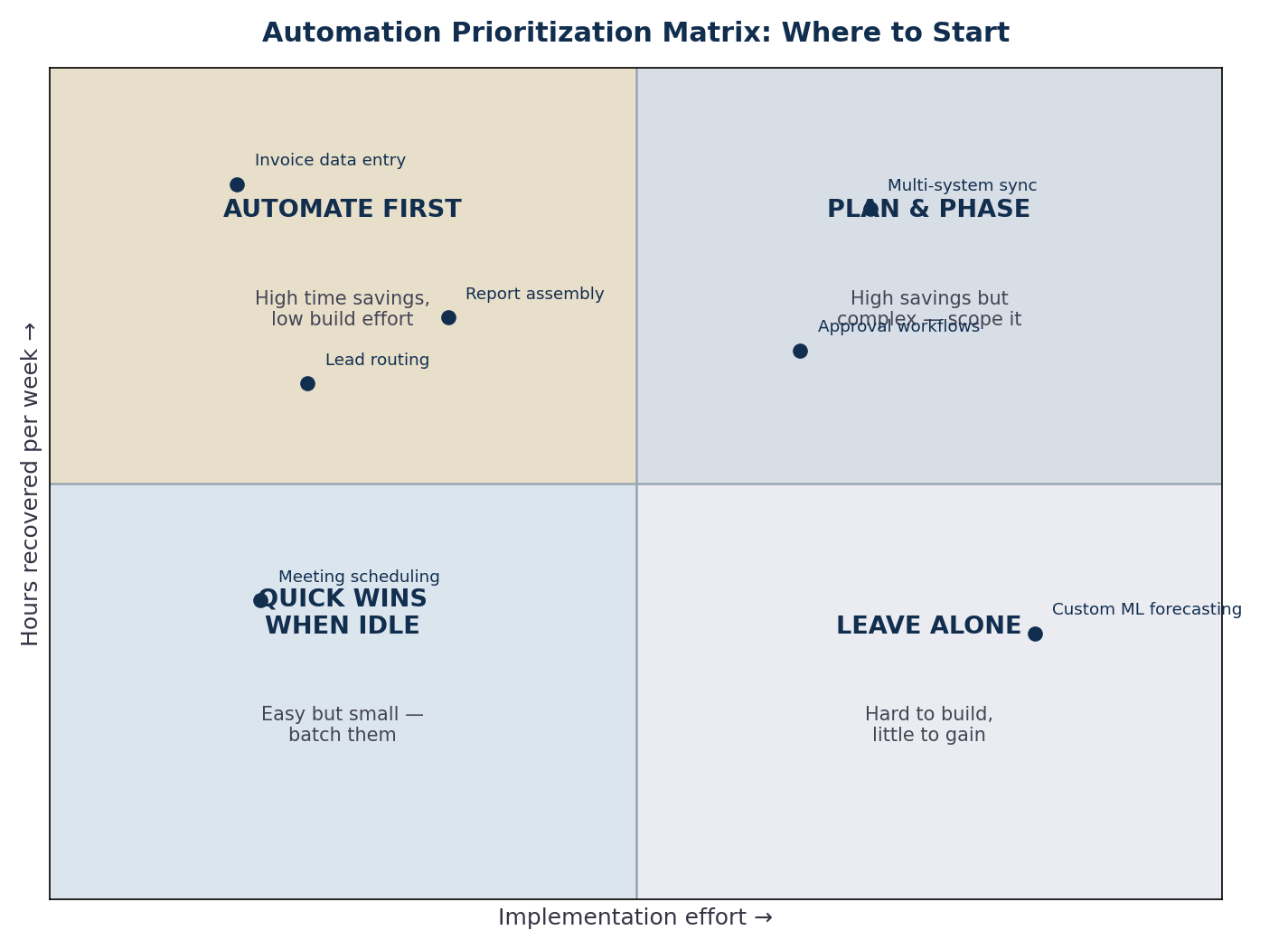
Figure 2: The prioritization matrix we use in automation audits — start in the top-left, where recovered hours are high and build effort is low.
The mistake most businesses make is starting with the most annoying task instead of the best-returning one. The discipline is simple: for each candidate, estimate hours recovered per week and implementation effort, then plot it. Invoice data entry, lead routing, and report assembly almost always land in the “automate first” quadrant. Deep multi-system synchronization is usually worth doing but needs phasing. And some tasks — genuinely judgment-heavy, low-frequency work — belong in “leave alone,” at least for now.
- Track one normal week. Have each person note tasks that are repetitive, rule-based, or involve moving data between systems. No process theater — a running list is enough.
- Price each sink. Hours per week × loaded hourly cost × 52. Seeing “$18,000/year” next to “retyping orders” changes the conversation.
- Plot effort honestly. Off-the-shelf connectors are days; custom integrations are weeks; anything touching a legacy system needs scoping first.
- Automate the top-left quadrant first. Bank the early wins — they fund and justify the harder phases.
- Measure recovered hours after 60 days. Compare against the baseline week; that delta is your ROI numerator.
What the Payback Looks Like
Because these sinks are payroll leaks, the returns are straightforward to model: hours recovered times loaded cost, minus build and subscription costs. For the common first-wave projects — document data extraction, lead routing, report pipelines, FAQ deflection — payback periods of a few months are typical, which is why we always start the engagement with the math, not the tools. If you want to run that calculation properly, I walked through the full method in how to calculate ROI on a business automation project — and MEAN Consultors’ AI & automation practice runs exactly this kind of audit as the first step of every engagement.
Frequently Asked Questions
What do businesses waste the most time on?
Coordination overhead — manual data entry between systems, searching for information, status updates and approval chasing, manual report assembly, scheduling, and repeatedly answering the same questions. Research from Asana puts this “work about work” at roughly 58% of the average knowledge worker’s day.
How do I figure out where my team is losing time?
Track one representative week: each person keeps a running list of tasks that feel repetitive, rule-based, or involve copying information between systems. Then price each item (hours × loaded cost × 52) and plot it on an effort-versus-savings matrix. The audit takes a week of light logging and reliably surfaces the top three targets.
Which wasted-time problems should be automated first?
The ones combining high recovered hours with low implementation effort — in our audits, that’s most often invoice/order data entry, lead routing and follow-up, and recurring report assembly. Complex multi-system synchronization usually pays off too, but belongs in a planned second phase.
Does fixing this require AI, or just regular automation?
Both, in layers. Moving structured data between systems is classic workflow automation and needs no AI at all. AI earns its place at the messy edges — reading unstructured documents, drafting replies, answering natural-language questions. Most businesses get the best returns from plumbing first, AI second.
How much does it cost to automate these workflows?
It ranges from low-cost no-code connectors (hundreds per month) to custom integration projects (five figures) depending on how many systems are involved and whether legacy software is in the mix. The better question is net cost: first-wave projects typically recover enough payroll hours to pay for themselves within a few months.
MEAN Consultors’ automation audits map your biggest time sinks, price them in payroll dollars, and rank the fixes by payback.