
Modernizing Desktop Applications Into Web-Based Platforms
Last updated: August 13, 2026 · By Joseph Olivas, Founder, MEAN Consultors · 8 min read
Somewhere in your office — or in a VM nobody wants to touch — there’s probably a desktop application the business can’t live without: a Visual Basic order-entry tool, an Access database with two decades of formulas, a Delphi or WinForms app the original developer no longer supports. It still works, which is exactly why it’s dangerous: every year it gets harder to run, harder to secure, and harder to connect to everything else you use. This guide walks through when a desktop-to-web move makes sense, the three paths to get there, and how to do it without disrupting the operation that depends on the old system.
Why Desktop Applications Become a Liability
Desktop software made sense when work happened at one desk on one machine. Today its constraints compound. Installation and updates have to be managed per machine. Remote and field employees can’t use it without VPNs or remote-desktop workarounds. It rarely talks to the cloud tools the rest of your stack runs on. OS upgrades break it, and the pool of developers fluent in its stack shrinks every year — a hiring problem that gets worse, not better.
There’s also a balance-sheet cost that’s easy to ignore. McKinsey’s research on technical debt found that companies pay a significant “tech debt tax” — a large share of every technology dollar goes to servicing old systems rather than building new capability. Aging desktop applications are among the purest examples: money spent keeping them alive buys zero new capability. If you’re seeing the warning signs I covered in signs your legacy software is costing you more than a rebuild would, the desktop-to-web question is really a when, not an if.
The Three Modernization Paths (And When Each Fits)
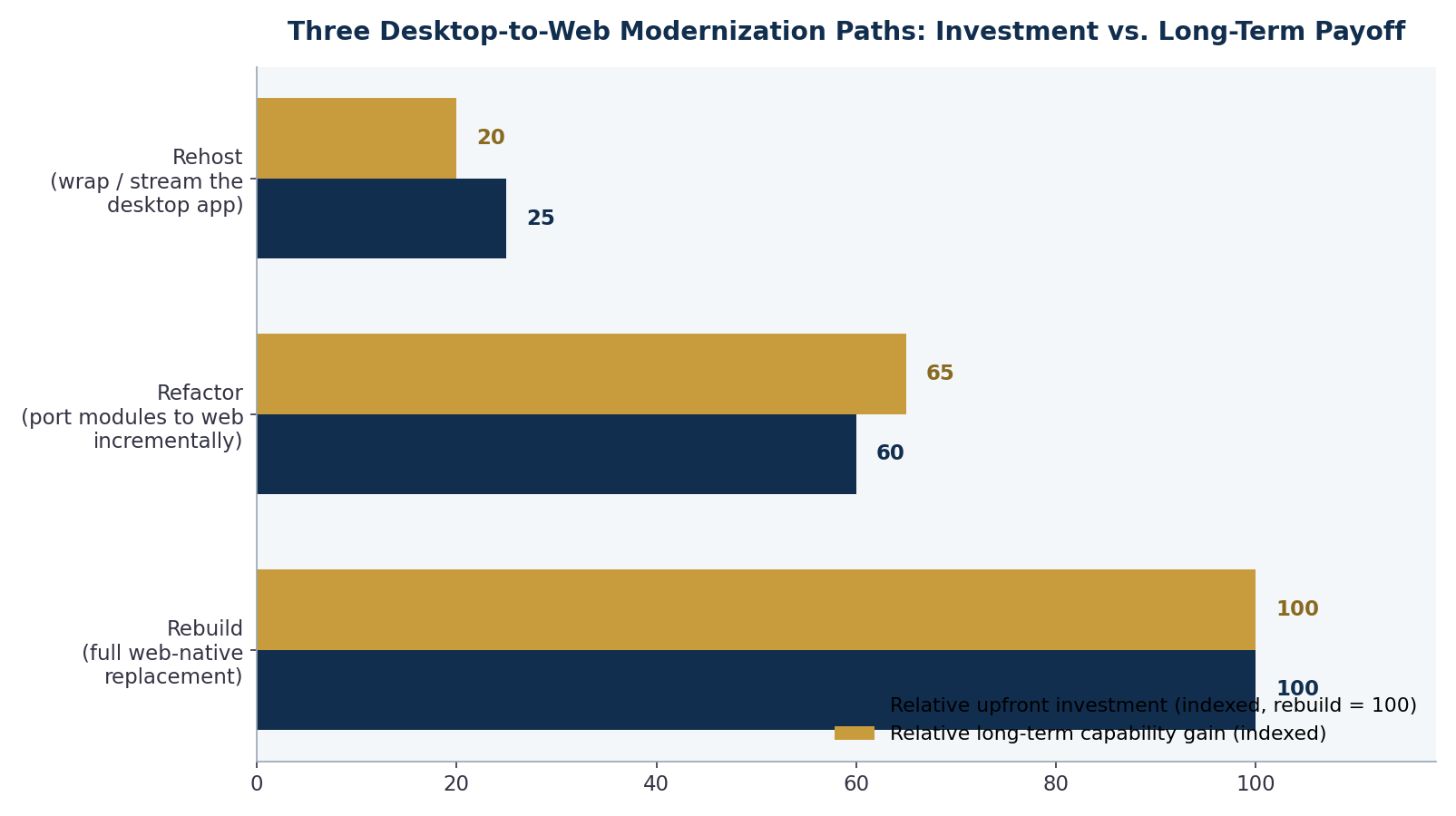
Figure 1: The three paths compared — rehosting is cheap but changes little; rebuilding costs the most and delivers the most; refactoring sits deliberately in between (indexed, rebuild = 100).
| Path | What it means | Best when | Watch out for |
|---|---|---|---|
| Rehost / wrap | Run the existing app via streaming (Citrix-style) or a thin wrapper, no code changes | You need remote access fast and the app is otherwise fine | All the old limitations remain; you’ve added hosting cost, not capability |
| Refactor / port incrementally | Rebuild the app module by module as a web application, retiring desktop screens as web versions ship | The business logic is sound but the delivery model is obsolete — the most common case | Requires discipline about scope; the two systems must share one source of truth during transition |
| Rebuild web-native | Design a new web platform from requirements up, migrating data at cutover | The old app no longer matches how the business works, or the code is unsalvageable | Highest cost and longest time-to-first-value; resist recreating every legacy quirk |
The incremental refactor path is the one we recommend most often at MEAN Consultors’ software development practice, because it applies the same logic as the strangler fig approach I wrote about in modernizing software without a risky big-bang rewrite: the old system keeps running as the system of record while each new web module proves itself in production. Cloud providers converge on the same guidance — AWS’s application modernization overview describes the same rehost-refactor-rebuild spectrum for exactly this reason: it lets you match investment to risk instead of betting everything on one launch date.
- Rehosting solves access, not capability — it’s a bridge, not a destination.
- Incremental refactoring ships value in months (first module live) instead of holding all value hostage to a single cutover date.
- Data is the hard part: plan the migration and reconciliation before writing application code, not after.
The Six-Step Desktop-to-Web Roadmap
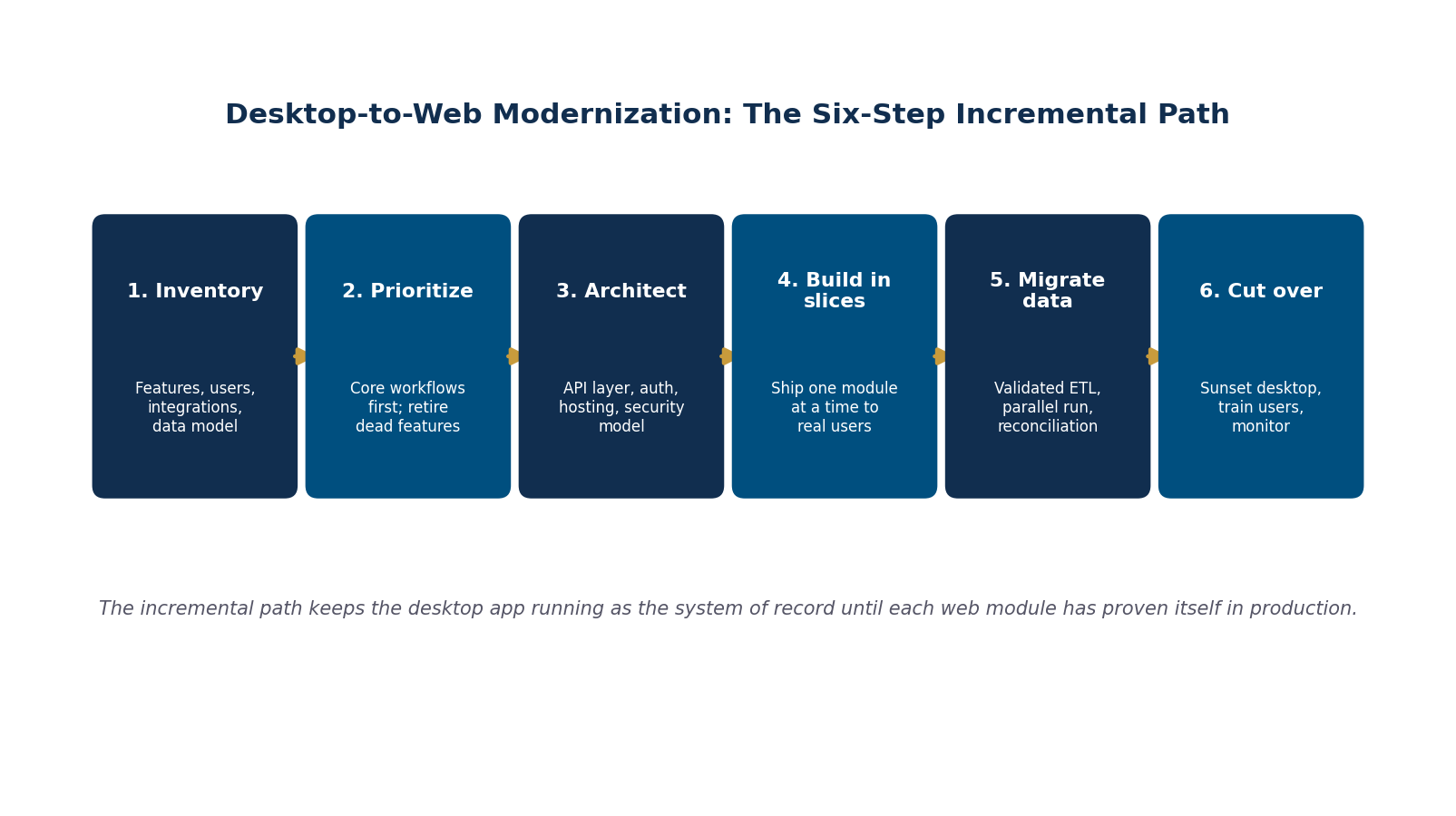
Figure 2: The six-step incremental path — the desktop app stays the system of record until each web module has proven itself.
1. Inventory what the app actually does. Not what the documentation says — what users actually use. Screen recordings and database query logs reveal the truth. In most legacy apps, 20–30% of features carry essentially all the usage, and knowing which ones changes the budget dramatically.
2. Prioritize workflows, not screens. Pick the workflow where web access pays off fastest — usually the one that currently forces people back to a specific desk — and ship it first.
3. Architect the foundation once. An API layer over the existing database, modern authentication, and a hosting/security model. This is where you decide how the web modules and the desktop app coexist — and getting the API layer right is what makes every subsequent module cheaper. (If your systems need to talk to each other anyway, this layer is the same investment I described in API integration 101.)
4. Build in slices. One module at a time, shipped to real users, with feedback folded into the next slice. Each slice retires a piece of the desktop app.
5. Migrate data with validation. Legacy databases hide decades of undocumented quirks — duplicate records, magic values, fields repurposed three owners ago. Run validated ETL with a parallel-run period and reconciliation reports. I published the complete checklist in data migration checklist: moving off legacy systems safely.
6. Cut over and sunset. Train users, monitor closely, keep the desktop app in read-only mode for a defined retention window, then decommission it — and stop paying its taxes.
What It Costs, How Long It Takes, and What You Get Back
For a typical line-of-business desktop app — order management, scheduling, quoting, inventory — an incremental modernization runs 4 to 12 months, with the first module usually live inside 8–12 weeks. Budgets vary too widely for a single number, but the structure is predictable: the API-and-authentication foundation is a fixed upfront cost, and each module after that is an increment you can schedule against budget cycles. The payback comes from four directions at once: IT time no longer spent on per-machine installs and breakage, work that can finally happen outside the office, integrations with the rest of your stack, and a hiring pool measured in millions of web developers instead of a shrinking guild of legacy specialists.
Frequently Asked Questions
How long does it take to convert a desktop application to a web application?
For most business applications, 4–12 months on the incremental path, with the first working web module live in 8–12 weeks. A small single-purpose tool can be faster; a deeply integrated ERP-style system can take longer. The biggest variables are data complexity and how many features genuinely need to survive the move.
Can we keep using the desktop app during the modernization?
Yes — that’s the core of the incremental approach. The desktop application remains the system of record while web modules ship one at a time, sharing the same database or synchronizing through an API layer. Users transition workflow by workflow instead of facing a hard switch.
Should we just move the app to Citrix or a remote desktop instead?
Streaming solves exactly one problem: remote access. It changes nothing about maintainability, integrations, user experience, or the shrinking talent pool for the underlying stack — and it adds recurring hosting and licensing costs. It’s a reasonable bridge while a real modernization is underway, and a poor permanent answer.
What happens to our data during the move?
The data is usually the most valuable part of the legacy system, and it moves through a validated ETL process: extract from the legacy database, clean and map it to the new schema, load it, then reconcile record counts and financial totals between old and new. A parallel-run period — both systems live, results compared — catches what testing misses.
Is a web app secure enough to replace our internal desktop software?
Done properly, a modern web application is more secure than an aging desktop one: centralized patching instead of unpatched workstations, modern authentication with role-based access and MFA, encrypted traffic, and audit logs. Most legacy desktop apps predate all of these. The security model is designed in step three of the roadmap, not bolted on.
MEAN Consultors modernizes legacy desktop applications into secure, integrated web platforms — incrementally, without a risky big-bang cutover.