
Signs Your Legacy Software Is Costing You More Than a Rebuild Would
Last updated: August 5, 2026 · By Joseph Olivas, Founder, MEAN Consultors · 9 min read
No one budgets for legacy software decay. The system that ran the business fine in 2015 still technically runs it today — which is exactly why the costs hide so well. They show up as hours, workarounds, turnover, and deals you couldn’t serve, not as a line item. This post lists the signs we look for when a client asks whether it’s time to stop patching, and how to turn a gut feeling into a defensible financial comparison. When the answer is “rebuild,” our software development team spends much of its time on precisely these projects.
The real cost structure of “keeping the lights on”
Legacy costs are structural, not incidental. The U.S. Government Accountability Office found that federal agencies spend roughly 80% of their ~$100 billion annual IT budget on operating and maintaining existing systems — much of it legacy — leaving a fraction for modernization. Private-sector businesses rarely measure it, but the pattern repeats at every scale.
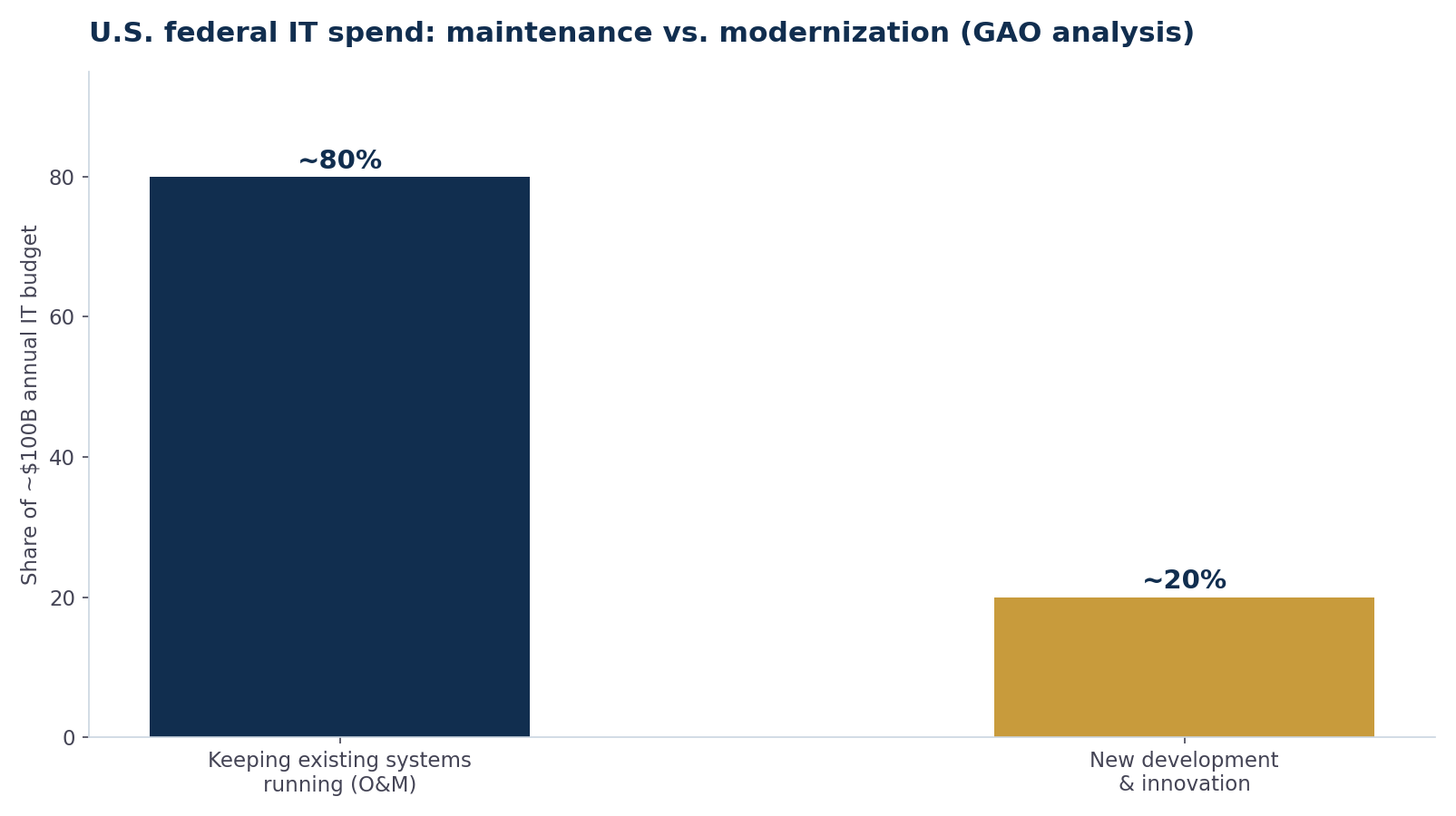
Figure 1: GAO analysis of U.S. federal IT spending — the overwhelming majority goes to maintaining existing systems rather than building new capability.
Developer time tells the same story. Stripe’s “Developer Coefficient” research estimated engineers spend around 42% of their working hours dealing with maintenance, bad code, and technical debt. If you employ or contract developers, nearly half of what you pay them may be going to the past instead of the future.
- GAO found ~80% of federal IT spending goes to operations and maintenance of existing systems — a useful proxy for how legacy consumes budgets everywhere.
- Stripe’s research puts developer time lost to maintenance and technical debt at roughly 42% of the work week.
- The correct comparison is rebuild cost vs. 3–5 years of total legacy cost: maintenance, workarounds, risk, and opportunity cost combined.
The 8 signs, in the order we check them
1. Maintenance eats most of your software spend
Add up licensing, hosting, support contracts, developer hours, and consultant fees for the current system over the last 12 months. If keeping the system alive costs more per year than roughly a quarter of what a rebuild would cost once, the five-year math almost always favors rebuilding.
2. The stack is end-of-life or unsupported
Unsupported frameworks, databases, and runtimes stop receiving security patches. From that point, every month of operation is unpriced risk — and compliance frameworks (PCI, HIPAA, SOC 2) treat unpatched components as findings, which can directly cost you contracts.
3. One person holds the keys
If a single developer — often the original author, sometimes already semi-retired — is the only person who can safely change the system, you have key-person risk that no support contract fixes. Ask the blunt question: if they were unavailable tomorrow, what breaks and for how long?
4. New features take months, not weeks
Velocity decay is the clearest economic signal. When a change that should take days takes a quarter — because every modification risks breaking something undocumented — you’re paying enterprise development prices for maintenance-grade output.
5. Integrations happen by hand
Staff re-keying data between the legacy system and your CRM, accounting, or e-commerce platform is an integration failure wearing a payroll disguise. Modern systems talk over APIs; if yours can’t, count the hours. (Our API integration guide covers what connected systems should look like.)
6. It can’t leave the building
Systems that only run on one machine, one office network, or one browser version block remote work, field access, and disaster recovery. If your continuity plan for the system is “hope nothing happens to that server,” that’s a sign.
7. Hiring around it is getting harder
Developers for aging stacks get scarcer and more expensive every year, and strong candidates decline jobs maintaining them. Recruiting friction is a compounding legacy cost that never appears in the IT budget.
8. It caps the business, not just the tech
The most expensive sign is the quietest: deals you don’t bid, customers you can’t onboard, product lines you can’t launch because “the system can’t handle it.” When operations bends around software instead of software bending around operations, opportunity cost has overtaken maintenance cost.
Turning the signs into a number
Score the comparison over a three-to-five-year window:
| Cost category | Keep the legacy system | Rebuild |
|---|---|---|
| Direct maintenance (licenses, hosting, support, dev hours) | Annual, rising ~10–20%/yr as scarcity grows | Lower steady-state after year 1 |
| Manual workarounds (staff hours × loaded cost) | Ongoing, grows with volume | Largely eliminated by automation/integrations |
| Risk exposure (security, compliance, key-person) | Compounds annually | Reset to managed baseline |
| Opportunity cost (blocked features, lost bids) | Hardest to measure, often largest | Converted into new revenue capability |
| One-time build cost | — | Significant, but amortized over system life |
Most businesses that run this exercise honestly find the crossover point sits earlier than they assumed — commonly two to three years. The rebuild is expensive once; the legacy system is expensive forever.
Patch, replatform, or rebuild — a repeatable decision

Figure 2: The annual decision loop we recommend — audit the same metrics every year, because legacy costs compound quietly.
The audit doesn’t need to be elaborate. Once a year, record four numbers: total maintenance spend, hours of manual workaround per month, average lead time for a feature request, and the count of blocked business initiatives. If all four are flat, patch and move on. If two or more are trending up, price the alternatives seriously — the earlier you catch the curve, the more options you have. And if you’re weighing a rebuild against buying something off the shelf, our build vs. buy framework is the companion exercise.
Frequently Asked Questions
How long does legacy software typically last before replacement makes sense?
There’s no fixed lifespan — well-maintained systems on supported stacks can run 15+ years, while a poorly built system can hit the crossover in five. The trigger isn’t age; it’s when annual total cost (maintenance + workarounds + risk + opportunity cost) exceeds roughly 20–30% of a one-time rebuild, because at that rate the rebuild pays for itself within three to five years.
Is it cheaper to rewrite software or keep maintaining it?
In the short term, maintaining is almost always cheaper — that’s why the decision gets deferred. Over a three-to-five-year window, the math flips once maintenance, manual workarounds, and blocked opportunities are counted. GAO’s finding that ~80% of federal IT spend goes to keeping existing systems running shows how completely maintenance can crowd out new capability.
What’s the difference between replatforming and rebuilding?
Rebuilding replaces the system wholesale with new software. Replatforming migrates the existing system incrementally — modernizing the infrastructure, extracting services one at a time, or putting an API layer over the legacy core — while the business keeps running on it. Replatforming suits systems whose business logic is sound but whose technology is outdated.
How do I estimate what a rebuild would cost?
Scope it like a new product: inventory the workflows the current system actually supports (not its full feature list — most legacy systems carry dead features), define integrations, and get fixed-scope estimates for a first phase that replaces the highest-cost workflows. Beware of anyone who quotes a full rebuild without discovery.
Can we rebuild without disrupting daily operations?
Yes — it’s the norm, not the exception. The standard approach runs the new system in parallel: build the replacement for one workflow, run both until the new one proves out, migrate, and repeat. Big-bang cutovers are where rebuild horror stories come from, and they’re avoidable.
MEAN Consultors runs legacy system audits that put real numbers on maintenance, risk, and rebuild cost — so the decision makes itself.