
B2B E-commerce Platform Features You Can’t Skip: A Build Guide for 2026
Last updated: August 6, 2026 · By Joseph Olivas, Founder, MEAN Consultors · 8 min read
I’ve scoped enough e-commerce projects at MEAN Consultors to notice a pattern: companies budget for a B2B platform as if it were a consumer store with bigger carts. It isn’t. The feature set that makes B2B buyers actually adopt a portal is fundamentally different, and the features most often cut “for phase two” are usually the ones that determine whether the platform gets used at all. This guide covers the non-negotiables, the order I recommend building them in, and what it costs you to skip each one.
Why B2B E-commerce Isn’t “B2C With Bigger Carts”
Consumer e-commerce assumes one person, one card, one price list. B2B assumes none of that. A single customer might be a 40-person purchasing department where a field technician builds the order, a manager approves it, and accounts payable settles it on net-45 terms against a negotiated contract price. McKinsey’s research on B2B buying found that winners in B2B sales offer e-commerce as one channel among many — but buyers now expect that digital channel to handle the same complexity their sales rep does, not a dumbed-down retail experience.
That expectation is the design constraint for everything below. If your platform can’t represent your actual commercial relationships — the pricing you agreed to, the people authorized to buy, the terms you extend — buyers will use it once, hit a wall, and call their rep. Adoption, not launch, is the real finish line. If you’re still deciding what to build on, our Shopify vs. WooCommerce vs. custom e-commerce comparison breaks down when platform templates stop being enough.
The Seven Features You Can’t Skip
1. Company accounts with roles and approval workflows
The account model is the foundation everything else sits on. B2B accounts belong to companies, not individuals: multiple buyers per account, role-based permissions (browse-only, order up to a limit, approve orders), and configurable approval chains. If a $15,000 order needs a manager’s sign-off, the platform — not an email thread — should route it.
2. Contract and customer-specific pricing
Almost every established B2B seller has negotiated pricing: volume tiers, contract rates, customer-group discounts. Your platform must show each logged-in buyer their price, not list price. This is the single most common reason B2B portals fail adoption — a buyer who sees the wrong price once stops trusting every number on the site.
3. Quote and RFQ workflows
Large or configured orders often start as a request for quote, not a cart. A quote-to-order workflow lets buyers submit an RFQ from the catalog, lets your team price it, and converts the approved quote into an order with one click — keeping the negotiation on-platform instead of in inboxes.
4. Bulk ordering and rapid reorder
B2B buyers are repeat buyers. They need CSV upload, SKU quick-entry grids, saved order templates, and one-click reorder from history. A distributor customer ordering 300 line items will not click through 300 product pages.
5. Payment terms, credit limits, and invoicing
Cards are the minority in B2B. The platform needs purchase orders, net terms with per-account credit limits, partial payments, and clean invoice handoff to your accounting system.
6. ERP and CRM integration
Inventory, pricing, customers, and orders all live in your ERP; deals and contacts live in your CRM. Without real-time (or near-real-time) sync, the portal shows stale stock and wrong prices — and staff re-key orders by hand. We covered the architecture options in our CRM, ERP, and e-commerce integration blueprint.
7. B2B-grade search and product data
Technical buyers search by part number, spec, and application, not lifestyle keywords. Faceted search over clean, attribute-rich product data is what makes a 50,000-SKU catalog usable.
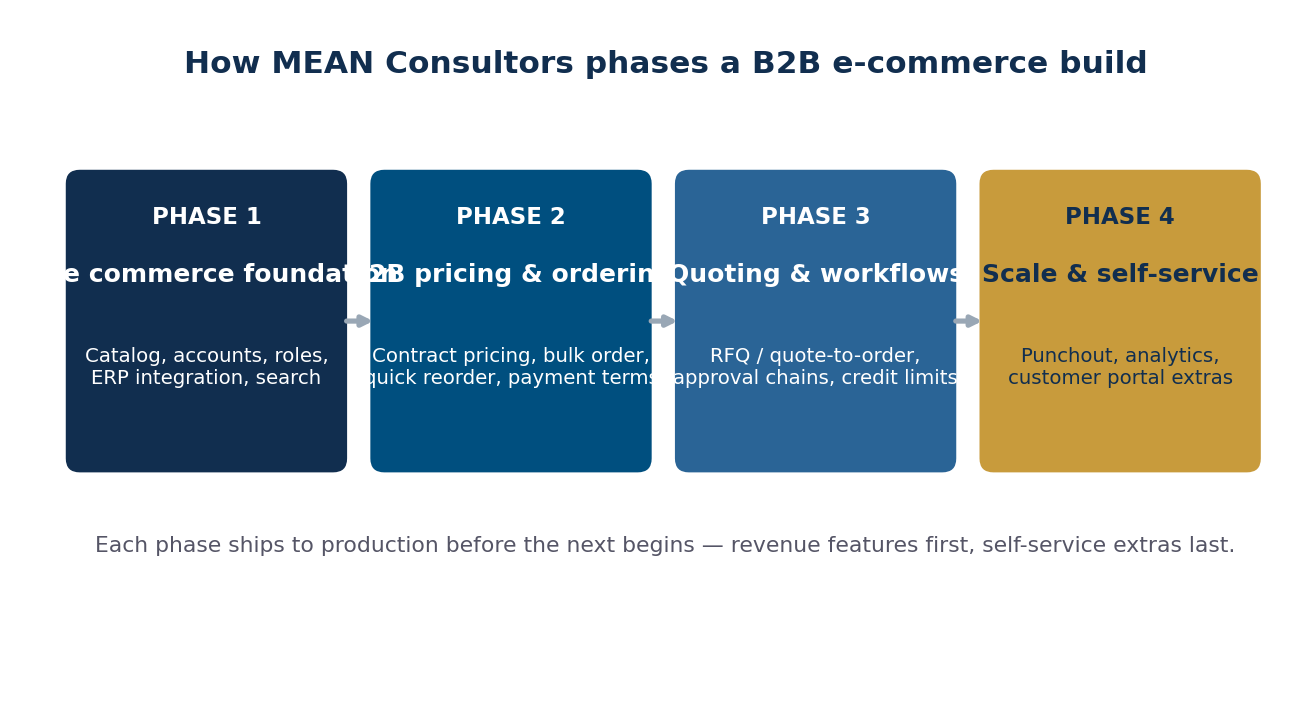
Figure 1: How we phase a B2B e-commerce build — each phase ships before the next begins.
What It Costs to Skip Each Feature
Here’s the feature-by-feature adoption risk, based on the failure modes we see when auditing underperforming B2B platforms:
| Feature | What happens if you skip it | Who feels it first |
|---|---|---|
| Company accounts & roles | Shared logins, no purchase control, compliance risk | Your customer’s finance team |
| Contract pricing | Buyers see wrong prices, lose trust, call their rep | Every negotiated account |
| Quote/RFQ workflow | Large orders stay in email; portal handles only small orders | Your highest-value deals |
| Bulk order & reorder | Repeat buyers find the portal slower than a phone call | Your most frequent customers |
| Payment terms & credit | Net-terms customers can’t check out at all | The majority of B2B volume |
| ERP/CRM integration | Stale stock, manual re-keying, order errors | Your own operations team |
| B2B search | Buyers can’t find parts they order monthly | Technical/spec-driven buyers |
- The features most often deferred — contract pricing, terms, and integration — are the ones that decide whether buyers adopt the portal or keep phoning their rep.
- 48% of online buyers abandon checkouts over unexpected extra costs (Baymard Institute), and B2B buyers are even less tolerant: they already know the price they negotiated.
- Phasing the build (foundation → pricing → quoting → self-service) gets revenue-critical features live first without a risky all-at-once launch.
Checkout and UX Still Decide Whether Orders Complete
B2B buyers are consumers after 5 p.m., and they bring consumer expectations to work. The Baymard Institute’s long-running research pegs average online cart abandonment near 70%, and the reasons map cleanly onto B2B failure modes: surprise costs, forced account friction, and checkouts that hide the total until the last step.
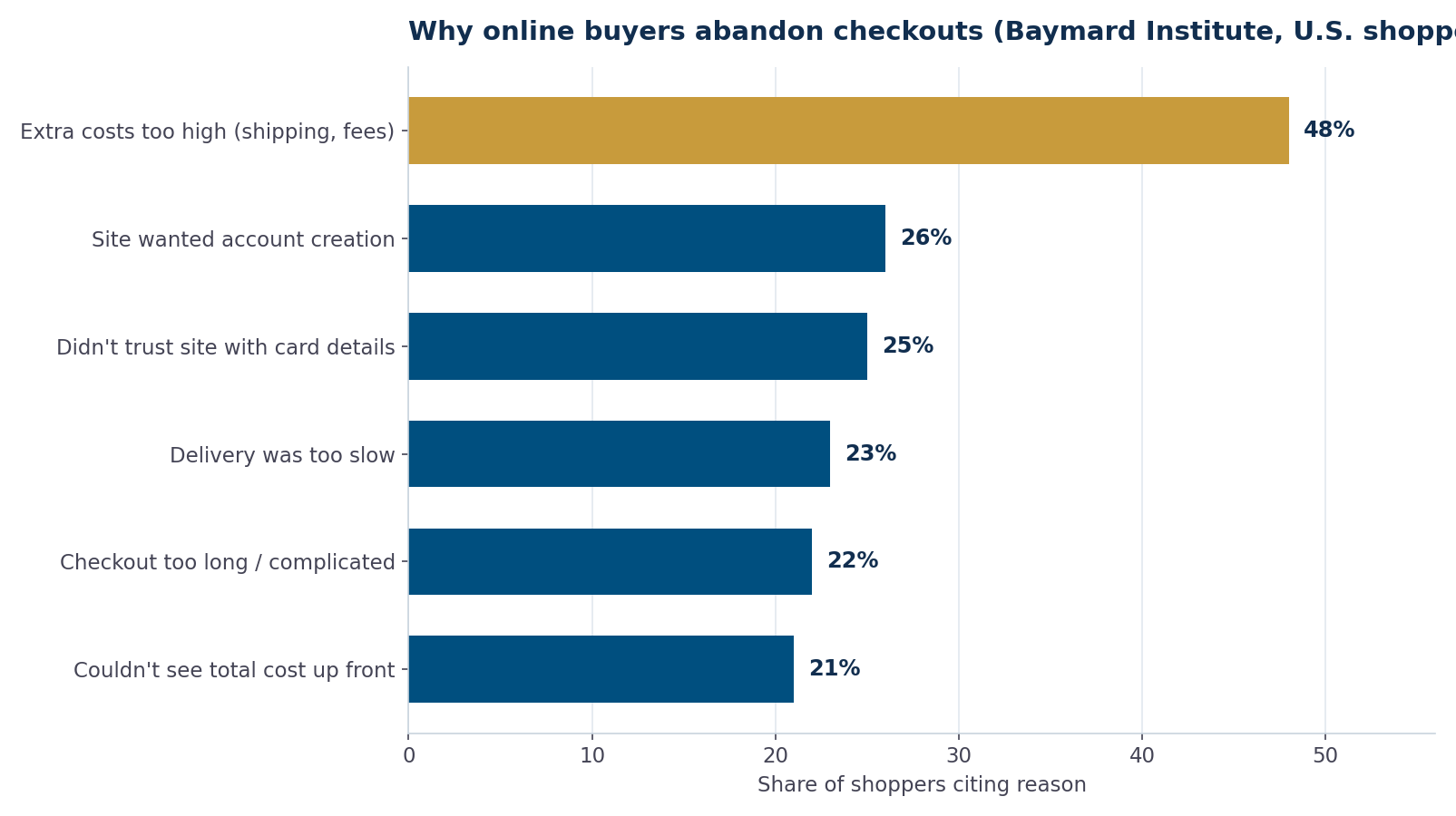
Figure 2: Reasons U.S. online shoppers abandon checkouts (Baymard Institute). In B2B, “couldn’t see total cost up front” translates directly to freight and contract-price transparency.
For B2B specifically, the fixes are: show contract pricing and estimated freight in the cart, never force a re-quote for standard items, and keep checkout to a single page for reorders. We went deeper on the mechanics in our guide to reducing cart abandonment with better checkout UX.
The Build Order That De-Risks the Project
You don’t need all seven features at launch — you need them in the right order. Here’s the sequencing checklist we use when a client engages our custom web development team for a B2B platform:
- Phase 1 — Foundation: catalog with clean product data, company account model, roles, ERP sync for stock and orders, faceted search.
- Phase 2 — Commercial reality: contract pricing, volume tiers, net terms and credit limits, bulk order grid and reorder.
- Phase 3 — Workflows: RFQ/quote-to-order, approval chains, order-level budget controls.
- Phase 4 — Self-service scale: punchout/procurement integration for enterprise customers, account dashboards, invoice and statement downloads.
Each phase should ship to production and get used before the next starts. That keeps the project honest: if buyers aren’t adopting Phase 1, Phase 3 features won’t save it — and you find out four months earlier.
Frequently Asked Questions
How long does it take to build a B2B e-commerce platform?
A phased build typically runs 3–6 months to a Phase 1–2 launch (foundation plus contract pricing and terms), with quoting and procurement integrations following over the next quarter. All-at-once builds take longer and carry far more launch risk.
Can I run B2B and B2C on the same platform?
Yes, if the platform separates catalogs, price lists, and checkout rules by customer group. Many of our clients run a public retail storefront and a logged-in wholesale portal on shared infrastructure — the account and pricing model does the separating.
Do I need custom development, or will an off-the-shelf B2B platform work?
Off-the-shelf covers standard patterns well. Custom development earns its cost when your pricing logic, quoting process, or ERP integration doesn’t fit the platform’s model — forcing your commercial process to fit the software is how portals lose adoption.
What’s the most commonly skipped feature that shouldn’t be?
Customer-specific pricing. Teams defer it because it requires ERP integration work, but a portal showing list price to negotiated accounts actively damages trust in the channel.
How do payment terms work in B2B checkout?
Approved accounts check out against a credit limit with a PO number instead of a card. The order flows to your ERP or accounting system, which issues the invoice on your standard terms — the portal enforces the limit and captures the PO.
What does ERP integration actually sync?
At minimum: stock levels, customer-specific prices, order submission, and order status. Mature integrations add invoices, statements, credit status, and shipment tracking so the portal becomes the customer’s single window into the relationship.
MEAN Consultors designs and builds custom B2B platforms — account hierarchies, contract pricing, and ERP integration included from day one.