
Website Security Checklist: 15 Vulnerabilities Small Businesses Overlook
Last updated: August 14, 2026 · By Joseph Olivas, Founder, MEAN Consultors · 8 min read
Nearly every website compromise I have been called in to clean up came down to something ordinary. A plugin two versions behind. A contractor’s admin account from a project that ended in 2023. A password reused from a personal email. The dramatic breaches make the news; the ones that take small businesses offline are almost always boring.
That is good news, because boring problems have boring fixes. This is the checklist I work through on a web development engagement when a client asks me to look at their site’s security posture — grouped so you can start at the top and work down.
First, understand how sites actually get breached
Before spending money on tooling, it is worth looking at where the risk actually concentrates. Verizon’s 2025 Data Breach Investigations Report analysed 12,195 confirmed breaches. Two patterns dominate: attackers logging in with credentials that belong to somebody else, and attackers exploiting a vulnerability that had a patch available.

Figure 1: Initial access vectors across 12,195 confirmed breaches, Verizon DBIR 2025. Credentials and unpatched vulnerabilities do most of the damage.
Notice what is not on that chart: novel attacks, custom malware, targeted campaigns against specific small businesses. Almost nobody is singling you out. What is happening is that automated tooling sweeps the internet looking for known-vulnerable software and reused passwords, and finds them.
- Credential abuse was the leading initial access vector across all 2025 breaches at 22%, and appeared in 88% of basic web application attacks.
- Exploitation of a known vulnerability accounted for a further 20% of breaches — these are patched problems that were not patched.
- Third-party involvement in breaches doubled to 30%, which means your plugins, agencies and integrations are part of your attack surface.
Vulnerabilities 1–5: access and accounts
This is where the highest-value fixes live, and where they cost the least.
- 1. No multi-factor authentication on the CMS. If an admin password is all that stands between an attacker and your site, one credential-stuffing run is all it takes. Enforce MFA for every account with publishing rights — not just yours.
- 2. Orphaned admin accounts. The freelancer from two redesigns ago. The employee who left in March. The “temp” account created for a migration. Every one is a live key. Audit the user list monthly and delete, do not just deactivate.
- 3. Over-privileged roles. Your content person does not need administrator access to publish a blog post. Editors edit; administrators install code. Conflating the two means a compromised marketing login becomes a compromised server.
- 4. Unprotected hosting and registrar accounts. People harden the CMS and leave the hosting control panel on a password from 2019. An attacker with hosting access does not need to bother with your CMS at all. The domain registrar is worse: lose that and you lose the domain.
- 5. Shared logins. One “admin” account used by four people cannot be audited, cannot be revoked selectively, and guarantees the password lives in a shared document somewhere.
Vulnerabilities 6–10: code and dependencies
The second cluster is about what your site is built from. Most small business sites run substantially more third-party code than first-party code, and every dependency is somebody else’s security decision that you inherit.
- 6. Unpatched CMS core, plugins and themes. The window between a vulnerability being disclosed and being exploited at scale is now measured in hours. Automated patching for minor and security releases is the default I recommend; hold manual review for major versions only.
- 7. Abandoned plugins. A plugin that has not been updated in eighteen months is not stable, it is unmaintained. When a vulnerability is found in it, no patch is coming. Inventory your plugins and remove anything that is not actively maintained or actively used.
- 8. Unvalidated form input. Any field that accepts user input and ends up in a database query, an email, or a file path is a potential injection point. This is OWASP’s oldest entry for a reason. Validate server-side, always — client-side validation is a user experience feature, not a security control.
- 9. Unrestricted file uploads. If visitors can upload files, restrict by content type rather than extension, store uploads outside the web root, and never execute anything from the upload directory.
- 10. Third-party scripts nobody owns. Chat widgets, analytics, pixels, A/B testing tools. Each one executes arbitrary JavaScript in your visitors’ browsers with your domain’s trust. Audit the list twice a year and remove anything no one can name a business reason for.
Vulnerabilities 11–15: configuration and recovery
- 11. Backups that have never been restored. An untested backup is a hypothesis. I have watched a business discover mid-incident that their nightly backup had been silently failing for seven weeks. Restore to a staging environment quarterly and confirm the site actually comes up.
- 12. Backups stored on the same server. If ransomware or a compromised host takes the server, it takes the backups with it. Keep at least one copy off the origin server and outside the same provider account.
- 13. Missing security headers. Content-Security-Policy, X-Content-Type-Options, Strict-Transport-Security and a sane Referrer-Policy cost nothing and shut down whole categories of client-side attack. Most small business sites ship with none of them.
- 14. Verbose error messages in production. Stack traces, database errors and version numbers rendered to visitors hand an attacker a map. Log the detail; show the visitor a generic message.
- 15. No monitoring, so no early warning. Most compromised sites are discovered by a customer, a browser warning, or a Google Search Console notice — days or weeks after the fact. File integrity monitoring and alerting on failed-login spikes turn a silent compromise into an alert.
What to fix first, when you cannot do all fifteen
Nobody clears a fifteen-item list in a week. Sequence matters more than completeness, so here is how I order the work when a client has limited time and budget.
| Priority | Action | Typical effort | Risk removed |
|---|---|---|---|
| 1 | Enforce MFA on CMS, hosting and registrar | Under a day | The single largest category of breach |
| 2 | Audit and remove unused accounts and plugins | Half a day | Dormant keys and unmaintained code |
| 3 | Turn on automated security patching | Half a day | Known-vulnerability exploitation |
| 4 | Move backups off-server and test a restore | 1–2 days | Recovery risk, not breach risk — but decisive |
| 5 | Add security headers and fix error verbosity | Half a day | Client-side attacks and reconnaissance |
| 6 | Add monitoring and failed-login alerting | 1 day | Detection time, which drives cleanup cost |
The first three items address the two attack patterns that dominate the Verizon data, and none of them requires a rebuild. That is the point: the highest-leverage security work on a small business website is almost never a project. It is a habit.
Security is a cadence, not a project
The reason these fifteen items keep showing up is not that business owners do not care. It is that security work has no deadline of its own, so it loses to everything that does. The fix is to attach it to a rhythm.
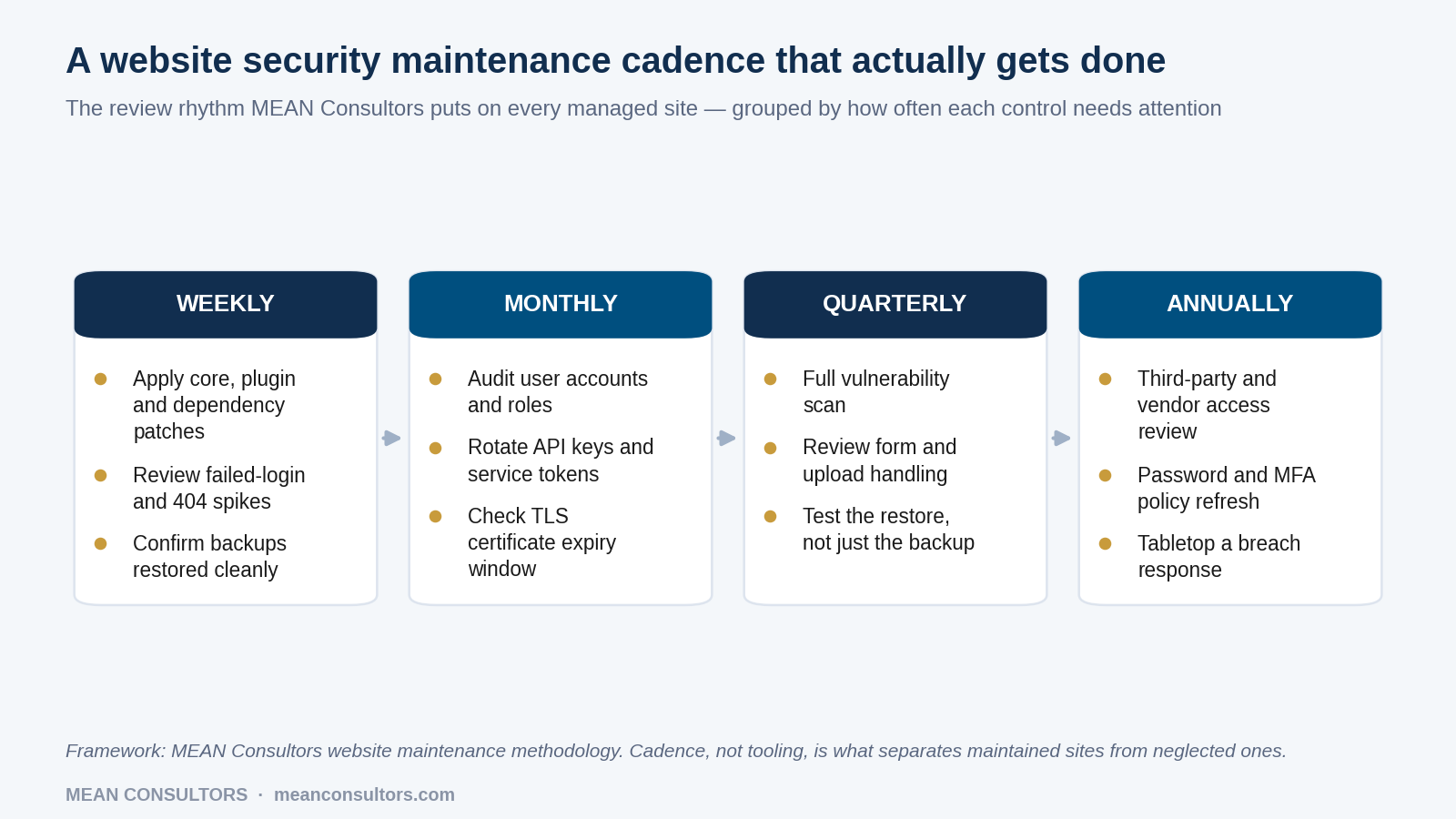
Figure 2: The maintenance cadence we run on managed sites. Assigning each control a frequency is what stops it drifting.
This is also the honest answer to “how much does website security cost?” — it is mostly a function of how your site is maintained rather than a separate purchase. If you are working out what that ongoing commitment looks like in budget terms, our breakdown of what a website really costs per year covers where security fits into a maintenance retainer.
One more thing worth saying plainly: if your site integrates with other systems — a CRM, an inventory system, a payment processor — the security question extends past the website. The API layer between those systems deserves the same scrutiny, and we cover that separately in our guide to API security best practices. If you are running a store, the customer data and payment flows raise the stakes again; that is usually where a conversation about custom software development and proper separation of systems starts.
Frequently Asked Questions
How often should a small business website be scanned for vulnerabilities?
Run automated dependency and malware scanning continuously, and do a deeper manual review quarterly. The automated pass catches known CVEs in plugins and libraries within hours of disclosure. The quarterly review is where a human looks at things scanners miss — stale admin accounts, over-permissive file uploads, forms without rate limiting, and third-party scripts nobody can explain.
Is an SSL certificate enough to make my website secure?
No. TLS encrypts traffic between the visitor and your server, which protects data in transit. It does nothing about a weak admin password, an outdated plugin, an unprotected form or a compromised hosting account. A padlock in the address bar tells a visitor the connection is private; it says nothing about whether the site itself has been compromised.
What is the single most common way small business websites get hacked?
Credential-based access. In Verizon’s 2025 dataset, 88% of basic web application attacks involved stolen credentials, and credential abuse was the leading initial access vector across all breaches at 22%. For most small businesses, enforcing multi-factor authentication on the CMS, the hosting panel and the domain registrar removes more risk than any other single change.
Do I need a web application firewall for a small business site?
A WAF is worth having, but it is a mitigation, not a fix. It buys you time between a vulnerability being disclosed and you patching it, and it filters a lot of automated noise. It will not save you if an attacker logs in with a valid password. Patch first, enforce MFA second, add the WAF third.
How much should a small business budget for website security?
Security is usually not a separate line item — it is a property of how the site is maintained. In practice most of what matters here (patching, backups, access review, monitoring) sits inside a normal maintenance retainer. What varies is scope: a brochure site needs far less than a site handling payments or customer data. The expensive scenario is always the one where nothing was budgeted and a recovery has to be paid for at short notice.
What should I do first if my website has already been hacked?
Take the site offline or into maintenance mode, change every credential (CMS, hosting, database, FTP/SSH, registrar), and preserve a copy of the compromised files and logs before you clean anything — you will need them to work out how the attacker got in. Then restore from a known-clean backup rather than trying to remove the malicious code by hand. Finally, request a review in Google Search Console if the site was flagged.
MEAN Consultors audits and maintains business websites from Jacksonville, Florida — patching, backups, monitoring and access control included.