
Scaling an Online Store: When to Move Off Shared Hosting and Templates
Last updated: August 13, 2026 · By Joseph Olivas, Founder, MEAN Consultors · 8 min read
Almost every successful online store starts on shared hosting with a template theme — and that’s the right call on day one. The problem is that the setup that got you to your first $10,000 month quietly becomes the thing holding back your $50,000 month. In this guide I’ll walk through the specific symptoms that tell you it’s time to move, what “moving” actually involves, and how to replatform without torching the SEO equity you’ve built.
Why Shared Hosting and Templates Eventually Stop Working
Shared hosting means your store lives on a server alongside hundreds of other websites, all competing for the same CPU, memory, and database connections. At low traffic, nobody notices. But e-commerce traffic is spiky by nature — email blasts, holiday promotions, a product going semi-viral — and shared environments throttle exactly when you need headroom most.
Template themes have a parallel problem. A general-purpose theme ships with code for hundreds of layouts and features you’ll never use, and every one of them loads on every page. Stack a dozen plugins on top — reviews, upsells, subscriptions, analytics — and you get script bloat, conflicting CSS, and checkout flows you can’t actually control. Google’s own guidance is blunt about the stakes: its Core Web Vitals program treats loading performance, interactivity, and visual stability as user-experience fundamentals, and slow stores pay for it twice — once in rankings and again in conversion rate. I covered the revenue side of this in detail in my post on page speed and conversion rate.
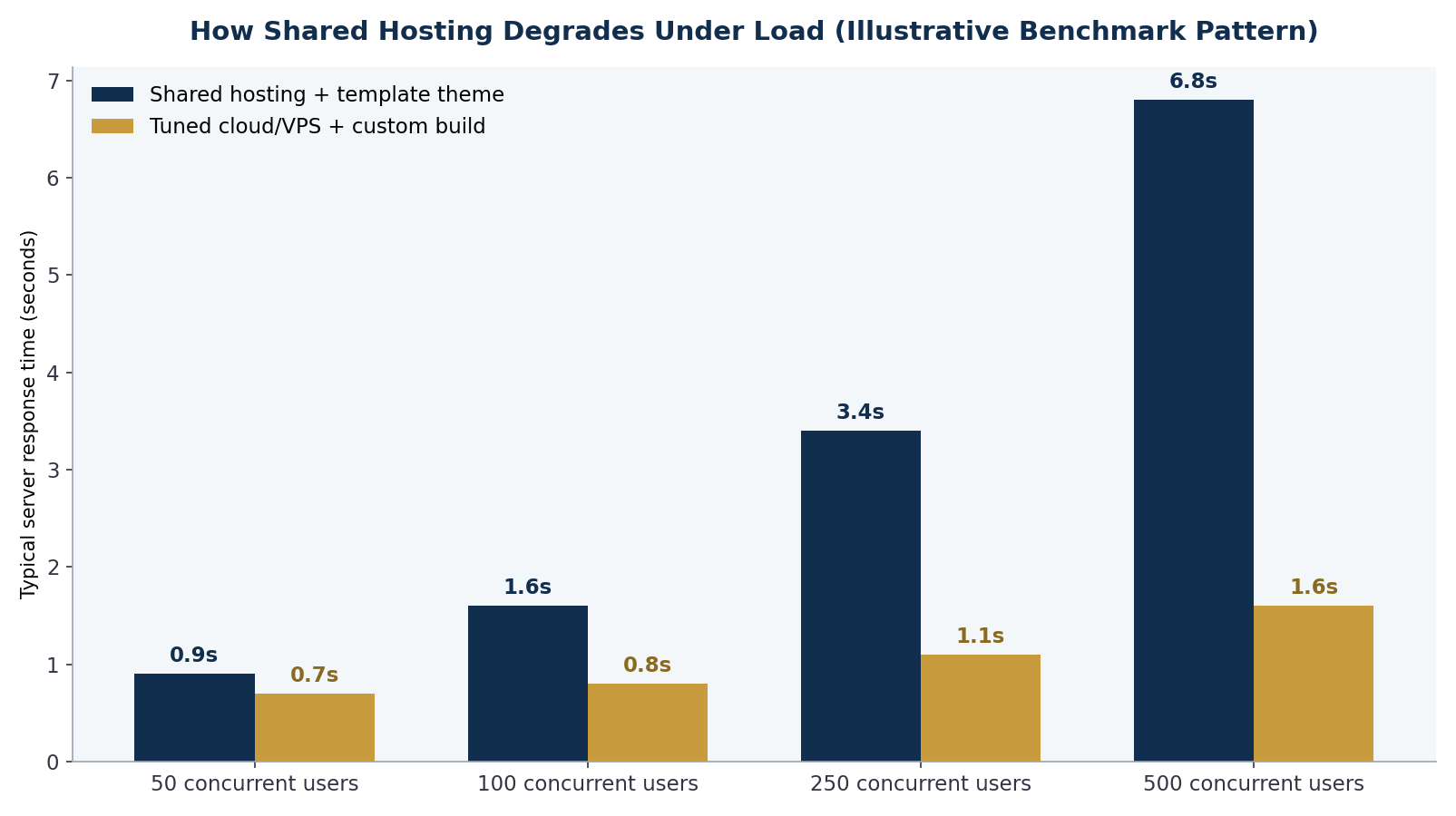
Figure 1: The pattern we see repeatedly in store audits — shared environments degrade non-linearly as concurrency climbs, while a tuned cloud setup stays nearly flat (illustrative benchmark).
7 Signs Your Store Has Outgrown Its Setup
These are the signals I look for when a store owner asks me whether it’s time. One alone is a yellow flag; three or more means the move is overdue.
- Slowdowns during promotions. If your site crawls or 503s every time you send a campaign email, your ceiling is your hosting, not your marketing.
- Product pages loading in 3+ seconds. Especially on mobile, where most e-commerce traffic now lives.
- Plugin conflicts eat your week. Updates break checkout, support tickets bounce between plugin vendors, and you’re afraid to touch anything.
- Features customers want don’t fit the template. B2B price tiers, configurators, bundles, subscriptions — the theme fights you at every step.
- Checkout you can’t customize. You know exactly where buyers drop off, but the platform won’t let you fix it.
- Reporting requires spreadsheet surgery. Inventory, orders, and accounting live in disconnected tools with manual exports between them.
- Hosting support says “upgrade your plan” every time. When each fix is another tier, you’re renting patience, not infrastructure.
What “Moving Off” Actually Means: Your Three Options
Replatforming isn’t one decision — it’s two: where the store runs, and what the store runs. Most growing stores land in one of three lanes.
| Option | What changes | Best for | Typical investment |
|---|---|---|---|
| Better infrastructure, same platform | Move to VPS/cloud hosting, add a CDN and caching; keep your theme | Stores whose only problem is load capacity | Low — mostly hosting + setup |
| Custom theme on a managed platform | Purpose-built storefront on Shopify/WooCommerce, template retired | Stores blocked by theme limits, not platform limits | Moderate |
| Custom e-commerce platform | Custom storefront and backend, integrations built to your workflow | Complex catalogs, B2B logic, heavy integrations, high volume | Highest — and the most scalable |
The right lane depends on where the friction actually is. If pages are fast until traffic spikes, infrastructure alone may buy you years. If the template is the bottleneck, a custom build changes what your store can do — I broke down the platform trade-offs in my Shopify vs. WooCommerce vs. custom e-commerce comparison, which is the best starting point if you haven’t chosen a destination yet. And if your buyers are businesses rather than consumers, the feature bar is higher still — see my guide to B2B e-commerce platform features.
- Shared hosting degrades non-linearly: a store that’s fine at 50 concurrent users can be effectively down at 500.
- Replatforming is two separate decisions — infrastructure and platform — and many stores only need to change one of them.
- A staged migration with proper URL mapping preserves SEO; a rushed cutover is how stores lose 30–50% of organic traffic overnight.
The Replatforming Roadmap (Without Losing Your Rankings)
The number-one fear I hear from store owners is losing the organic traffic they’ve spent years building. It’s a legitimate fear with a well-documented solution: treat the migration as an SEO project from week one, not an afterthought at launch. Google’s site move documentation lays out the mechanics — URL inventory, one-to-one 301 redirects, updated sitemaps, and monitoring in Search Console — and the stores that follow it typically see rankings recover within weeks, not quarters.
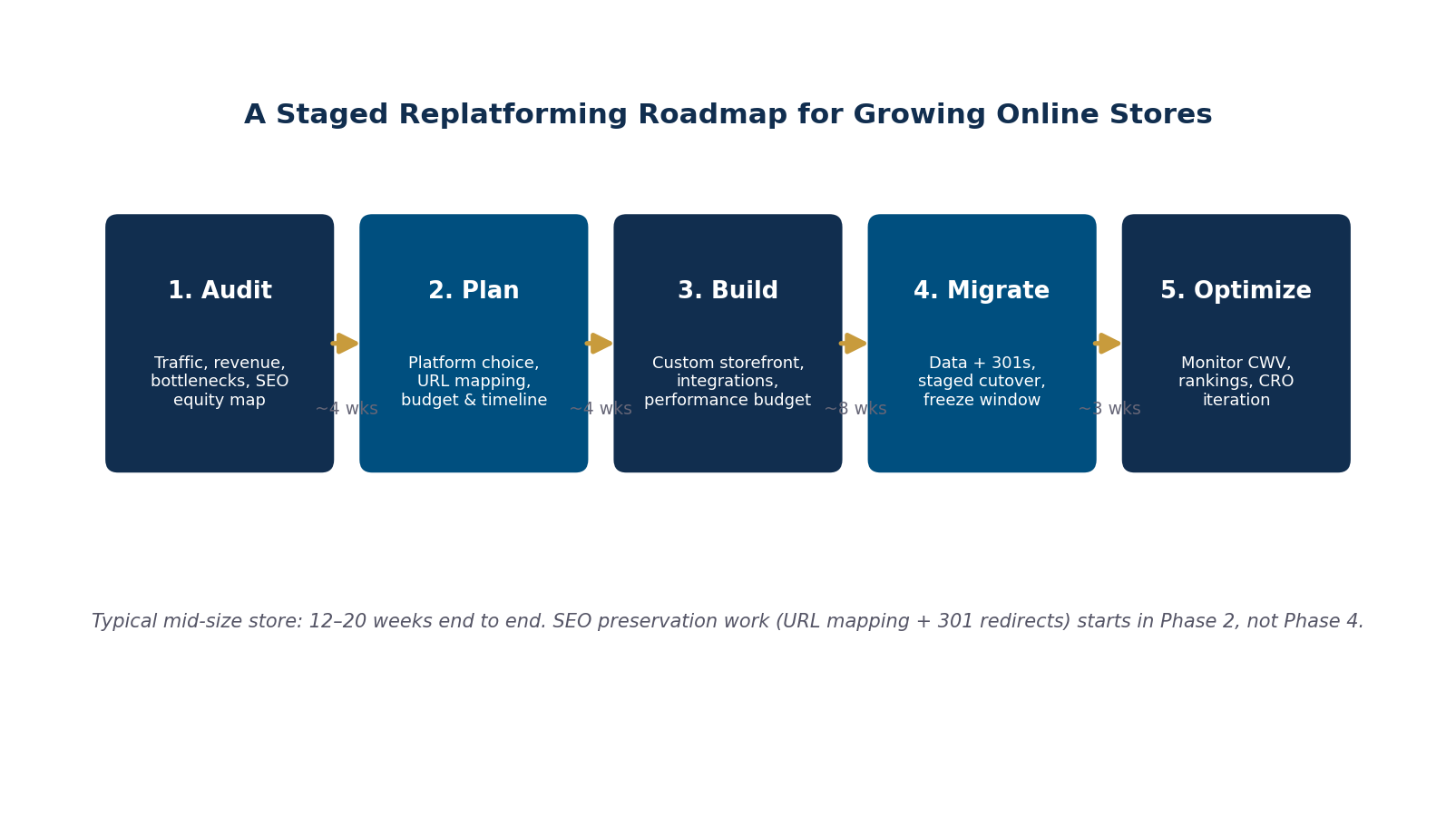
Figure 2: The five-phase roadmap we run replatforming projects on — SEO preservation work starts in Phase 2, not at cutover.
A few hard-won rules from projects we’ve run at MEAN Consultors’ web development practice:
Map every URL before anyone writes code. Crawl the existing store, pull landing pages from analytics and Search Console, and decide the destination for every URL that has traffic, links, or revenue attached. Orphaned redirects are where equity leaks.
Freeze content changes during cutover. Pick a low-traffic window, freeze catalog edits, migrate, verify, then unfreeze. Trying to migrate a moving target multiplies reconciliation work.
Keep a rollback path. The old environment stays warm until the new store has survived a full traffic cycle, including at least one campaign send.
What It Costs and How Long It Takes
For a mid-size store — a few thousand SKUs, a handful of integrations — a full replatform typically runs 12 to 20 weeks end to end. Infrastructure-only moves can land in 2 to 4 weeks. Budget-wise, the honest answer is a range: infrastructure upgrades start in the low four figures; a custom storefront on a managed platform generally lands in the mid five figures; and a fully custom platform is an investment that only makes sense when the store’s volume or complexity justifies it. The math that matters isn’t the invoice — it’s the revenue recovered from faster pages, higher conversion, and campaigns you can finally run without fear. A store doing $1M annually that lifts conversion by even half a point typically pays back a replatform inside the first year.
Frequently Asked Questions
How do I know if my problem is hosting or my theme?
Test them separately. If pages are slow even at 3 a.m. with no traffic, the theme and plugin stack are the likely culprit. If pages are fast until traffic climbs, it’s infrastructure. Tools like PageSpeed Insights plus a simple load test will tell you which side of the line you’re on — and many stores have both problems at once.
Will I lose SEO rankings if I replatform my store?
Not if the migration is run correctly. The critical pieces are one-to-one 301 redirects for every URL with traffic or links, preserved page content and metadata, an updated XML sitemap, and monitoring in Search Console after cutover. Stores lose rankings when redirects are skipped or bulk-pointed at the homepage — not because moving is inherently risky.
Should I move to a bigger shared plan first?
Upgrading tiers within shared hosting buys months, not years, because the fundamental constraint — shared resources and no isolation — doesn’t change. If you’re already hitting limits, a VPS or managed cloud environment is usually only marginally more expensive and removes the ceiling entirely.
How long does an e-commerce replatform take?
Infrastructure-only migrations: 2–4 weeks. A custom storefront on an existing platform: 8–14 weeks. A fully custom platform with integrations: 12–20+ weeks depending on catalog complexity and how many systems (ERP, accounting, fulfillment) need to connect.
Can I keep selling during the migration?
Yes — the store stays live throughout the build. The only sensitive window is cutover, which is typically scheduled for a low-traffic overnight period with a catalog freeze of 24–48 hours. Done right, customers never notice anything except that the site got faster.
MEAN Consultors builds custom e-commerce platforms and runs SEO-safe replatforming projects for growing U.S. stores.