
Cloud Migration Strategy: A Practical Framework for SMBs
Last updated: August 14, 2026 · By Joseph Olivas, Founder, MEAN Consultors · 9 min read
The cloud migrations that go badly for small and mid-size businesses rarely fail technically. They fail commercially. The workloads move, everything runs, and then the third monthly invoice arrives and nobody can explain it. By then the migration is done and the leverage to fix it is gone.
This is the framework I use on software development engagements where a migration is on the table. It front-loads the unglamorous work — inventory, path assignment, cost guardrails — because that is where the outcome is actually decided.
Start with the cost reality, not the pitch
Cloud is sold on elasticity and sometimes on savings. The industry data on what actually happens is more sobering. Flexera’s 2025 State of the Cloud Report found that managing cloud spend is now the top challenge cited by respondents, and that estimated waste rose to 29% — reversing a five-year downward trend.
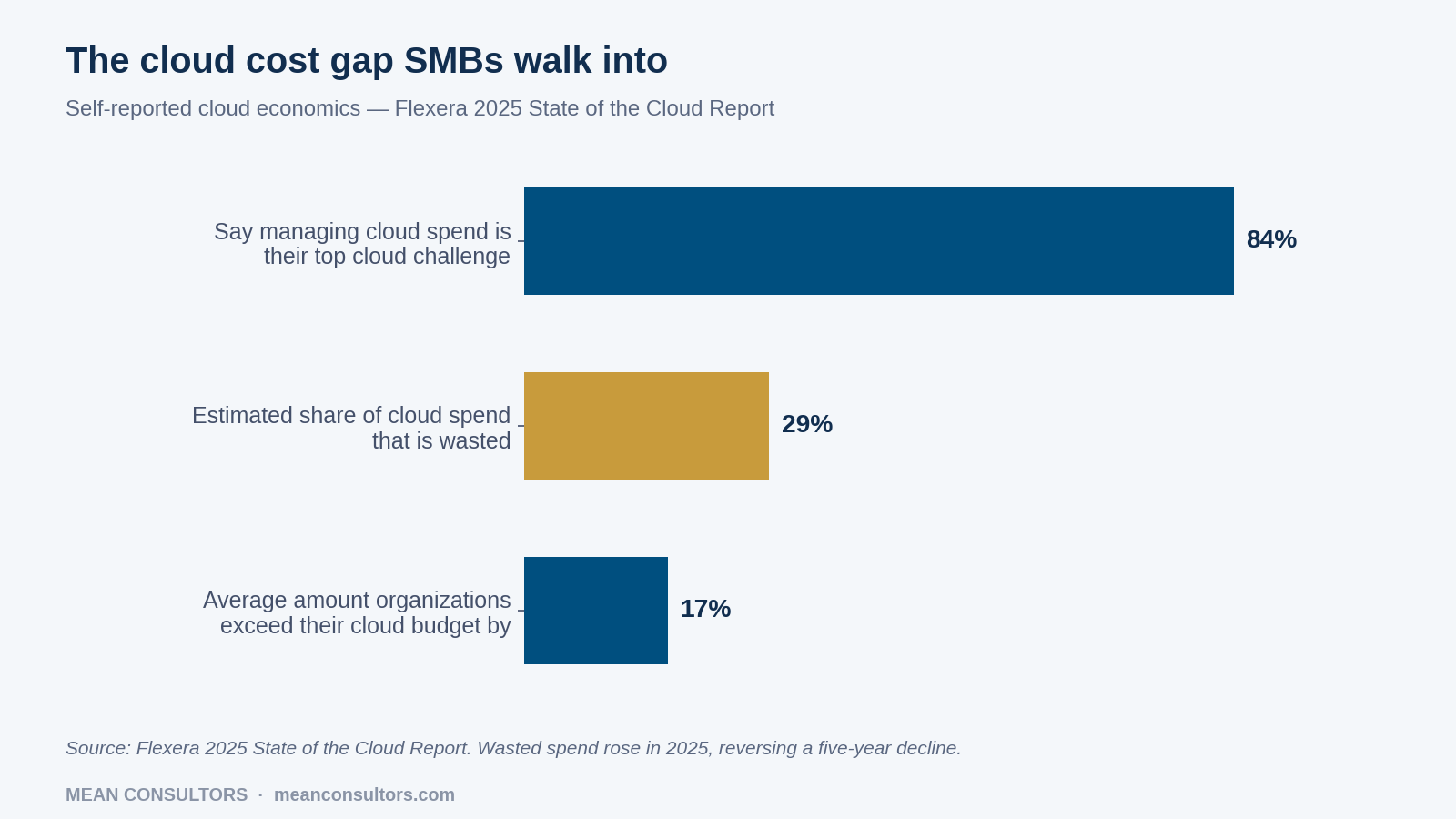
Figure 1: Self-reported cloud economics, Flexera 2025 State of the Cloud Report.
Read that as a warning about sequencing rather than a reason to stay put. Waste accumulates when workloads are moved before anyone has decided how they should run in the new environment. An oversized always-on virtual machine costs more in the cloud than it did in your rack, and it will keep costing more every month until someone right-sizes it.
- 84% of organizations name managing cloud spend as their top cloud challenge — ahead of security and skills.
- Estimated wasted cloud spend rose to 29% in 2025, driven by AI workloads and expanding service portfolios.
- Organizations exceed their cloud budgets by an average of 17%, which is the number to plan against, not the vendor estimate.
Phase 1: inventory what you actually run
Every migration I have seen run over schedule ran over during discovery. Not because the inventory is hard, but because it is usually incomplete — and the missing item is invariably a scheduled job on a server nobody has logged into since 2021 that quietly produces a report the finance team depends on.
- List every system, including the ones nobody owns. Applications, databases, file shares, scheduled jobs, scripts, integrations, reporting tools.
- Record actual utilization, not provisioned capacity. This is what tells you whether to right-size on the way over. Provisioned specs are historical accidents.
- Map dependencies in both directions. What does this system call, and what calls it? The second question is the one that catches people out.
- Note compliance and data residency constraints per system. These constrain the migration path before any technical consideration does.
- Assign a business owner to each system. If nobody will claim it, that is a strong signal it belongs in the “retire” column.
If your inventory turns up systems that predate most of your staff, the migration question may be secondary to a modernization question. Our legacy system modernization roadmap covers how to sequence that decision without a big-bang rewrite.
Phase 2: assign every workload one of six paths
This is the core of the framework, and it is where most of the value sits. Every item in the inventory gets exactly one path assigned before anything is provisioned. Assigning paths forces the arguments to happen on paper, where changing your mind is free.
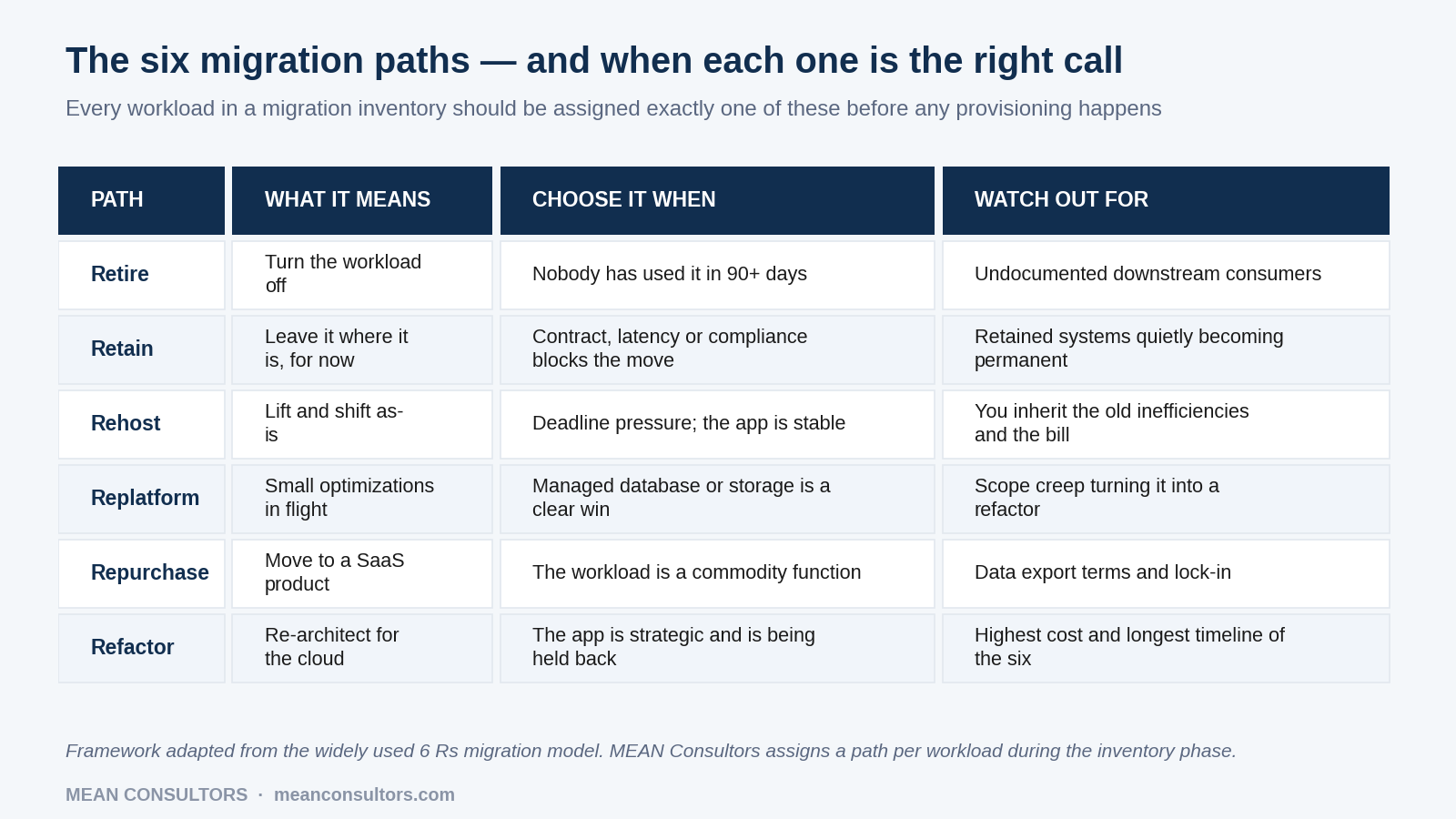
Figure 2: The six migration paths, when each is the right call, and what to watch for.
Two practical notes. First, retire is underused. In most SMB inventories, somewhere between a tenth and a quarter of systems have no active users, and migrating them is pure cost. Second, retain needs an expiry date. A workload retained for a good reason in year one is frequently still retained in year four because nobody revisited it.
Phase 3: move something low-risk first
The first workload you migrate is not chosen for business value. It is chosen to test the process: your networking assumptions, your identity setup, your monitoring, your backup and restore, your deployment pipeline and your cost visibility. Pick something real but not business-critical — an internal tool, a reporting environment, a staging system.
What you are looking for is not “did it work.” It is: how long did it take versus the estimate, what did discovery miss, what did the first invoice look like against the forecast, and could you restore it if you had to. If the pilot came in at double the estimated effort, your wave plan needs rebuilding before wave one, not after.
Data movement deserves its own attention here. Migrations lose more sleep to data than to compute — cutover windows, referential integrity, reconciliation. Our data migration checklist is the pass I run before any cutover that touches a production database.
Phase 4: migrate in waves, with guardrails already on
Group the remaining workloads into waves by dependency cluster, not by convenience. Systems that talk to each other move together, or you spend the intervening weeks paying for traffic between two environments and debugging latency that will not exist afterwards.
| Guardrail | Set it up | What it prevents |
|---|---|---|
| Budget alerts per environment | Before the first workload moves | Discovering overspend on the invoice |
| Mandatory resource tagging | Before the first workload moves | Untraceable costs nobody will own |
| Non-production shutdown schedules | Wave 1 | Paying for dev and staging overnight and at weekends |
| Right-sizing review | 30 days after each wave | Provisioned-for-peak capacity running permanently |
| Documented rollback per workload | Before each cutover | Cutovers with no way back |
| Reserved capacity commitments | Only after usage stabilises | Locking in the wrong shape for a year |
Notice that the first two guardrails are due before anything moves. Retrofitting tagging onto a live environment is a project of its own, and untagged resources are exactly the ones that become unexplainable line items.
When the answer is “not yet”
A migration is not automatically the right call. If your systems run acceptably, your hardware has years of life left, and your constraint is functionality rather than infrastructure, moving to the cloud solves a problem you do not have. The stronger signals are recovery time you cannot live with, hardware refresh cycles you would rather not fund, capacity that is genuinely spiky, or a team spending real hours on infrastructure maintenance instead of the business.
And if the real problem is that a system does what it was built to do in 2014 and nothing since, the honest comparison is migration versus replacement. That is a build vs. buy decision wearing an infrastructure costume, and it is worth naming it as one before you spend the budget moving code you intend to retire.
Frequently Asked Questions
How long does a typical SMB cloud migration take?
For a small or mid-size business with a handful of business-critical systems, plan in waves rather than as a single cutover: an inventory and assessment phase measured in weeks, a pilot workload, then waves every few weeks. The variable that dominates the timeline is not the technology, it is how much undocumented behaviour you discover in the systems you are moving. Migrations that run long almost always ran long during discovery, not during deployment.
Will moving to the cloud reduce our IT costs?
Sometimes, but it is the wrong reason to move. Flexera’s 2025 data has organizations exceeding cloud budgets by an average of 17% and estimating 29% of cloud spend as wasted. Cloud economics reward elasticity and reduce capital commitment; they punish lift-and-shift of oversized always-on servers. The better arguments are resilience, recovery time, and no longer maintaining hardware.
Should we lift and shift, or re-architect?
Neither, universally — decide per workload. Lift and shift (rehost) is right when a deadline is real and the application is stable; you accept that you inherit the old inefficiencies. Re-architecting (refactor) is right when the application is strategic and its current design is genuinely holding the business back. Most SMB migrations end up mostly rehost with two or three deliberate refactors.
What is the most common mistake in an SMB cloud migration?
Provisioning before inventorying. Teams stand up the new environment first, then discover mid-migration that a critical report depends on a scheduled job on a server nobody documented. The second most common is having no cost guardrails on day one, which is how a proof of concept quietly becomes a recurring bill.
Do we need to move everything to the cloud?
No, and treating it as all-or-nothing causes bad decisions. “Retain” is a legitimate outcome for workloads blocked by contract terms, latency requirements or compliance constraints. The risk is drift: a workload retained for a good reason in year one is often still retained in year four for no reason at all. Put a review date on every retained system.
How do we avoid vendor lock-in?
Accept that some coupling is the price of managed services, then be deliberate about where you accept it. Keep data in portable formats, keep infrastructure definitions in code, and avoid proprietary services at the core of your business logic unless the operational saving is genuinely large. Full portability is expensive and usually not worth buying; knowing your exit cost per service is.
MEAN Consultors scopes and runs cloud migrations for U.S. small and mid-size businesses, starting with the assessment rather than the provisioning.