
Building a Custom Order Management Portal: Lessons From a Real DME Platform
Last updated: August 31, 2026 · By Joseph Olivas, Founder, MEAN Consultors · 8 min read
Most of the order management portals I get called in to build are not replacing another portal. They are replacing a shared inbox, a spreadsheet, and one person who knows how everything actually works. That is the real starting condition, and it changes how the project has to be run. This is what I have learned building order platforms for distribution and durable medical equipment (DME) businesses — where the order is never just a line item, because it carries payer rules, documentation requirements, and a delivery promise with it.
What an order management portal actually replaces
Before you can scope a build, you have to be honest about what the current process costs. On one distribution and DME workflow, we sat with the order desk and timed every step of a routine order — not the complicated ones, the ordinary ones. The result was uncomfortable: about 34 minutes of human handling per order, and more than half of it was work that produced no new information. It was moving data that already existed somewhere else.
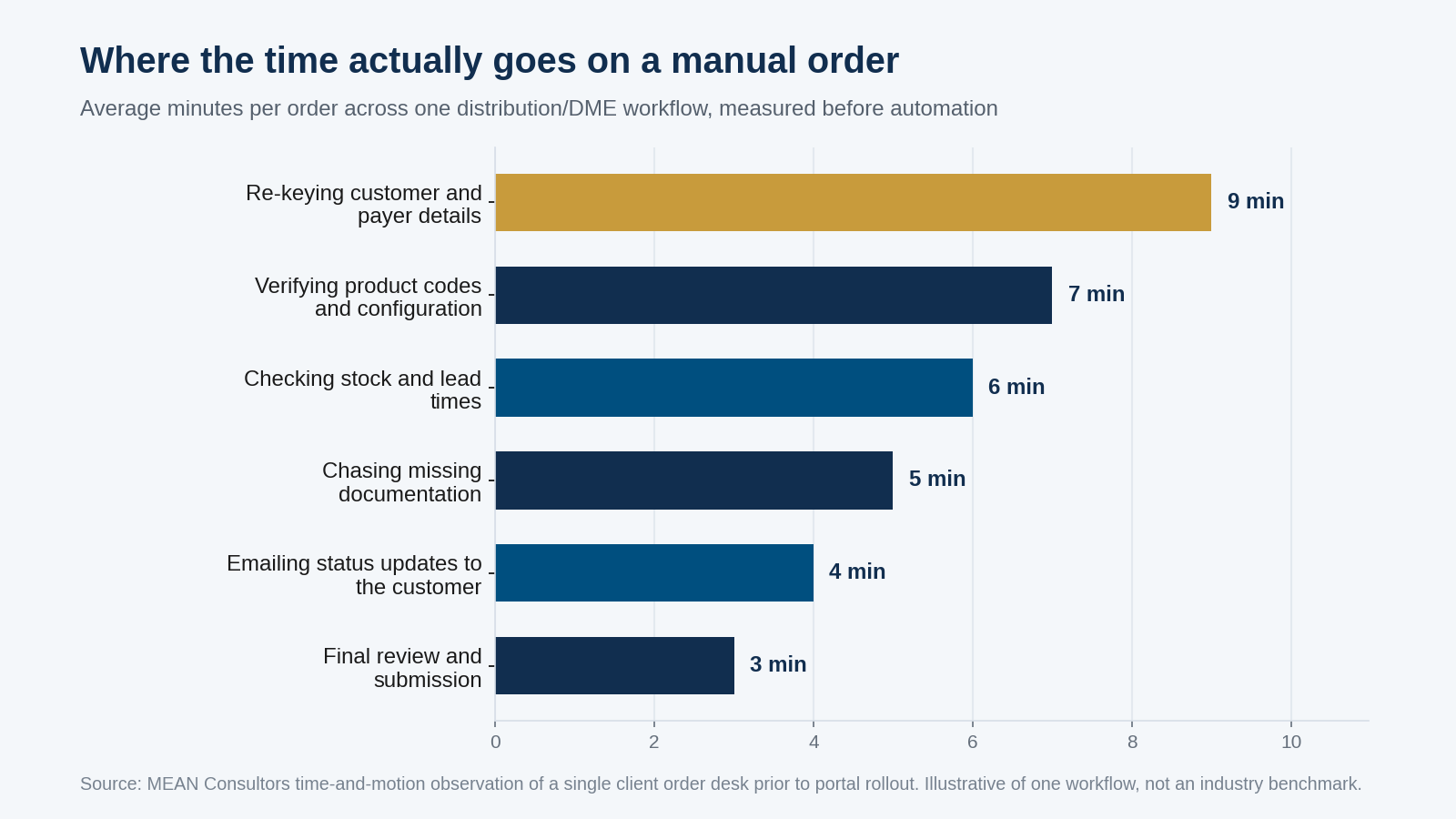
Figure 1: Time-and-motion breakdown of a single manual order before portal rollout. Re-keying data the business already had was the single largest cost.
That first bar is the one that matters. Nine minutes of re-keying customer and payer details means the data lives in at least two systems that do not talk to each other. No amount of staff training fixes that. It is an integration problem wearing a productivity costume, and it is the reason a custom web development engagement usually has to start with plumbing rather than screens.
- In the workflow we measured, roughly 34 minutes of handling went into a routine order, with re-keying data as the largest single block at about 9 minutes.
- Steps that produced no new information — re-keying, status emails, availability lookups — accounted for more than half the total.
- The bottleneck was integration, not effort. The staff were fast; the systems were disconnected.
Get the data model right before you design a single screen
The most expensive mistake I see on order platforms is designing the order entry screen first. It feels productive because stakeholders can see it, and it is almost always wrong, because the screen encodes assumptions about the data model that nobody has agreed to yet.
On a DME order, a single record has to carry things a generic e-commerce order never does: the referring provider, the payer and plan, the product code and any modifiers, the documentation on file, the authorization status, and the delivery or fitting appointment. Those are not fields you bolt on later. They determine what a valid order even is.
So the sequence we use is: map the workflow, model the data, then build the interface that the model makes possible. In practice that means writing down the answer to four questions before any UI work starts.
- What is the smallest set of facts that makes an order valid, and what happens to an order that is missing one of them?
- Which system is the source of truth for each fact — the portal, the ERP, the payer, or the customer?
- What states can an order be in, and who is allowed to move it between them?
- What has to be preserved for audit: who changed what, when, and on whose authority?
That last one is not optional in regulated distribution. If you are supplying under Medicare, the supplier standards published by the Centers for Medicare & Medicaid Services assume you can produce records on request. A portal that cannot reconstruct the history of an order is not a portal you can operate.
Validation is the product, not a feature of it
Here is the part clients are usually surprised by. The value of an order management portal is not the form. It is everything the form refuses to let you do.
Nielsen Norman Group makes this point about complex enterprise applications generally: the best designs prevent error-prone conditions rather than reporting errors after the fact. On an order desk, that translates into rules that fire while someone is typing, not after they submit. A product code that does not match the payer’s coverage. A quantity above the allowed frequency. A delivery address that fails validation. A missing signed document on an order that requires one.
Every one of those checks removes a downstream phone call. And downstream phone calls are where the real cost sits — not in the 30 minutes of order entry, but in the three days of rework when an order comes back denied.
How the build actually runs
Order platforms fail more often from sequencing than from technology. Build the customer-facing portal before the internal order desk is stable and you get a beautiful front door onto a broken process. We run these in five phases, in this order, for that reason.
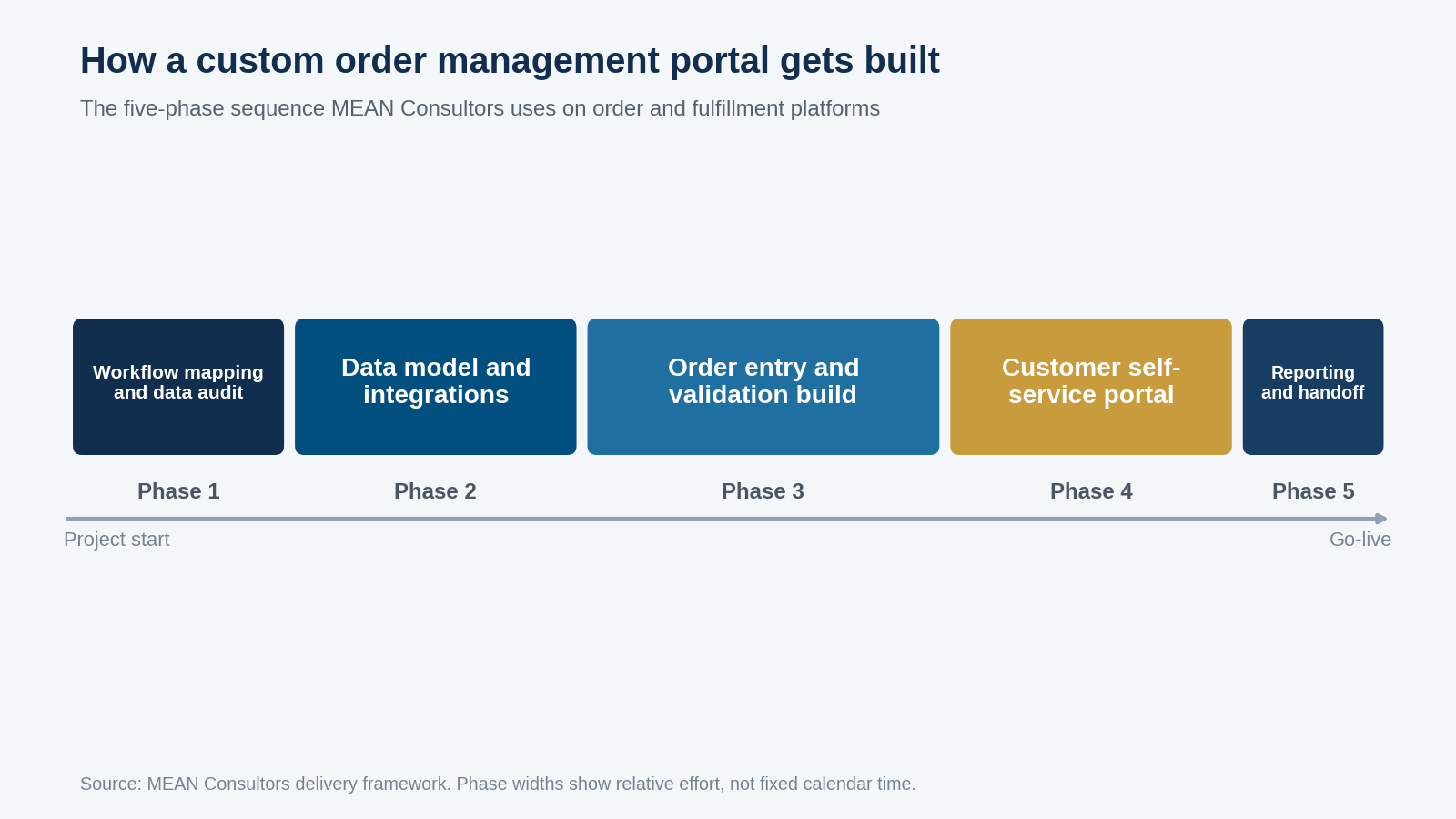
Figure 2: The five-phase build sequence. Customer-facing self-service comes fourth, not first, and never before internal order entry is stable.
| Phase | What gets decided | What goes wrong if you skip it |
|---|---|---|
| 1. Workflow mapping and data audit | Real current-state steps, exception paths, source of truth per field | You automate the exceptions instead of the process |
| 2. Data model and integrations | Order schema, states, ERP/accounting sync, audit trail | Rework of every screen once the model changes |
| 3. Order entry and validation build | Internal order desk, validation rules, roles and permissions | Staff keep the spreadsheet running in parallel |
| 4. Customer self-service portal | Reorder, status visibility, document upload | Customers see an unstable process and lose trust |
| 5. Reporting, training and handoff | Operational reporting, documentation, admin ownership | The system becomes dependent on the developer |
Phase 3 is the one worth protecting. The internal order desk is where the process either becomes real or stays theoretical. If the people entering orders are still keeping a private spreadsheet at the end of Phase 3, something in the model is wrong and no amount of Phase 4 polish will fix it.
The integration work nobody budgets for
Every order portal is really an integration project. The portal has to agree with the accounting system about what a customer is, with the ERP about what a product is, and often with a third-party system about what a payer will cover. If you have already worked through connecting a CRM, ERP, and e-commerce platform, none of this will be new — but the order domain adds a wrinkle, which is that the order is a live object. It changes state after it is created, and every connected system needs to hear about it.
Three things reliably consume more time than the estimate allows. First, historical data that does not conform to the new model — customers with three spellings, products that were never coded. Second, the fields that exist in the ERP but were used for something else entirely by a former employee. Third, the reconciliation logic for when two systems disagree, which is a business decision dressed up as a technical one and therefore has to go back to the client.
I budget for these explicitly now. A clean-looking legacy dataset is usually a dataset nobody has looked at closely.
What actually changed after go-live
The number clients ask about first is time per order, and it does drop — the re-keying block goes away almost entirely once the integration is live, and the availability lookup collapses into the same screen. But the change that mattered more was less visible.
Order status stopped being a question. When customers can see where their order is, the inbound “where is my order” traffic falls, and the order desk stops spending its afternoon composing status emails. That is the fifth bar in Figure 1, and it disappears not because anyone got faster but because the work stopped being necessary.
The second change was that new staff became productive faster. When the validation rules live in the system, onboarding is about learning the interface rather than absorbing years of tribal knowledge about which payer needs which document. For a business that has struggled to scale its order desk, that is often the actual return — and it is the same argument that applies to building a purchase order and inventory system on the procurement side of the same business.
- Time your current process before you scope anything. The measurement usually reframes the project.
- Model the data before you design the screen. Screens are cheap to change; schemas are not.
- Treat validation rules as the deliverable. They are what converts a form into an operational system.
- Sequence internal order entry before customer self-service, always.
If your order process runs on a shared inbox and one person’s memory, you do not need a bigger spreadsheet. You need the rules written down somewhere they can be enforced. That is what a portal is for.
Frequently Asked Questions
How much does a custom order management portal cost to build?
It depends almost entirely on integration scope rather than screen count. A portal that talks to one accounting system is a fundamentally different project from one that has to reconcile an ERP, a payer system, and a legacy database. The honest answer is that the data audit in phase one is what produces a defensible number, which is why we scope that phase separately before quoting the build.
Should we buy an off-the-shelf order management system instead?
If your orders are simple line items with standard fulfillment, buy. Off-the-shelf systems are mature and cheaper. Build becomes the right call when the order carries domain-specific obligations the packaged product cannot model — payer rules, documentation requirements, product configuration, regulated audit trails — and you would end up maintaining a pile of workarounds around the packaged system anyway.
How long does an order management portal take to build?
Plan in phases rather than a single date. Workflow mapping and the data audit typically run a few weeks, integrations depend entirely on the state of the source systems, and internal order entry is where most of the build effort sits. Customer self-service is comparatively quick once the internal process is stable, because the hard decisions have already been made.
What is the biggest risk in a project like this?
Legacy data. Nearly every project we run finds that the historical dataset does not conform to the model everyone believed was in place — duplicate customers, products that were never properly coded, fields repurposed by a former employee. Budget time for reconciliation explicitly, and treat conflicts between systems as business decisions that go back to the client rather than technical ones the developer resolves alone.
Do we need a customer-facing portal at all?
Not always, but it is usually where the visible return shows up. When customers can check status themselves, the order desk stops spending its afternoon writing status emails. The important sequencing rule is that self-service comes after internal order entry is stable — a customer-facing view onto a broken process damages trust faster than no portal at all.
How do we keep the system from becoming dependent on the developer?
Insist on phase five. Operational reporting, written documentation, and a named internal administrator with real permissions are what make the platform yours. If nobody on your team can add a user, change a validation rule, or run a report without calling the vendor, the project is not finished regardless of what the software does.
MEAN Consultors builds custom order management and fulfillment platforms for distribution, DME, and B2B businesses from our Jacksonville, Florida base.