
Headless CMS vs. Traditional CMS: Which Is Right for Your Business Website?
Last updated: July 19, 2026 · By Joseph Olivas, Founder, MEAN Consultors · 8 min read
Nearly every business owner I talk to already has a content management system, usually WordPress, and wonders whether the “headless” approach everyone mentions is worth switching to. The honest answer depends on how many places your content needs to appear and how much performance and flexibility matter to your growth. Here is the plain-English breakdown.
What “headless” actually means
A traditional CMS stores your content and renders your web pages in one connected system. When someone visits your site, the CMS builds the page and sends it to the browser. A headless CMS keeps only the content and the editing tools, then serves that content through an API to whatever “head” you connect: a website, a mobile app, a kiosk, a smartwatch, or all of them at once. If you want to weigh this against a fully bespoke build, our web development team scopes both models for clients regularly.
That architectural difference is driving real money. The headless CMS market was valued at roughly $2.1 billion in 2025 and is projected to exceed $12 billion by 2034, a compound annual growth rate near 22%, according to market research compiled by Grand View Research and others.
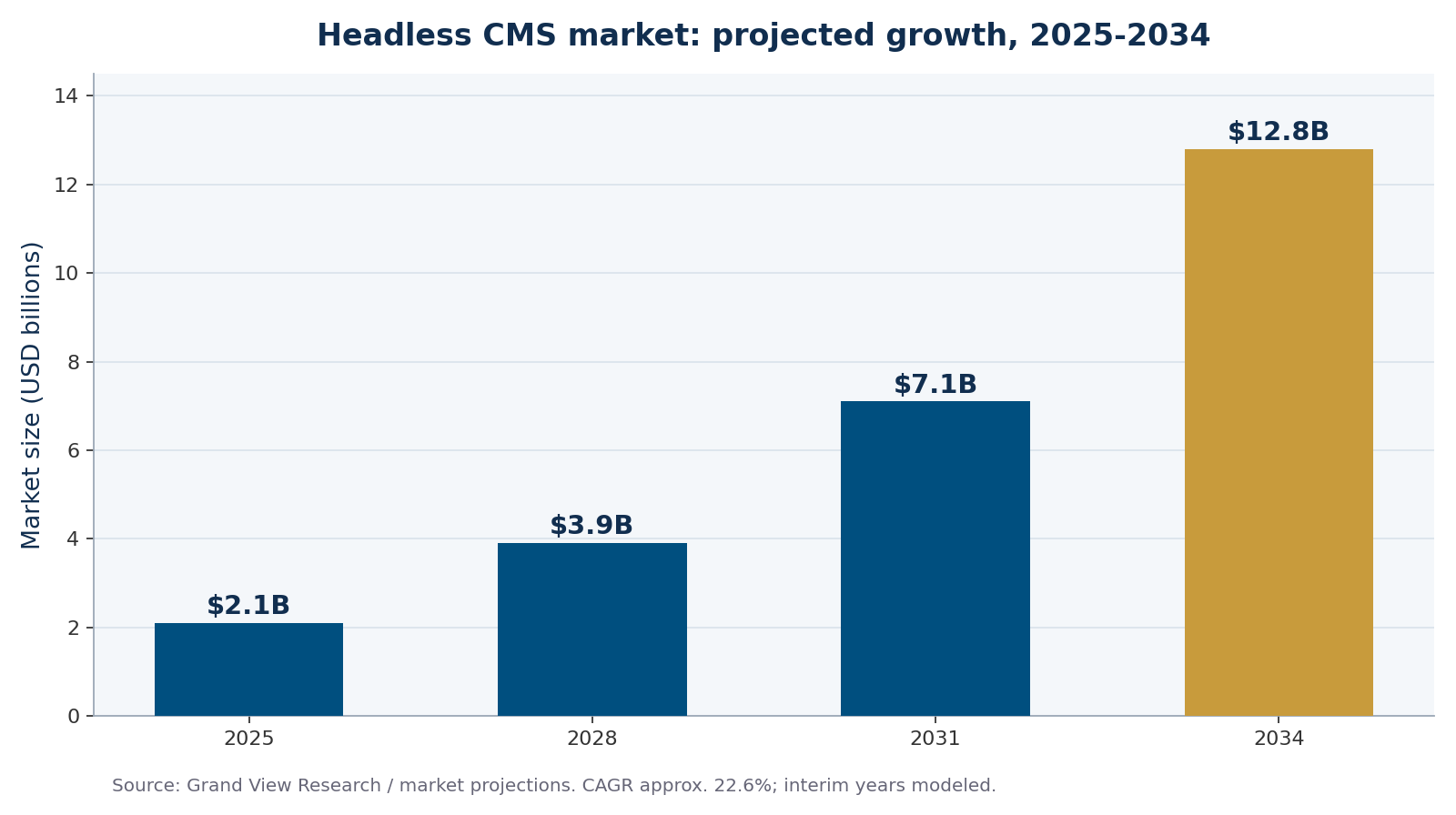
Figure 1: The headless CMS market is projected to grow more than fivefold between 2025 and 2034.
Why adoption is accelerating
Headless is no longer a fringe developer choice. Industry surveys report that more than 62% of organizations had integrated a headless CMS into their stack by 2024, enterprise adoption is growing over 48%, and roughly 56% of enterprises now pair their CMS with AI-driven content automation. The pull is omnichannel publishing: businesses want to write content once and deliver it everywhere without rebuilding it for each channel.
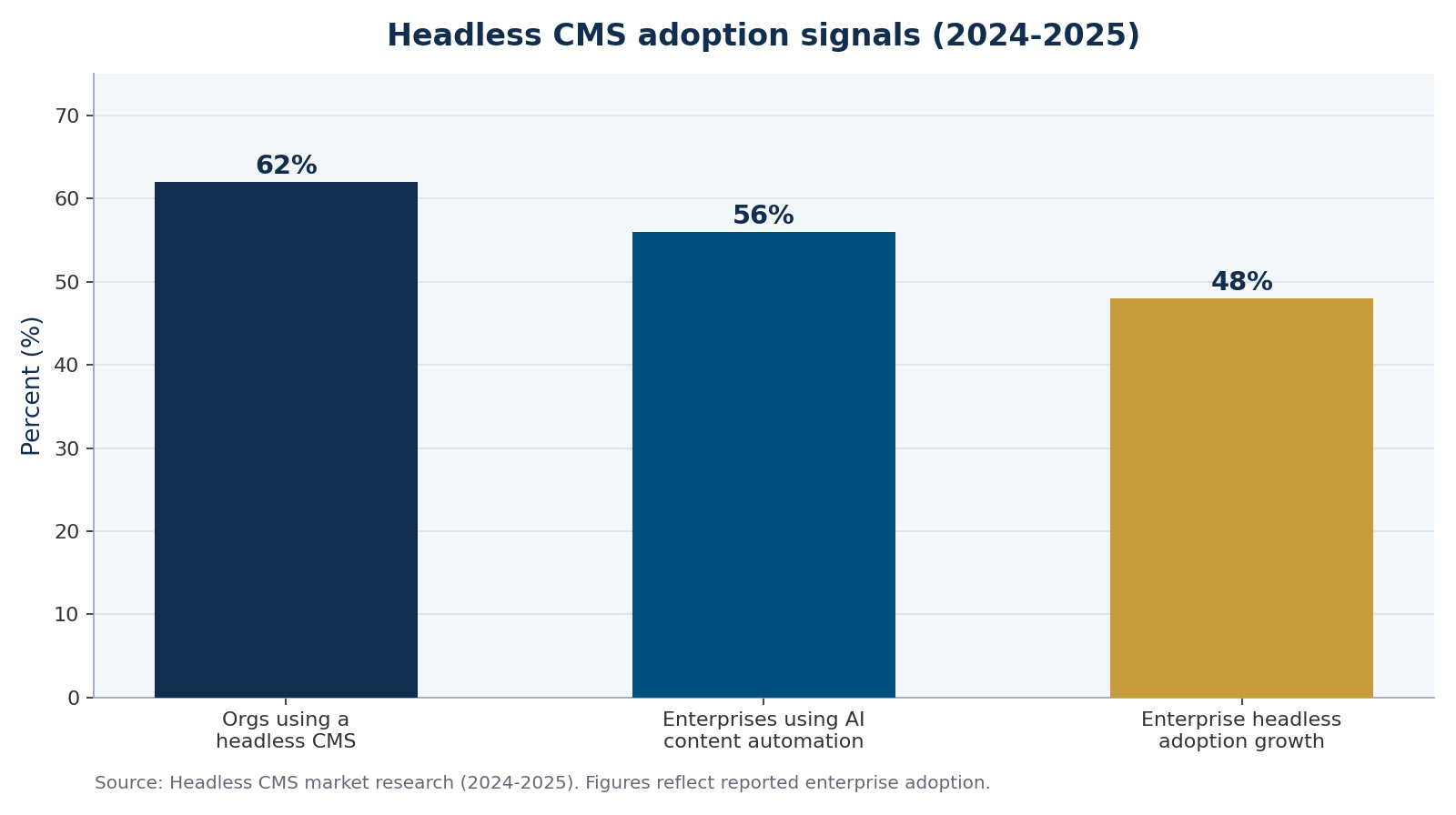
Figure 2: Adoption signals for headless CMS across organizations and enterprises, 2024-2025.
- Traditional CMS bundles content and front end; headless separates them and delivers content by API.
- The headless CMS market is projected to grow from ~$2.1B (2025) to ~$12.8B (2034), a CAGR near 22%.
- Headless wins on performance and multi-channel delivery; traditional wins on simplicity and lower cost for a single site.
Traditional vs. headless: a side-by-side
Neither model is universally better. Here is how they compare on the factors that matter to most business websites.
| Factor | Traditional CMS | Headless CMS |
|---|---|---|
| Setup cost & speed | Lower, faster to launch | Higher, needs developers |
| Editing experience | Visual, WYSIWYG, live preview | Structured fields, preview varies |
| Performance | Good with tuning | Excellent, very fast front ends |
| Multi-channel delivery | Website-first | Any channel via API |
| Ongoing maintenance | Plugins & updates on one system | Front end and CMS maintained separately |
| Best fit | Single marketing site, self-serve editing | Scale, apps, and omnichannel needs |
When to choose a headless CMS
Lean headless when flexibility and speed are strategic. Good signals include:
- You publish the same content to several channels (web, app, in-store, partners).
- Page speed and Core Web Vitals are directly tied to your revenue.
- You have or can hire developer support to maintain a decoupled front end.
- You expect rapid growth or frequent redesigns and want to change the front end without touching content.
- You want to use modern frameworks (React, Vue, the MEAN/MERN stack) for the user experience.
When to stick with a traditional CMS
A traditional CMS is still the right, cost-effective answer for a large share of small and mid-size businesses.
- You operate a single website and value simple, visual editing.
- Your team updates content without developer help.
- Budget is tight and time-to-launch matters more than architectural flexibility.
- Your current site performs well and meets your goals.
Many businesses get the best of both worlds by keeping a traditional CMS today while structuring content cleanly, so a future move to headless (or a hybrid setup) is far easier. That planning is part of how we approach every website build.
Frequently Asked Questions
What is the main difference between a headless CMS and a traditional CMS?
A traditional CMS combines content storage and website rendering in one system, while a headless CMS stores only content and delivers it through an API to any front end. Traditional is simpler for one site; headless is more flexible for multiple channels.
Is a headless CMS faster than a traditional CMS?
Usually yes. Headless setups pair with modern front-end frameworks and content delivery networks that produce very fast, lightweight pages, which helps Core Web Vitals. A well-tuned traditional CMS can still perform well, but headless has a structural speed advantage.
Is a headless CMS more expensive?
Typically higher up front and to maintain, because you build and support a separate front end that requires developers. For a single marketing site with self-serve editing, a traditional CMS is usually more cost-effective.
Can I use WordPress as a headless CMS?
Yes. WordPress can run “headless” by using its REST API to feed content to a separate front end, letting you keep the familiar editor while gaining a modern, fast presentation layer. It is a common bridge between the two models.
Which CMS is best for a small business website?
For most small businesses with one site and a team that edits its own content, a traditional CMS is the practical choice. Consider headless once you publish across multiple channels, need maximum performance, or have developer support.
MEAN Consultors designs fast, scalable websites on both traditional and headless architectures, matched to how your team actually works.