
Custom GPTs and Internal AI Tools: A Practical Introduction
Last updated: September 3, 2026 · By Joseph Olivas, Founder, MEAN Consultors · 10 min read
When a client tells me they want to “do something with AI internally,” the conversation usually starts with an expensive idea: a custom-built assistant wired into every system. Sometimes that is the right end state. It is almost never the right first step. The right first step is nearly always a custom GPT, and this article explains what that means, what it is good for, where it falls short, and how it fits with the AI automation work we do at MEAN Consultors.
The phrase “custom GPT” comes from OpenAI, which introduced GPTs in November 2023 as tailored versions of ChatGPT built with instructions, extra knowledge, and optional actions. The same idea now exists on every major platform under different names. I use “custom GPT” here as the generic term for all of them.
Why internal AI tools are worth your attention now
Adoption has moved faster than any workplace technology in living memory. An NBER working paper by Alexander Bick, Adam Blandin, and David Deming found that 39.4% of U.S. adults aged 18 to 64 had used generative AI by August 2024, roughly two years after ChatGPT launched. For comparison, the personal computer reached about 20% adoption three years after its introduction, and the internet reached about 20% two years after mass adoption began.

Figure 1: Generative AI adoption after two years was roughly double the early adoption pace of the PC and the internet.
The practical consequence for an owner is that your employees are already using these tools, usually on personal accounts, with no shared instructions and no agreement about what data is safe to paste in. A custom GPT is the cheapest way to turn that scattered, unmanaged use into something consistent, reviewable, and yours.
What a custom GPT actually is
Strip away the branding and a custom GPT has four parts.
| Component | What it does | Example for a small business |
|---|---|---|
| Instructions (system prompt) | Standing rules the assistant follows in every conversation: role, tone, format, what to refuse | “You are the proposal assistant for a Jacksonville HVAC contractor. Always quote in our three-tier format. Never invent pricing; ask for it.” |
| Knowledge files | Documents the assistant can reference: policies, price sheets, style guides, past examples | Employee handbook, service catalog, five approved past proposals |
| Capabilities | Built-in abilities toggled on or off: web browsing, image generation, code execution, file analysis | File analysis on, web browsing off (to keep answers grounded in your documents) |
| Actions / connectors | Optional links to outside systems through APIs so the assistant can look things up or take steps | Read-only lookup of open tickets in your help desk |
Everything except the last row is configuration, not programming. A manager who can write a clear job description can write a workable set of instructions, and a folder of good examples usually matters more than clever wording. The prompt engineering basics I covered earlier apply directly; a custom GPT is simply a prompt you wrote once and never have to paste again.
Where custom GPTs sit among internal AI tools
Custom GPTs are the second rung on a four-tier ladder we use to scope internal AI. Each tier adds control and capability, and each costs roughly an order of magnitude more effort than the one below it.
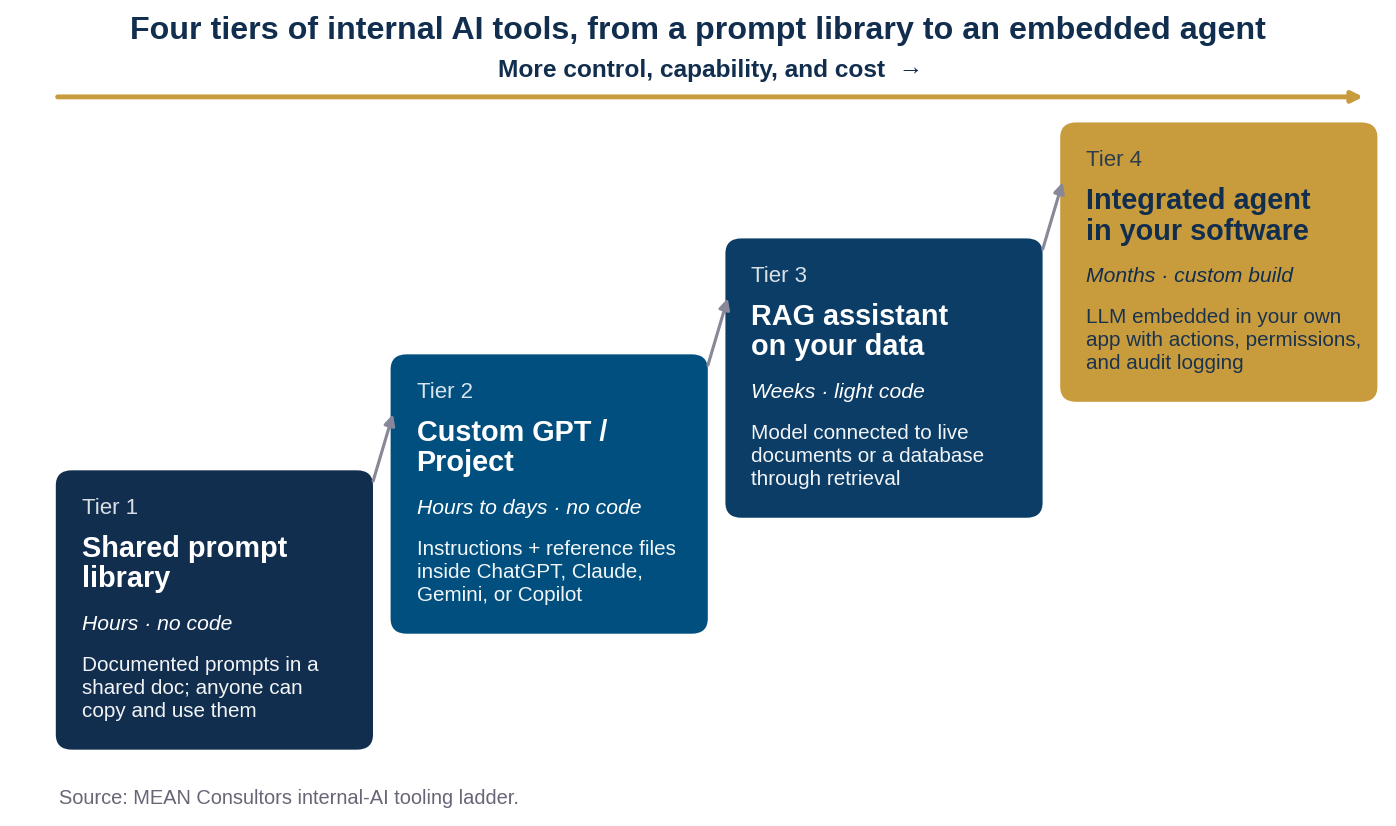
Figure 2: Most businesses should live at Tier 2 for six to twelve months before funding Tier 3 or 4.
| Tier | Best for | Limits | When to move up |
|---|---|---|---|
| 1. Prompt library | Getting everyone to a shared baseline quickly | Relies on people copying and pasting correctly | Immediately, for any repeated task |
| 2. Custom GPT / Project | Repeatable knowledge work on stable documents: drafting, summarizing, first-pass review, internal Q&A | Knowledge is static until you re-upload; limited memory of company systems; per-seat licensing | Documents change daily, or answers must come from a live database |
| 3. RAG assistant | Q&A over large or fast-changing document sets and databases | Requires engineering, hosting, and retrieval tuning | The assistant needs to take actions, not just answer |
| 4. Integrated agent | Multi-step work inside your own software with permissions and audit trails | Custom build; months of effort; ongoing maintenance | Rarely needed until Tier 2 and 3 have proven the value |
- Tier 2 covers the majority of internal knowledge-work use cases for companies under a few hundred employees, at the cost of a per-seat subscription.
- The jump from Tier 2 to Tier 3 is the first one that requires developers; it is justified when knowledge changes faster than you can re-upload files, which is the domain of retrieval-augmented generation.
- Tier 4 is where the earlier work on integrating an LLM into existing software pays off; skipping straight to it is the most common way to overspend on AI.
Five custom GPTs that pay for themselves quickly
These are the configurations we build most often with clients in the first month. None requires code; each takes an afternoon to set up and a couple of weeks of feedback to refine.
The policy and procedures assistant. Load the employee handbook, SOPs, and benefits documents. Instruct it to answer only from those files, to quote the relevant section, and to say “that is not covered; ask HR” when it is not. This alone removes a surprising volume of repeat questions from managers.
The proposal and quote drafter. Load five to ten approved proposals and your service descriptions. Instruct it to produce a first draft in your structure from a short intake, and to leave pricing as clearly marked placeholders. Pair it with the review discipline from using AI to draft business documents.
The brand voice editor. Load your style guide and best-performing content. Its job is not to write from scratch but to rewrite drafts into your voice and flag claims that need a source. It fits naturally into the AI-assisted content workflow we recommend.
The meeting-to-action summarizer. Paste a transcript; get decisions, owners, and deadlines in a fixed template. Instruct it to never infer an owner that was not stated.
The onboarding buddy. Load role guides, tool instructions, and FAQ; new hires ask it the questions they are embarrassed to ask a colleague for the third time.
Data, privacy, and the mistakes to avoid
The single most important setup decision is which account tier your team uses. OpenAI states that for ChatGPT Team, Enterprise, and its API, business data is not used to train its models by default, and the same kind of commitment exists in the business tiers of the other major platforms. Consumer accounts operate under different terms. If employees are using personal logins, you have no such assurance and no administrative control; moving them to a business workspace is step one, before you configure anything.
- Use a business or enterprise workspace with admin controls, not personal consumer accounts.
- Decide, in writing, which data categories may be uploaded as knowledge files; exclude regulated data unless your agreement and controls specifically cover it.
- Turn web browsing off for assistants that should answer only from your documents; it reduces confident off-topic answers.
- Write a refusal rule into the instructions: what the assistant should decline and who the human owner is.
- Assign an owner per custom GPT who reviews a sample of conversations monthly and refreshes the knowledge files.
- Label outputs internally as drafts until a person has reviewed them; the assistant is a first-pass tool, not a decision-maker.
- Log which GPTs exist, who can access them, and what data they hold, so your inventory is ready when a customer or auditor asks.
These controls line up with the AI governance framework and the data privacy practices I have written about; a custom GPT is a small enough scope that you can apply them fully rather than aspirationally. And the failure modes are the familiar ones: fabricated details, quietly outdated knowledge files, and drift from your brand voice. I have covered how to think about each in generative AI risks for business.
When a custom GPT is no longer enough
You will know you have outgrown Tier 2 when one of three things happens. Knowledge files go stale faster than anyone re-uploads them, which means you need retrieval from live sources. People start asking the assistant to do things rather than tell them things, such as creating a ticket or updating a record, which means you need actions with permissions. Or several teams build overlapping assistants with inconsistent answers, which means you need a shared, governed layer rather than a dozen configurations.
Each of those points toward a retrieval-augmented generation architecture or an LLM integrated into your existing software, and by that time you will have months of real usage data that tells you which workflows deserve the investment. That evidence is the real return on starting small; it is the difference between the off-the-shelf versus custom AI decision being a guess and being a calculation.
Most of the generative AI use cases in business operations I write about begin exactly this way: a manager, a folder of documents, and an afternoon. The sophistication comes later, and it comes cheaper because the early work told you where it was needed.
Frequently Asked Questions
What is a custom GPT?
A custom GPT is a configured version of a general AI assistant that carries standing instructions, uploaded reference documents, selected capabilities, and optionally connections to other tools. OpenAI introduced GPTs in November 2023; comparable features exist as Claude Projects, Gemini Gems, and Microsoft Copilot agents.
Do I need a developer to build a custom GPT for my business?
No. Instructions, knowledge files, and capability toggles are configuration, not code. A manager who can write a clear job description and gather good example documents can build one in an afternoon. Developers become necessary at the next tier, when the assistant must read live data or take actions in other systems.
Is company data uploaded to a custom GPT used to train the AI model?
On business and enterprise tiers, the major providers state that customer data is not used for model training by default; OpenAI makes this commitment for ChatGPT Team, Enterprise, and its API. Consumer accounts operate under different terms, so move employees to a business workspace before uploading company documents.
What are the best first use cases for an internal AI tool?
Policy and procedure Q&A from the employee handbook, first-draft proposals from approved examples, brand-voice editing, meeting-transcript summaries into a fixed action template, and new-hire onboarding assistance. Each relies on stable documents and produces drafts a human reviews.
What is the difference between a custom GPT and a RAG assistant?
A custom GPT references static files you upload manually. A retrieval-augmented generation (RAG) assistant connects the model to live document stores or databases so answers reflect current data. RAG requires engineering and hosting; it is the right upgrade when knowledge changes faster than you can re-upload files.
How do I keep a custom GPT accurate over time?
Assign a named owner, review a sample of conversations monthly, refresh knowledge files on a schedule, keep web browsing off for document-grounded assistants, and write explicit refusal rules into the instructions so the assistant defers to a human when a question falls outside its files.
MEAN Consultors helps businesses design their first custom GPTs, set the guardrails, and plan the path to integrated AI when the data says it is time.