
Technical SEO Audit Checklist: 40 Points to Check Before You Rank
Last updated: July 19, 2026 · By Joseph Olivas, Founder, MEAN Consultors · 9 min read
Great content and links do not help if search engines cannot properly access your site. A technical SEO audit finds the plumbing problems that quietly cap your rankings. Below is the 40-point checklist my team runs, grouped so you can tackle the highest-impact issues first. You can start today with our search engine optimization framework.
The audit at a glance
Forty checkpoints sounds like a lot, but they cluster into six categories. Roughly a quarter of them relate to site speed and Core Web Vitals, which is where most sites lose ground.
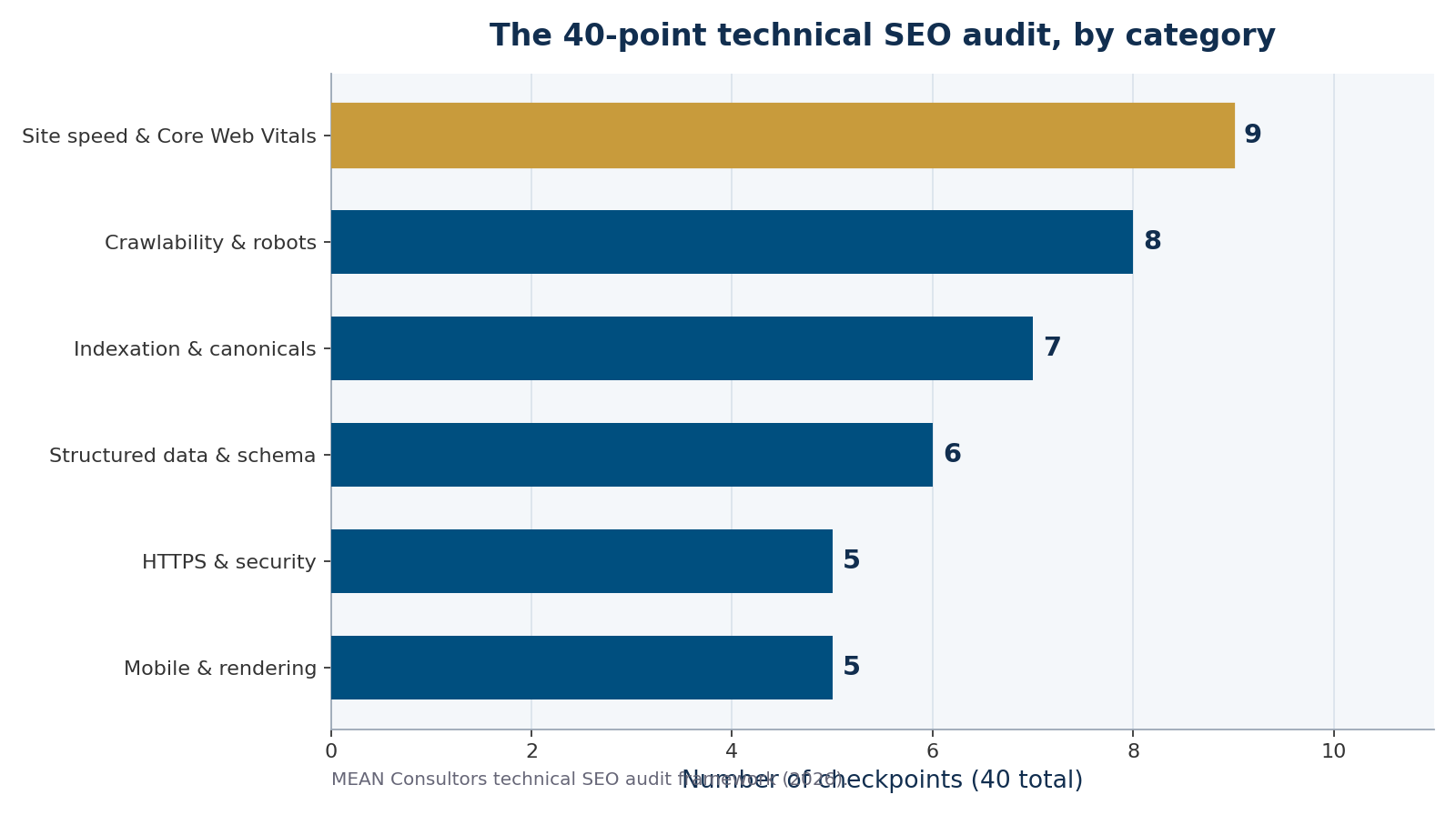
Figure 1: How the 40-point technical SEO audit checklist breaks down by category.
Crawlability and indexation (15 points)
Start here. If crawling or indexing is broken, nothing downstream matters. Check these first:
- An XML sitemap exists, is current, and is submitted in Google Search Console.
- robots.txt is not accidentally blocking important pages or assets.
- No critical pages carry an unintended noindex tag.
- Canonical tags point to the correct preferred URLs.
- Redirect chains and loops are cleaned up (use single 301s).
- Broken internal links and 404s are found and fixed or redirected.
- Orphan pages (no internal links pointing to them) are linked or removed.
- Pagination and faceted URLs are not generating thin, duplicate pages.
Site speed and Core Web Vitals (9 points)
Google evaluates real-world page experience using Core Web Vitals, judged at the 75th percentile of your visits. The passing thresholds are well defined, per Google Search Central and web.dev:
| Metric | What it measures | “Good” threshold |
|---|---|---|
| LCP (Largest Contentful Paint) | Loading speed | Under 2.5 seconds |
| INP (Interaction to Next Paint) | Responsiveness | Under 200 ms |
| CLS (Cumulative Layout Shift) | Visual stability | Under 0.1 |
Hitting these is harder than most owners assume. According to the 2025 Web Almanac, only about 48% of mobile pages and 56% of desktop pages pass all three Core Web Vitals, and LCP is the toughest, cleared by roughly 62% of mobile pages.
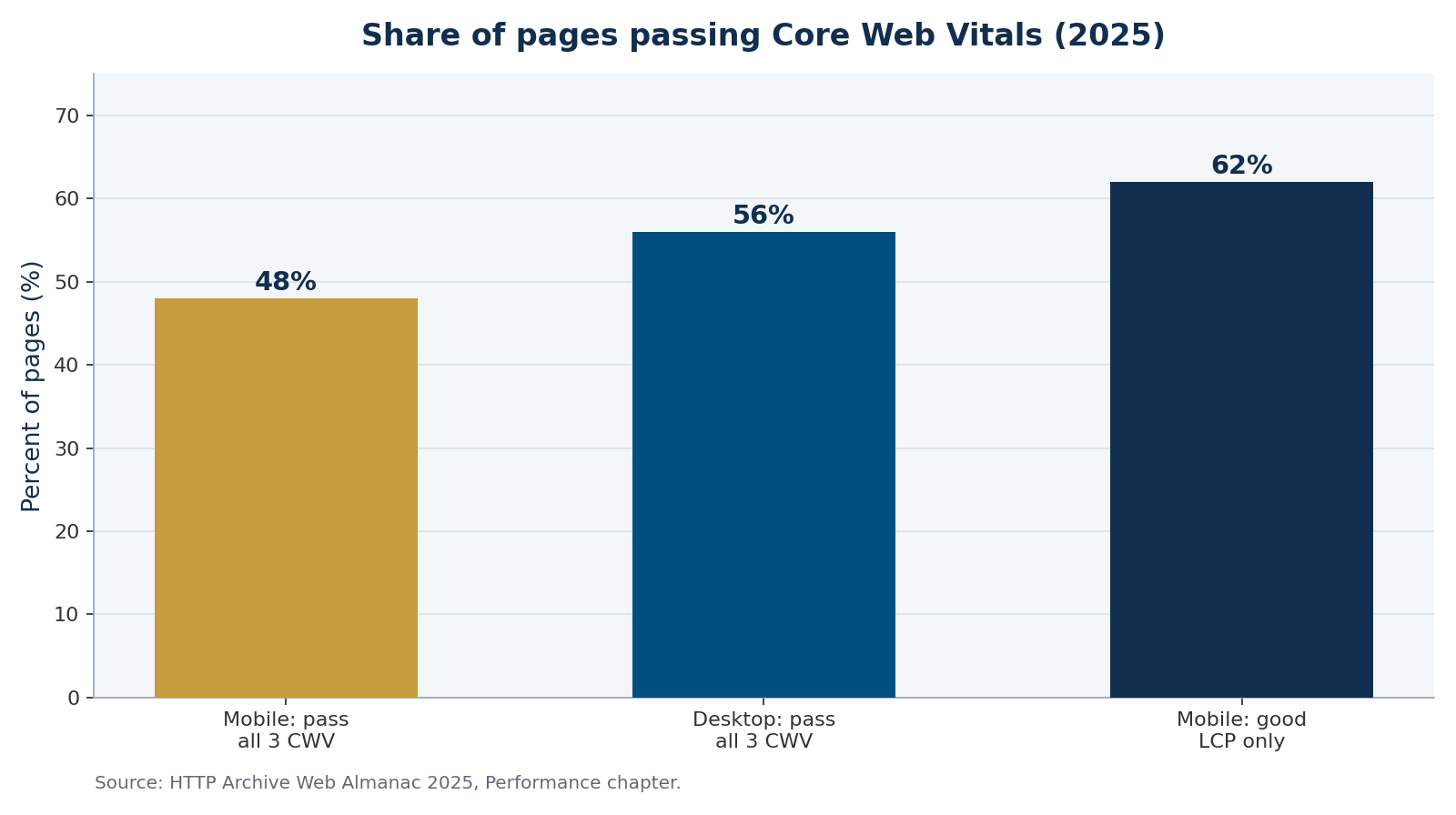
Figure 2: Most mobile pages still fail to pass all three Core Web Vitals (2025).
- Fix crawl and indexation issues before anything else; unreachable pages never rank.
- Core Web Vitals thresholds are LCP under 2.5s, INP under 200ms, and CLS under 0.1, judged at the 75th percentile.
- Only ~48% of mobile pages pass all three Core Web Vitals, so speed work is often the biggest available win.
Mobile, rendering, and structured data (11 points)
Google indexes the mobile version of your site first, so mobile issues are ranking issues. Verify:
- The site is responsive and passes Google’s mobile-friendly rendering.
- Content and links are the same on mobile and desktop (no hidden-on-mobile content that matters).
- JavaScript-rendered content is visible to crawlers (test with the URL Inspection tool).
- Structured data (schema) is valid for articles, products, FAQs, and local business where relevant.
- Titles and meta descriptions are unique, present, and within sensible lengths.
- Image files use descriptive alt text and are compressed.
Getting page experience right is not just a ranking factor; it protects revenue. Industry analyses link a one-second delay to conversion drops of several percent, and roughly 53% of mobile users abandon a page that takes longer than three seconds to load.
HTTPS and security (5 points)
Trust signals round out the audit. Confirm HTTPS is enforced sitewide with a valid certificate, that HTTP reliably redirects to HTTPS, that there is no mixed content, that security headers are in place, and that no pages leak staging or duplicate environments into the index. When these fundamentals are solid, your content and link-building efforts finally get full credit. Many clients pair this audit with our ongoing web development and maintenance support to keep the fixes from regressing.
Frequently Asked Questions
What is a technical SEO audit?
A technical SEO audit is a systematic review of how well search engines can crawl, render, index, and trust your website. It covers crawlability, indexation, site speed and Core Web Vitals, mobile-friendliness, structured data, and security, rather than the content or backlinks themselves.
How often should I run a technical SEO audit?
Run a full audit at least once or twice a year, plus a lighter check after any major site change such as a redesign, migration, or platform switch. Monitoring Google Search Console monthly will surface urgent crawl and index issues between audits.
What are the most important technical SEO issues to fix first?
Fix crawl and index blockers first: accidental noindex tags, robots.txt rules blocking important pages, broken canonicals, and redirect problems. A page Google cannot reach or index cannot rank, so these outrank every other fix in priority.
What are good Core Web Vitals scores?
A page passes when LCP is under 2.5 seconds, INP is under 200 milliseconds, and CLS is under 0.1, measured at the 75th percentile of real user visits. All three must be in the “good” range to pass.
Can I do a technical SEO audit myself?
You can run the basics with free tools like Google Search Console and PageSpeed Insights, which cover indexation and Core Web Vitals. Deeper issues such as crawl budget, JavaScript rendering, and structured data usually benefit from an experienced SEO or developer.
MEAN Consultors audits your crawlability, Core Web Vitals, and indexation, then fixes what is holding your rankings back.