
GoHighLevel Attribution: Why Your Leads Show "Direct" and How to Fix It
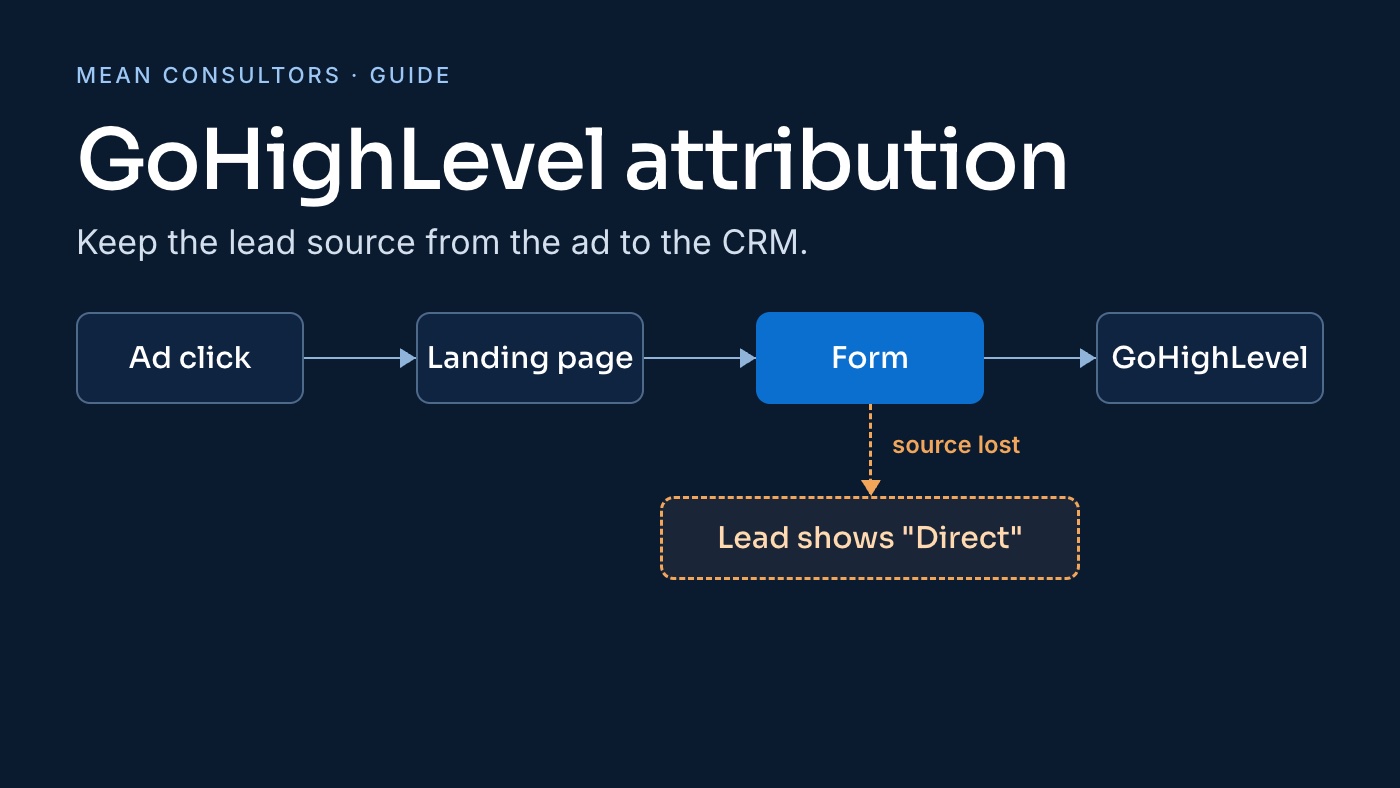
GoHighLevel labels a lead "Direct" when the form, booking or chat submission arrives with no referring domain and no tracking parameters. The ad click usually happened, but its gclid, fbclid or UTMs were lost before the form. The fix: capture the source on landing, carry it to every entry point and audit the result monthly.
- "Direct" in GoHighLevel means "no source found", not "the person typed your URL". Most wrong labels start on the website, before the CRM.
- HighLevel’s own documentation says UTMs are only recorded if the form is submitted on the page the ad sent the visitor to.
- Third-party booking domains, iframes, cached pages, imports and renamed campaigns are the other usual suspects.
- Track one number every month: the Known-Source Rate, the share of new leads with a classified source.
- Fix capture first, then counting, then send real outcomes back to Google Ads and Meta.
You pay for clicks on Google and Meta, the leads arrive in GoHighLevel, and the attribution panel says "Direct Traffic". The report is not lying. It shows exactly what reached the CRM, and the source usually died a few steps earlier.
This guide treats attribution as a chain, not a report setting. Platform behavior is cited to official documentation as of November 2026. HighLevel updates its help center often, so check the linked articles before changing a live setup.
How GoHighLevel decides where a lead came from
HighLevel stores two records on every contact. First Attribution is the first recorded interaction and never changes. Latest Attribution is overwritten each time the contact completes another tracked action: a form or survey, a calendar booking, the chat widget (after contact details are submitted) or an order form (HighLevel: Understanding Attribution Traffic Sources).
To classify the session, HighLevel checks the full page URL and the referring domain against ordered rules. The first match wins:
utm_sourcecontainsadwords, or a Google click ID (gclid,wbraid,gbraid) or Microsoft’smsclkidis present: Paid Search.- UTMs are present and the referrer is google.com: Paid Search.
utm_sourcecontainsfb_ad(orlinkedin_ad,twitter_ad,reddit_ad): Paid Social.- The referrer is a social network: Social Media. A search engine: Organic Search. Any other site: Referral.
- No referring domain and no tracking URL: Direct Traffic.
Contacts created outside web events get their own buckets: Others (calls, SMS, email, messages), CRM UI (created by hand) and Third-Party (integrations such as Zapier). Two details catch many teams. UTM values are case-sensitive, and HighLevel has deprecated utm_source=facebook in favor of fb_ad. And the built-in "Contacts by Source" and "Top Sources" widgets apply a Latest Attribution filter (HighLevel: Contacts widgets), so a returning visitor can turn a paid lead into "Direct" on that chart while First Attribution still shows the ad.
The attribution chain: six hand-offs
Every lead’s source has to survive six hand-offs, and any one can drop it silently.

- Ad click. The landing URL carries
gclidfrom Google Ads auto-tagging,fbclidfrom Meta and the UTMs from your tracking template. - Landing page. Something on your domain reads those parameters and keeps them, because the visitor is about to navigate.
- Form or booking. Whatever the person submits carries the stored source, whether it is a HighLevel form, a WordPress form or a booking widget.
- GoHighLevel contact. The source lands in the contact’s attribution or custom fields.
- Outcome. Someone moves the opportunity to booked, qualified, signed or sold. Without maintained stages there is nothing to attribute.
- Back to the ads. The outcome goes to Google Ads and Meta with the click identifier, so bidding learns from customers instead of form fills.
Seven places the source dies before GoHighLevel sees it
1. The form is not on the ad’s landing page
This is the most common cause, and HighLevel documents it. Its troubleshooting steps say that for UTMs to be recorded, a visitor who lands from an ad cannot move from that page: "if someone lands on a page and then clicks a button that moves them to another page to submit a form, no attribution data from [UTMs] can be added." The suggested workaround is a pop-up or an on-page form section (HighLevel: Understanding Attribution Traffic Sources). On many business websites that is the normal journey: ad, service page, "Contact us", form.
2. Redirects and third-party domains
Google’s auto-tagging documentation warns that if your site uses redirects, the GCLID must be passed to the final landing page (Google Ads: About auto-tagging). The same happens when "Book now" opens a booking platform on another domain. Without cross-domain measurement, Google Analytics creates new cookies on each root domain and counts two users and two sessions instead of one (GA4: cross-domain measurement). The booking gets recorded; the campaign behind it does not.
3. Forms the tracking script cannot read
For non-HighLevel forms, HighLevel’s External Tracking script detects forms on the page and captures UTMs, page URLs and session data. It needs a real <form> element with named, visible inputs, and it does not support iframe forms or widgets that hide their inputs (HighLevel: External Tracking). A related failure we have seen on WordPress: page caching and AJAX submissions made a form plugin’s source tags return the page’s own URL instead of the real source. Nothing errors. Every lead just gets the same useless value.
4. The visitor comes back days later
Someone clicks an ad on Monday and returns on Thursday by typing your domain. Thursday’s session has no referrer and no parameters, so it is Direct, and it is the session where the form gets submitted. Unless the original source was stored on your domain, it is gone. Meta, for its part, recommends keeping its click ID in a first-party _fbc cookie with a 90-day expiration (Meta: ClickID and the fbp and fbc parameters). Your lead source deserves the same treatment, with a window that matches your sales cycle.
5. Contacts that never passed through a tracked form
CSV imports, contacts typed in by staff, integration pushes and inbound calls or messages arrive without a web session. They are classified as CRM UI, Third-Party or Others, and the attribution "Medium" values (Form, Calendar, CSV Import, Manual, API and others) show how they arrived (HighLevel: Contacts widgets). They are real leads with no marketing source, and they dilute every report until a rule fills the gap.
6. UTM templates that do not match HighLevel’s rules
HighLevel’s setup guides ask for exact templates: utm_source=adwords in the Google Ads tracking template and utm_source=fb_ad with campaign, ad set and ad names in Meta’s URL parameters. The help center also says not to add custom UTMs to those templates, to keep names unique and not to rename campaigns or ads mid-flight, because the CRM keeps the original name (HighLevel: Google Ad Reporting; HighLevel: Facebook Ad Reporting). One testing trap is documented too: Meta does not add UTMs to links in ad previews, so test with a live ad.
7. Browser privacy features
Some loss is outside your control. Safari 17 blocks known tracking query parameters in links opened in Private Browsing (WebKit: Safari 17.0), and ad blockers can strip parameters too. That is why 100% is not a realistic target for web forms, and why outcomes should go back to the ad platforms with more than one identifier.
Symptom, cause and fix
| What you see | Likely cause | Fix |
|---|---|---|
| Google Ads leads labeled Direct | Form submitted on a page other than the ad’s Final URL | Put the form on the landing page, or store the parameters on landing and pass them into hidden fields later |
| Paid Meta leads labeled Social Media or Referral | Missing URL parameters, or utm_source=facebook instead of fb_ad | Apply HighLevel’s exact Meta template; test with a live ad |
| Bookings with no source | Booking runs on another domain or in an iframe | Keep booking on your domain, or link domains and write the source into the booking record |
| Every lead has the same source, often the page URL | Cached HTML or AJAX submissions reading the wrong value | Read the source in the browser at submit time from a first-party cookie |
| Repeat visitors flip to Direct on dashboards | Widgets use Latest Attribution; the return visit had no parameters | Report acquisition on First Attribution; persist first-touch data |
| Add to Google Ads action skips contacts | No GCLID, GBRAID or WBRAID stored on the contact | Confirm auto-tagging, fix redirects and page changes, check the click ID on test contacts |
| Campaign reports show old names | Campaign, ad set or ad renamed mid-flight | Create a new campaign or ad instead of renaming |
| Ad platforms report more conversions than the CRM has leads | The same conversion counted by several tags or systems | One primary conversion per goal, lead actions counted once per click, Pixel and Conversions API deduplicated |
| Many contacts in CRM UI, Third-Party or Others | Imports, manual entry, integrations and calls with no source rule | Require a source at those entry points, or report them as a separate group |
GoHighLevel, GA4 and the ad platforms will never match exactly
Each system answers a different question. GA4 classifies sessions, which by default end after 30 minutes of inactivity (GA4: sessions), and its attribution models give direct visits no credit unless the whole path was direct (GA4: attribution). GoHighLevel stores a first and a latest touch per contact. Google Ads counts conversions per ad interaction, and Google suggests counting leads once per click (Google Ads: conversion counting).
Don’t force the numbers to agree. Make the CRM the source of truth for leads and customers by channel, use GA4 for on-site behavior and let the ad platforms optimize. Count each conversion in one place only; removing double counting was one of the first steps in our law firm attribution project.
Closing the loop: send real outcomes back to the ads
A form fill is a weak signal; a signed client is a strong one. Both major ad platforms accept outcomes from your CRM, and GoHighLevel can send them from workflows.
Google Ads. The Add to Google Ads workflow action only works if the contact has a GCLID, GBRAID or WBRAID stored, and the conversion action must exist in Google Ads first (HighLevel: Add to Google Ads). Google recommends enhanced conversions for leads, which adds hashed first-party data such as email to improve matching, and still recommends sending the GCLID when you have it (Google Ads: enhanced conversions for leads). For custom integrations: starting June 15, 2026, Google began migrating these uploads to its Data Manager API (Google Ads: offline conversion imports).
Meta. HighLevel’s Meta Conversion API action sends events server-side. Lead events cover Meta lead-form contacts as they move through pipeline stages (HighLevel: Meta Conversion API action). For website leads, a stage change can send a funnel event only if the fbclid was captured on arrival, stored on the contact and passed through custom mapping (HighLevel: lead event walkthrough). If you also run the Meta Pixel, send the same event_id and event name from both so Meta can deduplicate (Meta: deduplication).
The 12-point lead source integrity audit
Run it with a live ad click and a test submission on every entry point. Each check should leave evidence: a URL, a contact record or a screenshot.
- Google Ads auto-tagging is on, and HighLevel’s tracking template is set at account level.
- Meta ads use HighLevel’s URL parameter template with
utm_source=fb_adand no extra custom UTMs. - Campaign, ad set and ad names are unique and have not been renamed since launch.
- A live ad click reaches the landing page with gclid, fbclid and UTMs intact after every redirect.
- The landing page stores those values in first-party storage before the visitor navigates.
- Every form, on any page, writes the stored source into the contact, natively or through hidden fields.
- Non-HighLevel forms meet External Tracking’s requirements, or send the source through the API.
- Booking and checkout stay on your domain, or domains are linked and the source reaches the booking record.
- On cached or AJAX pages, test leads from different channels show different source values.
- Imports, manual entries, integrations and calls have a source rule, or are reported separately.
- Each conversion is counted once across tags, platforms and the CRM.
- Booked, qualified and won outcomes go back to Google Ads and Meta, and the Known-Source Rate is reviewed monthly.
How to compute your Known-Source Rate
Known-Source Rate = new leads with a classified source ÷ all new leads × 100
- Numerator: leads whose First Attribution session source is Paid Search, Paid Social, Organic Search, Social Media or Referral, plus leads whose source was recorded by a rule you trust, such as a referral field.
- Denominator: every new lead in the period, minus test and internal contacts. Direct, empty, CRM UI, Third-Party and Others count here but not in the numerator.
- Cadence: monthly, split by entry point (each form, calendar, chat and import) so a leak points to a specific place.
An illustrative example, not client data: 120 new leads in October, 54 with a classified first-touch source, gives 45%. If the 66 unknowns cluster on a contact form two clicks away from the ad’s landing page, you know where to start.
Some Direct traffic is genuine, so the metric slightly understates real coverage. We know of no published benchmark for it; measure your own baseline and watch the trend.
What to fix first
Work upstream to downstream. A dashboard on top of broken capture only makes wrong numbers easier to read.
- Capture and persist on landing: correct ad templates, auto-tagging, parameters stored on your domain. This layer usually changes the most labels.
- Make every entry point write the source: secondary-page forms, booking flows, chat and third-party forms.
- Remove double counting across tags and systems.
- Give non-web contacts a rule: imports, manual entry, integrations and calls.
- Send outcomes back to Google Ads and Meta once click IDs are reliably stored.
- Report: only now build the channel dashboard, with the Known-Source Rate on it.
What this looked like in three projects
A U.S. law firm. Conversions were double counted across systems, many leads had no source, leads were moved between systems by hand and reports lived in spreadsheets. We cleaned up measurement, standardized source capture on every landing page and form, connected GoHighLevel in real time and sent signed clients back to Google Ads and Meta. Leads with a known source went from about 40% to about 95%, each lead reaches the CRM in under five seconds, and a new measured landing page takes about 15 minutes instead of about two hours (read the law firm case).
A U.S. med spa. The "Book" button sent visitors to the booking platform’s domain, so appointments lost their campaign source. We rebuilt the booking flow inside the clinic’s WordPress site, using the platform’s API only as a data source, with a 30-day first-party cookie for people who book days later. Now 100% of bookings are recorded with their channel, with zero external redirects (read the med spa booking case).
A U.S. logistics company recruiting drivers. The form plugin’s native tags returned the page URL instead of the real source because of caching and AJAX submissions. A custom WordPress plugin now captures UTMs, gclid, fbclid, landing page and referrer in its own cookie, overrides the form’s tags and classifies each lead with Google Analytics-style channel logic (read the lead routing case).
Only the first project ran on GoHighLevel. The other two show the same chain breaking outside the CRM, which is where most "Direct" leads start.
When native GoHighLevel tracking is enough
Native tracking usually holds up when ads point to HighLevel pages with the form or calendar on the landing page, on one domain, with HighLevel’s templates. Then a monthly audit may be all you need.
You need your own capture layer when the site is a multi-page WordPress build, booking happens on a third-party platform, forms live in iframes, leads return weeks later, or outcomes sit in another system. That layer can be a script, a plugin or an integration. When it has to own data, logic and reporting across several systems, it becomes a custom software project rather than a settings change.
The next step
Pull last month’s new leads from GoHighLevel, group them by First Attribution session source and entry point, and compute your Known-Source Rate. If it is low, the audit above shows where to look. If you’d rather have it fixed end to end, from ad templates and on-site capture to workflows that send signed clients back to Google Ads and Meta, see our business process automation and CRM integration services or talk to an expert.
Sources and scope of this guide
Primary sources consulted on November 25, 2026. Platform behavior changes; check the linked documentation before changing a live account. Project figures come from Deep Basis Studio’s published case studies and are approximate where marked. The Known-Source Rate example is illustrative.
- HighLevel: Understanding Attribution Traffic Sources.
- HighLevel: External Tracking for external forms.
- HighLevel: How to set up Google Ad Reporting.
- HighLevel: How to set up Facebook Ad Reporting.
- HighLevel: Contacts widgets in dashboards and reports.
- HighLevel: Workflow action, Add to Google Ads.
- HighLevel: Meta Conversion API action and lead event walkthrough.
- Google Ads: About auto-tagging and conversion counting options.
- Google Ads: enhanced conversions for leads and offline conversion imports.
- GA4: cross-domain measurement, attribution models, sessions and avoiding PII.
- Meta: ClickID and the fbp and fbc parameters and event deduplication.
- WebKit: Safari 17.0 features.

Founder
José Olivas
Founder & Director. Software engineer with 15+ years in technology: in IT since 2009, building custom software since 2012 and leading Deep Basis Studio since 2016.